2/34
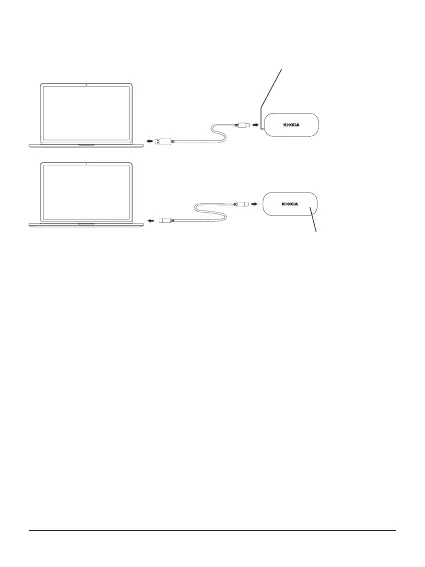
Names and connection method (the illustrations are conceptual drawings)
Lit: Power on
Blinking: Reading/writing
USB Type-A
USB Type-C
USB Type C to A cable
USB Type C to C cable
•• Plugging and unplugging
To properly plug the Product into and unplug it from a compatible Host Device,
follow the procedure in the user manual of the Host Device.
Plugging:
Plug the Product into a USB port on your Host Device according to the user
manual of the Host Device.
Forced plugging can damage or break the Product and/or the USB port.
Orienting the Product properly, plug the Product into a USB port on a Host
Device as far as it goes.
The Product will not work properly if plugged poorly or oriented improperly.
Unplugging:
Follow the steps below to unplug the Product from a USB port on a Host Device
while the Host Device is up:
* The steps or descriptions may vary depending on the version of operating
system.
· Windows
1. Click “Safely Remove Hardware” icon on the taskbar.
2. Click “Remove KIOXIA”.
3. Check “Remove Hardware” appearing on the window.
4. Unplug the Product.


 To Next Page