EasyManua.ls Logo

Kirsch Automation III - User Manual

Kirsch Automation III
6 pages
Print Icon
To Next Page IconTo Next Page
Loading...
1
Kirsch
®
Automation III
REMOTE CONTROL GUIDE
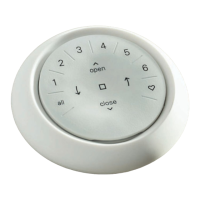
The Automation III Remote
has been redesigned with a
modern look while maintaining
its compatibility with the remote
housing and wall mount. Precisely
control your Automation III
window coverings throughout your
home with the touch of a button.
The following pages provide all
the details on how to set up and
operate both remote styles.
Table of Contents
Key Components ...............
1
Getting Started ...................
2
Programming .....................3
Basic Operation ...................
4
Battery Replacement ..............5
Troubleshooting ..................
6
Key Components
AUTOMATION III REMOTE MODULE
INCLUDED
OR
Question and Answer IconNeed help?

Do you have a question about the Kirsch Automation III and is the answer not in the manual?

Summary

Key Components

Getting Started

Inserting the remote module into the remote housing (hand-held)

Instructions for inserting the remote module into the remote housing without a wall mount.

Mounting the Automation Wall Mount

Steps for installing the wall mount plate, ring, and remote module.

Programming

HOW TO CONFIGURE A REMOTE

Details on how remotes are set up via the Automation App and grouped.

DEACTIVATING THE REMOTES RAISE-TO-WAKE FEATURE

Procedure to disable or enable the automatic LED wake-up feature to save battery.

REMOVING A WINDOW COVERING FROM A GROUP

Steps to remove a specific window covering from a configured GROUP using the app.

SETTING FAVORITE POSITIONS

Guide to setting custom favorite positions for window coverings via the Automation App.

Basic Operation

Battery Replacement

REPLACING BATTERIES IN THE REMOTE

Detailed instructions for replacing the CR2032 batteries in the remote module.

Troubleshooting

Summary

Key Components

Getting Started

Inserting the remote module into the remote housing (hand-held)

Instructions for inserting the remote module into the remote housing without a wall mount.

Mounting the Automation Wall Mount

Steps for installing the wall mount plate, ring, and remote module.

Programming

HOW TO CONFIGURE A REMOTE

Details on how remotes are set up via the Automation App and grouped.

DEACTIVATING THE REMOTES RAISE-TO-WAKE FEATURE

Procedure to disable or enable the automatic LED wake-up feature to save battery.

REMOVING A WINDOW COVERING FROM A GROUP

Steps to remove a specific window covering from a configured GROUP using the app.

SETTING FAVORITE POSITIONS

Guide to setting custom favorite positions for window coverings via the Automation App.

Basic Operation

Battery Replacement

REPLACING BATTERIES IN THE REMOTE

Detailed instructions for replacing the CR2032 batteries in the remote module.

Troubleshooting

Kirsch Automation III Specifications

General IconGeneral
BrandKirsch
ModelAutomation III
CategoryRemote Control
LanguageEnglish