Need help?
Do you have a question about the Kisai RPM and is the answer not in the manual?
Explains how to interpret LED indicators for hours and minutes, and provides examples.
Steps to adjust the watch's hour setting using buttons.
Guide to adjusting the watch's minute setting using buttons.
Instructions for enabling or disabling the watch's LED animation.
Detailed instructions for recharging the watch's USB rechargeable battery.
Information on the LIR 2032 rechargeable battery type and usage.
Details on the 1-year warranty and safety precautions for watch use.
This document describes the Kisai RPM watch, a unique timepiece designed to change the way you think about time. It features an innovative LED display for timekeeping and a rechargeable battery.
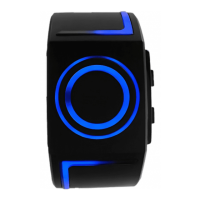
The Kisai RPM watch displays time using a series of LEDs arranged in a circular pattern. To read the time, simply press Button A. All LEDs will illuminate, and the current time will be indicated by blinking LEDs. The display will automatically turn off after 7 seconds to conserve battery life.
The time is read in two main parts: hours and minutes. The outer ring of LEDs represents hours from 1 to 12. The inner ring of LEDs represents minutes in groups of 5 (e.g., 5, 10, 15, 20, etc.). Additionally, there are smaller individual minute lights (1-4) to indicate precise minutes within each 5-minute group. A dedicated PM/Charging indicator light is also present.
For example, if the 3 o'clock light is flashing, the 45-minute light is flashing, and 4 individual minute lights are flashing, the time is 3:49. If the 6 o'clock light is flashing, the 5-minute light is flashing, and 1 individual minute light is flashing, the time is 6:06.
Setting the Time: To set the time, press and hold Button B for 3 seconds to enter the setting mode. The watch will deactivate setting mode after 7 seconds of inactivity.
Setting the Hour:
Setting the Minutes:
Setting the Animation: The Kisai RPM watch includes a light-up animation feature. The LEDs will animate once every 15 minutes between 6 PM and 12 AM.
Recharging the Battery: The Kisai RPM watch is equipped with a USB rechargeable battery. When the lights become dim or fail to light up, it's time to recharge the battery.
To recharge:
Battery Information: The watch uses an LIR 2032 rechargeable battery, which is replaceable. The battery lifetime is estimated at approximately 300 charges, though this can vary depending on usage. To maximize battery life, it is advised to turn off the animation feature. The standard input voltage for the LIR 2032 battery is DC5V. Always use the charging cable provided with the watch when recharging.
Water Resistance: This watch has limited resistance to water. To prevent damage, do not use the watch in the shower, for swimming, or during other water-related activities.
Warranty: The Kisai RPM watch comes with a 1-year manufacturer's warranty. This warranty does not cover damage caused by water, accidental damage, neglect, or unauthorized repairs.
Included Items: The watch package includes the Kisai RPM watch, a USB charging cable, a spare USB cap, a screwdriver for accessing the USB port, and an instruction manual.
 General
| Display Type | LCD |
|---|---|
| Case Material | Stainless Steel |
| Band Material | Silicone |
| Water Resistance | 3 ATM |
| Battery Life | 1 year |


 To Next Page