Need help?
Do you have a question about the Kisai OPTICAL ILLUSION and is the answer not in the manual?
Explains the watch's always-on LCD display and digital time format, with examples.
Details how to press button B to reveal the time and AM/PM indicator.
Instructions on how to activate the backlight using button C.
How to toggle the display sound on/off by holding button C.
Explains how to use button A to display the date in MM/DD format.
How to use button D to view alarm time and status (ON/OFF).
Details the format for displaying alarm hours and minutes.
Instructions to enter date and time setting mode by holding button A.
How to increase or decrease numbers using button swipes (C to B or B to C).
Procedure for setting the year, including flashing digits and confirmation.
Procedure for setting the month, including flashing digits and confirmation.
Procedure for setting the date, including flashing digits and confirmation.
Procedure for setting the hour and AM/PM indicator, including flashing digits.
Procedure for setting the minutes, including flashing digits and confirmation.
How to turn animation mode on/off, which reveals time every 20 seconds.
Instructions to enter alarm setting mode by holding button D.
How to toggle the alarm function between ON and OFF.
Procedure for setting the alarm hour and AM/PM indicator.
Procedure for setting the alarm minutes.
Details about the CR2025 battery, its lifespan, and conservation tips.
Information on the 1-year warranty coverage and exclusions.
Notes on water resistance (3ATM) and usage restrictions.
The Kisai Optical Illusion watch is a unique timepiece designed to "change the way you think about time" by presenting time and date information in a hidden, optical illusion format. This instruction manual details how to read the time and date, operate basic functions, set the time and alarm, and provides user information regarding battery and warranty.
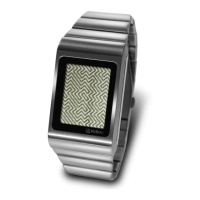
The core function of the Kisai Optical Illusion watch is to display time and date using an "always on" LCD display. The time is presented digitally with hours in the upper half of the screen and minutes in the lower half. The unique aspect is that the numbers are hidden within a patterned LCD display, requiring the user to focus their eyes to discern the digits.
To read the time, the user can simply focus on the display. For a clearer view, or if required, touching Button B will reveal the time, and an AM/PM indicator will flash to count seconds.
The watch also displays the date. By touching Button A, the date is shown digitally with the month in the upper half of the screen and the day in the lower half. A "date indicator" is present to help distinguish it from the time display.
An alarm function is integrated into the watch. To check the alarm time, Button D is touched. The display will show the alarm time, with an AM or PM indicator to specify the set time. If the alarm is off, the display will show "OFF." The alarm time is displayed in the same format as the regular time, with alarm hours in the upper half and alarm minutes in the lower half. When the alarm sounds, it can be turned off by touching any button.
The watch features a touch-sensitive screen with four designated "buttons" (A, B, C, D) for interaction.
Backlight: To illuminate the display in low light conditions, Button C is touched. The backlight will stay on for 15 seconds. It's important to note that the backlight cannot be operated when the watch is in setting mode.
Display Sound: The watch has an optional display sound. To toggle this sound on or off, Button C is held for 3 seconds. The manual clarifies that turning off the display sound does not affect the alarm sound.
Setting Mode: The watch has a comprehensive setting mode for adjusting the year, month, date, hour, and minutes. To enter setting mode, Button A is held for 3 seconds. A helpful recommendation for easier time setting is to turn the display sound on before entering this mode. If there is 10 seconds of inactivity in setting mode, it will automatically deactivate.
Year Setting: Once in setting mode, the year digits will flash. To increase the year, the user swipes their finger from Button C to Button B. To decrease the year, they swipe from Button B to Button C. Pressing Button A confirms the year and moves to month setting.
Month Setting: The month digits will flash, displayed in the same position as the hour. Swiping from Button C to B increases the month, and swiping from Button B to C decreases it. Pressing Button A confirms the month and moves to date setting.
Date Setting: The date digits will flash, displayed in the same position as the minutes. Swiping from Button C to B increases the date, and swiping from Button B to C decreases it. Pressing Button A confirms the date and moves to hour setting.
Hour Setting: The hour digits will flash, and an AM or PM indicator will be displayed. Swiping from Button C to B increases the hour, and swiping from Button B to C decreases it. Pressing Button A confirms the hour and moves to minute setting.
Minute Setting: The minute digits will flash, with an AM or PM indicator. Swiping from Button C to B increases the minutes, and swiping from Button B to C decreases them. Pressing Button A confirms the minutes and exits setting mode.
Alarm Setting: The alarm can be set independently. To enter alarm setting mode, Button D is held for 3 seconds. Similar to time setting, 10 seconds of inactivity will deactivate this mode, and it's recommended to have the display sound on for easier setting.
Turning Alarm On/Off: Within alarm setting mode, the alarm can be turned on or off by swiping a finger from Button C to Button B. Pressing Button D confirms the selection and moves to alarm hour setting.
Alarm Hour Setting: The alarm hour digits will flash, accompanied by an AM or PM indicator. Swiping from Button C to B increases the alarm hour, and swiping from Button B to C decreases it. Pressing Button D confirms the hour and moves to alarm minute setting.
Alarm Minute Setting: The alarm minute digits will flash. Swiping from Button C to B increases the alarm minutes, and swiping from Button B to C decreases them. Pressing Button D confirms the minutes and exits setting mode.
Animation Mode: The watch includes an animation mode where the display will reveal the time once every 20 seconds. This function can be turned on or off by pressing Buttons A and B together for 3 seconds.
Battery: The watch uses a CR2025 replaceable watch battery. The estimated battery lifetime is at least one year, though actual life may vary depending on usage. To maximize battery life, it is advised to limit the use of the EL backlight and the animation mode.
Warranty: The Kisai Optical Illusion watch comes with a 1-year warranty. This warranty covers manufacturing defects but explicitly does not cover water damage, accidental damage, neglect, or unauthorized repair.
Water Resistance: The watch is water resistant to 3ATM. However, users are cautioned against using the watch in the shower, for swimming, or for any other water-related activities beyond incidental exposure.
 General
| Display Type | LCD |
|---|---|
| Case Material | Stainless Steel |
| Band Material | Stainless steel |
| Battery | CR2032 |
| Water Resistance | 3ATM (30 meters) |
| Battery Life | 12 months |
| Functions | Time, Date |

 To Next Page