EasyManua.ls Logo

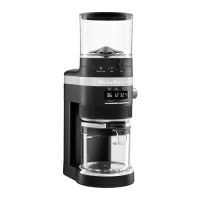
KitchenAid 5KCG8433 - User Manual

KitchenAid 5KCG8433
148 pages
Print Icon
To Next Page IconTo Next Page
Loading...
W11629536A
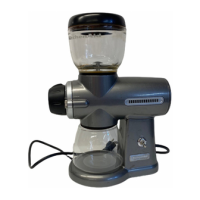
BURR GRINDER
5KCG8433
OWNER'S MANUAL
2
10
20
30
38
46
54
62
71
79
87
94
101
108
116
124
132
1
EN
DE
FR
IT
NL
ES
PT
EL
SV
NO
FI
DA
IS
Owner’s Manual
Bedienungsanleitung
Le manuel d'utilisation
Manuale del proprietario
Gebruikershandleiding
El manual del propietario
Manual do proprietário
Εγχειριδιο Κατοχου
Användarhandbok
Brukerhåndbok
Omistajan Opas
Brugervejledning
Notandahandbók
Instrukcja Obsługi
Uživatelská Příručka
Kullanici Kilavuzu
Посібник з експлуатації
كﻟﺎﻣﻟا لﯾﻟد
PL
CS
TR
UA
AR

Table of Contents

Other manuals for KitchenAid 5KCG8433

Questions and Answers

  • H
    hunterkimberlyAug 13, 2025
    What to do if my KitchenAid Coffee Grinder shows 'Er2' and doesn't turn on?
    • E
      Elizabeth MillerAug 13, 2025
      If your KitchenAid Coffee Grinder doesn't turn on and the display shows “Er2”, it means the grinder is in motor overload protection mode. To resolve this, unplug the grinder, clean the burrs, reassemble the machine, and securely plug it into an earthed outlet.
  • F
    Frank AndersonAug 16, 2025
    What to do if my KitchenAid 5KCG8433 Coffee Grinder shows 'Er3' and doesn't turn on?
    • G
      George TurnerAug 16, 2025
      If your KitchenAid Coffee Grinder doesn't turn on and the display shows “Er3”, your grinder is in protection mode. Unplug the grinder and allow it to cool for 10 minutes before turning it back on.
  • T
    tracyosborneAug 20, 2025
    Why does my KitchenAid 5KCG8433 stop abruptly?
    • S
      Samuel DiazAug 21, 2025
      If your KitchenAid Coffee Grinder is operating normally but stops abruptly, it is possible that a coffee bean has jammed the burrs. Stop the grinder and refer to the “Care and Cleaning” section for details on cleaning the burrs.
  • T
    Timothy BrownAug 25, 2025
    What to do if my KitchenAid 5KCG8433 shows 3 dashes on display?
    • K
      Kelly TurnerAug 25, 2025
      If the KitchenAid Coffee Grinder shows 3 dashes (---) on the display, it indicates that the top hopper is not locked in place. Refer to the product assembly instructions for proper installation.
  • M
    mayodanielAug 28, 2025
    Why won't my KitchenAid 5KCG8433 Coffee Grinder turn on?
    • T
      timothy60Aug 28, 2025
      If your KitchenAid Coffee Grinder does not start, check if it is securely plugged into an earthed outlet. Also, if you have a circuit breaker box, make sure the circuit is closed.
  • S
    Sarah FisherAug 31, 2025
    What to do if my KitchenAid Coffee Grinder still isn't working?
    • J
      Jeremiah ArnoldAug 31, 2025
      See the “Terms of KitchenAid Guarantee (“Guarantee”)” sections. Do not return the Burr Grinder to the retailer – retailers do not provide service. NOTE: Any other servicing should be performed by an authorised service representative.
  • D
    Darrell OliverSep 4, 2025
    Why is no coffee coming out of my KitchenAid Coffee Grinder?
    • J
      joshua82Sep 4, 2025
      If coffee is not coming out from the grind outlet of your KitchenAid Coffee Grinder, make sure that there are fresh coffee beans in the top hopper.
  • S
    Shawn WatkinsSep 8, 2025
    How to turn on KitchenAid Coffee Grinder display?
    • E
      Edgar EwingSep 8, 2025
      If the Burr Grinder display of your KitchenAid is not illuminated, it might be in standby mode. To wake it up, press any button or turn any knob.

Summary

PRODUCT SAFETY

Safety Alert Symbol and Statements

Explains the safety alert symbol and its meaning, including DANGER and WARNING.

Important Safeguards

Basic precautions for safe operation, covering user capabilities and child safety.

Continued Safety Precautions

Further safety guidelines covering operation, maintenance, and electrical hazards.

PRODUCT OVERVIEW

Coffee Grind Setting Chart

Details grind sizes and dose settings for different coffee types.

ELECTRICAL REQUIREMENTS

Power Specifications

Lists voltage, frequency, and power rating for the appliance.

PRODUCT ASSEMBLY

Assembly Steps

Step-by-step guide for putting the coffee grinder together.

PRODUCT USAGE

Selecting Grind Size and Dose

How to choose grind size and coffee quantity for brewing.

Grinding Operation

Instructions for starting, pausing, and canceling the grinding process.

Coffee Grind Time Chart

Maximum grind times for various coffee brewing methods.

Program Functionality

How to save and recall custom grind time settings.

Micro-Adjusting Conical Burrs

Guide to adjusting the upper burr for finer grind size customization.

CARE AND CLEANING

Cleaning the Burrs

Instructions for cleaning the internal burrs of the grinder.

General Cleaning and Maintenance

How to clean grinder parts and the main body.

ELECTRICAL EQUIPMENT WASTE DISPOSAL

Disposal of Packing Material

Information on recycling packaging materials.

Recycling the Product

Guidance on proper disposal of the appliance as WEEE.

DECLARATION OF CONFORMITY

For United Kingdom

Compliance statement for UK safety and regulations.

For European Union

Compliance statement for EU directives and regulations.

TERMS OF KITCHENAID GUARANTEE (GUARANTEE)

Guarantee Terms and Consumer Rights

Details warranty conditions and consumer rights in UK, Ireland, South Africa, UAE.

Guarantee Services and Claims

Explains how to claim warranty service and the guarantor's responsibilities.

Limitations of the Guarantee

Outlines conditions under which the guarantee does not apply.

PRODUCT REGISTRATION

Register Your Appliance

Instructions on how to register the KitchenAid appliance.

KitchenAid 5KCG8433 Specifications

General IconGeneral
BrandKitchenAid
Model5KCG8433
CategoryCoffee Grinder
LanguageEnglish

Related product manuals