12
PROGRAMMING FUNCTION
The Espresso Machine is equipped with programming functionality. Any customised settings
will be saved even in the event power is lost to the machine.
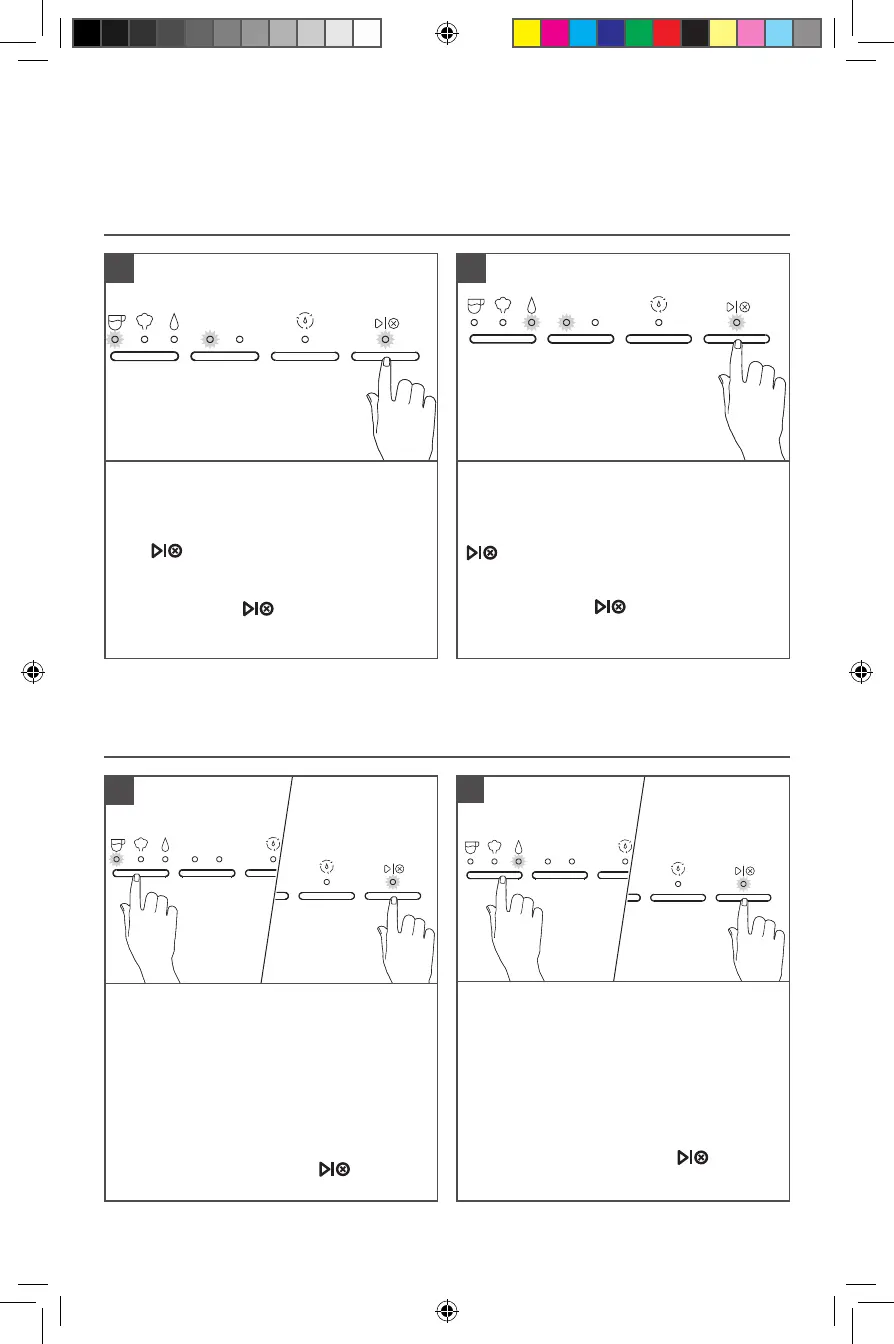
PROGRAMMING THE ESPRESSO AND HOT WATER AMOUNT
1 2
To change pre-programmed Espresso
Volume for 1 / 2: Toggle the Mode Button
to select Espresso. Select the dose you
desire to programme (1 or 2). Press and
hold button until desired espresso
amount is reached in your cup.
While programming your selected dose,
the dose and the button lights will
blink. Lights will stop blinking when
programming is complete.
1
1 2
To change pre-programmed Water
Volume for 1 / 2: Toggle the Mode Button
to select Water. Select the dose you desire
to programme (1 or 2). Press and hold
button until desired water amount is
reached in your cup.
While programming your selected dose,
the dose and the button light will
blink. Lights will stop blinking when
programming is complete.
2
TIP: To restore all factory settings, Press and Hold “Dose Button” for 3 seconds. Changing the
factory default Espresso or Water Volumes may impact the intended performance of the machine.
PROGRAMMING THE WATER TEMPERATURE AND WATER HARDNESS
To change pre-programmed Water
Temperature: Toggle the Mode Button
to select Espresso, press and hold for
3seconds.
The indicator lights will show the default
factory setting or previous saved setting
(see Indicator light chart for reference).
Toggle the Mode Button between Low-Mid-
High to select desired temperature.
To save your selection, press button or
wait for 10 seconds.
1
To change pre-programmed Water
Hardness: Toggle the Mode Button to
Water, Press and hold for 3 seconds.
The indicator lights will show the default
factory setting or previous saved setting
(see Indicator light chart for reference).
Toggle the Mode Button between Low-
Mid-High to select desired water hardness.
To save your selection, press button
or wait for 10 seconds.
2
W11331487C_01_EN.indd 12W11331487C_01_EN.indd 12 26-04-2021 13:42:0826-04-2021 13:42:08





 To Next Page