13
PROGRAMMING FUNCTION
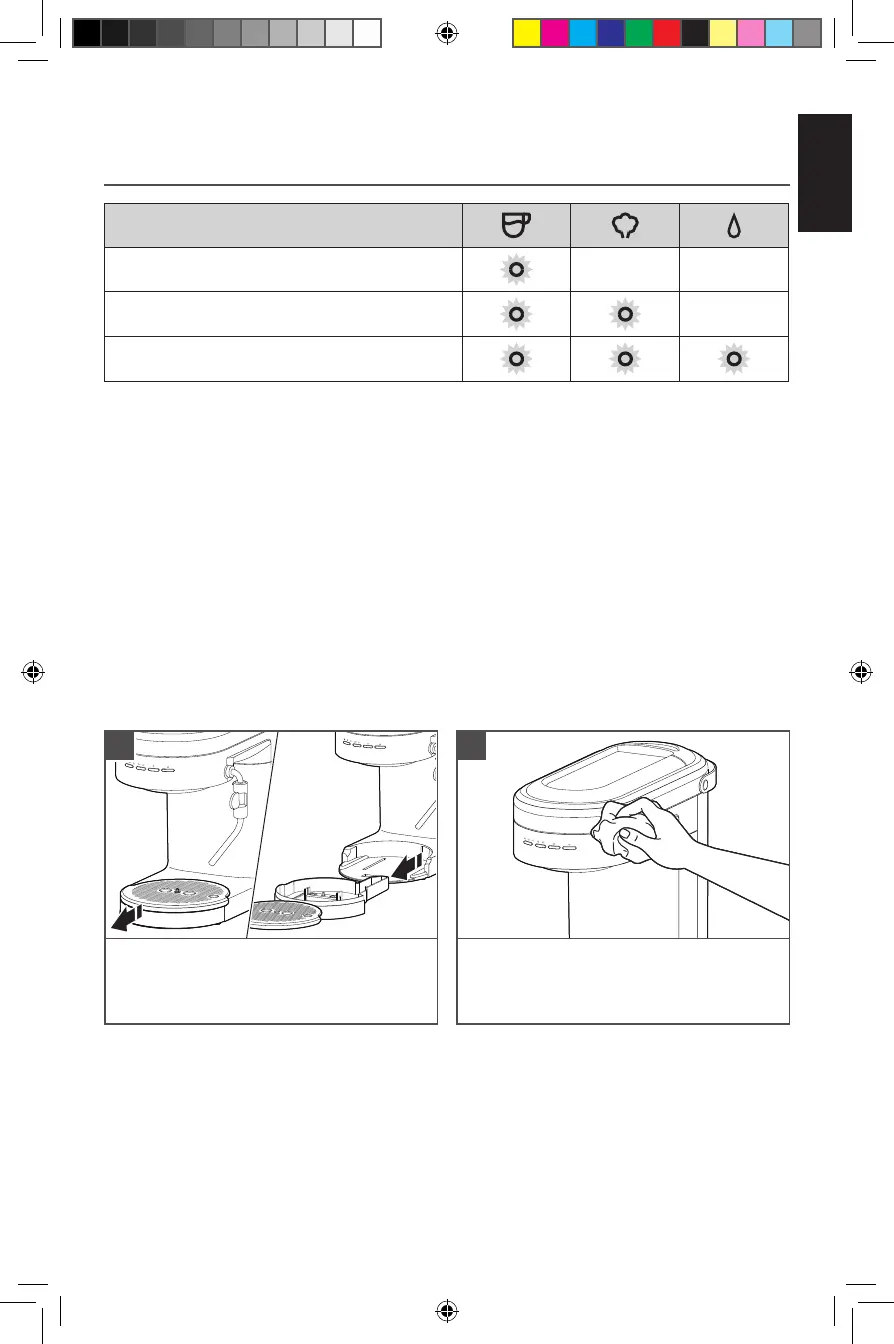
INDICATOR LIGHT CHART
TIP: To restore all factory settings, Press and Hold “Dose Button” for 3 seconds.
All indicator lights will blink indicating that all settings are restored.
Water Temperature or Water Hardness
Low
Medium
High
NOTE: Water Hardness - Low: 0 to 60 ppm
Medium: 60 to 120 ppm
High: more than 120 ppm
Wipe the Espresso Machine housing and
Group Head with a clean soft damp cloth.
2
For best results, regularly clean the Espresso Machine and accessories.
CARE AND CLEANING
When the Drip Tray Indicator rises and
becomes visible above the surface of the
Drip Tray Plate, empty the Drip Tray and
rinse with warm water.
1
IMPORTANT: Unplug the Espresso Machine before cleaning. Allow the Espresso
Machine and accessories to cool down.
NOTE: Do not use abrasive cleansers or scouring pads when cleaning the Espresso
Machine, parts, or accessories. Do not immerse the Espresso Machine or cord in water
or other liquids.
W11331487C_01_EN.indd 13W11331487C_01_EN.indd 13 26-04-2021 13:42:0926-04-2021 13:42:09





 To Next Page