USING THE FOOD PROCESSOR | 15
OPERATING THE FOOD PROCESSOR
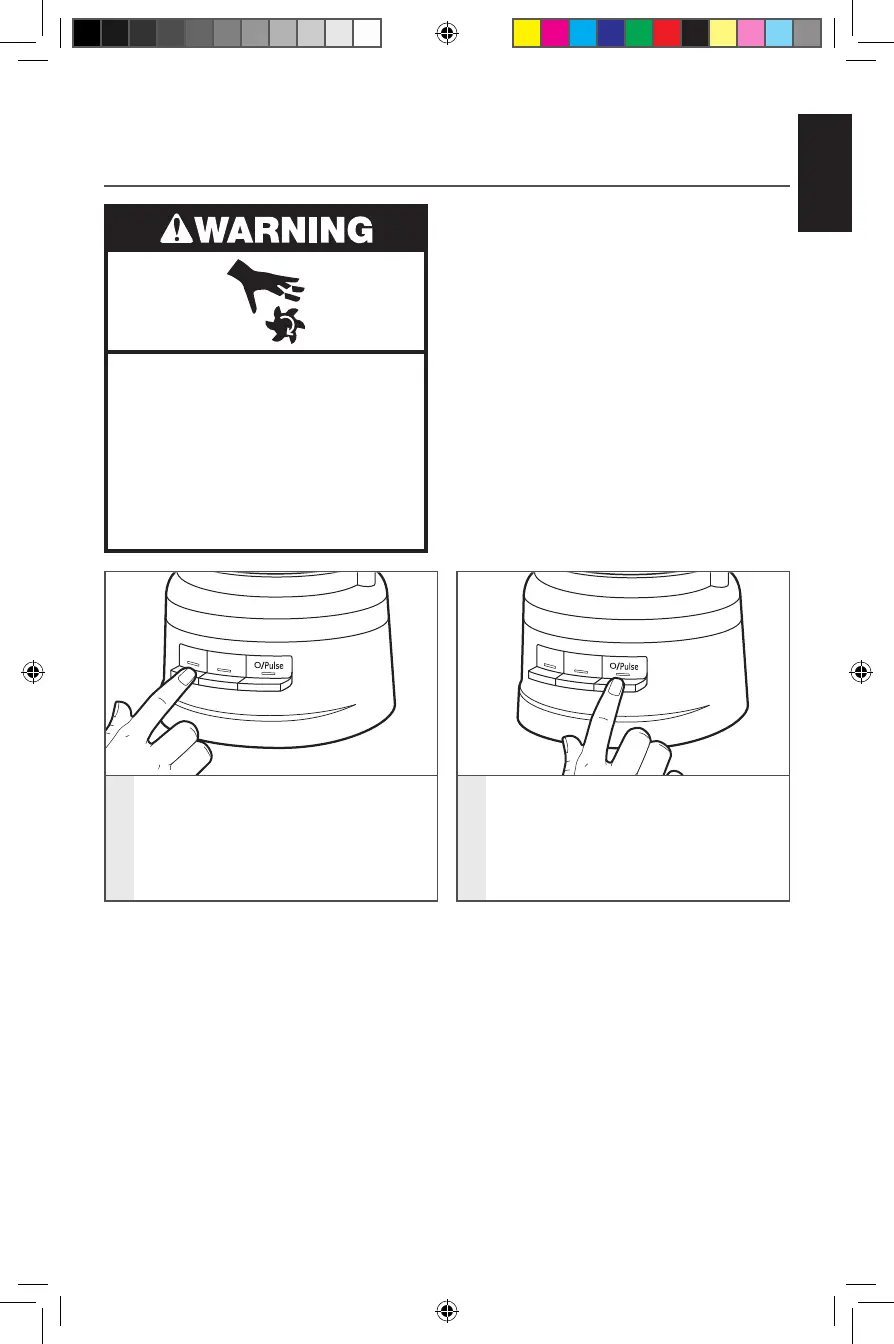
Before operating the Food Processor, be
sure the work bowl, blades, and work bowl
cover are properly assembled on the base
(see the “Assembling the Food Processor”
section).
Rotating Blade Hazard
Always use food pusher.
Keep ngers out of openings.
Keep away from children.
Failure to do so can result in
amputation or cuts.
USING THE FOOD PROCESSOR
1
2
1
To turn on, press 1 or 2. The Food
Processor will run continuously and
the indicator light will glow.
To turn off, press 1 or 2 again, or
press O/Pulse.
2
To use the Pulse function:
Press O/Pulse for short bursts,
or press and hold for longer bursts.
The Pulse function runs at high speed
only. The Food Processor will turn off
when the O/Pulse button is released.
W11243754A_01_EN.indd 15 8/24/2018 2:28:32 PM






 To Next Page