8
PRODUCT USAGE
NOTE: For ease of assembly, install the desired Blade or Disc before attaching
the Work Bowl Cover.
NOTE: Your Food Processor will not
operate unless the Work Bowl Cover is
fully closed and the Work Bowl is properly
seated on the base.
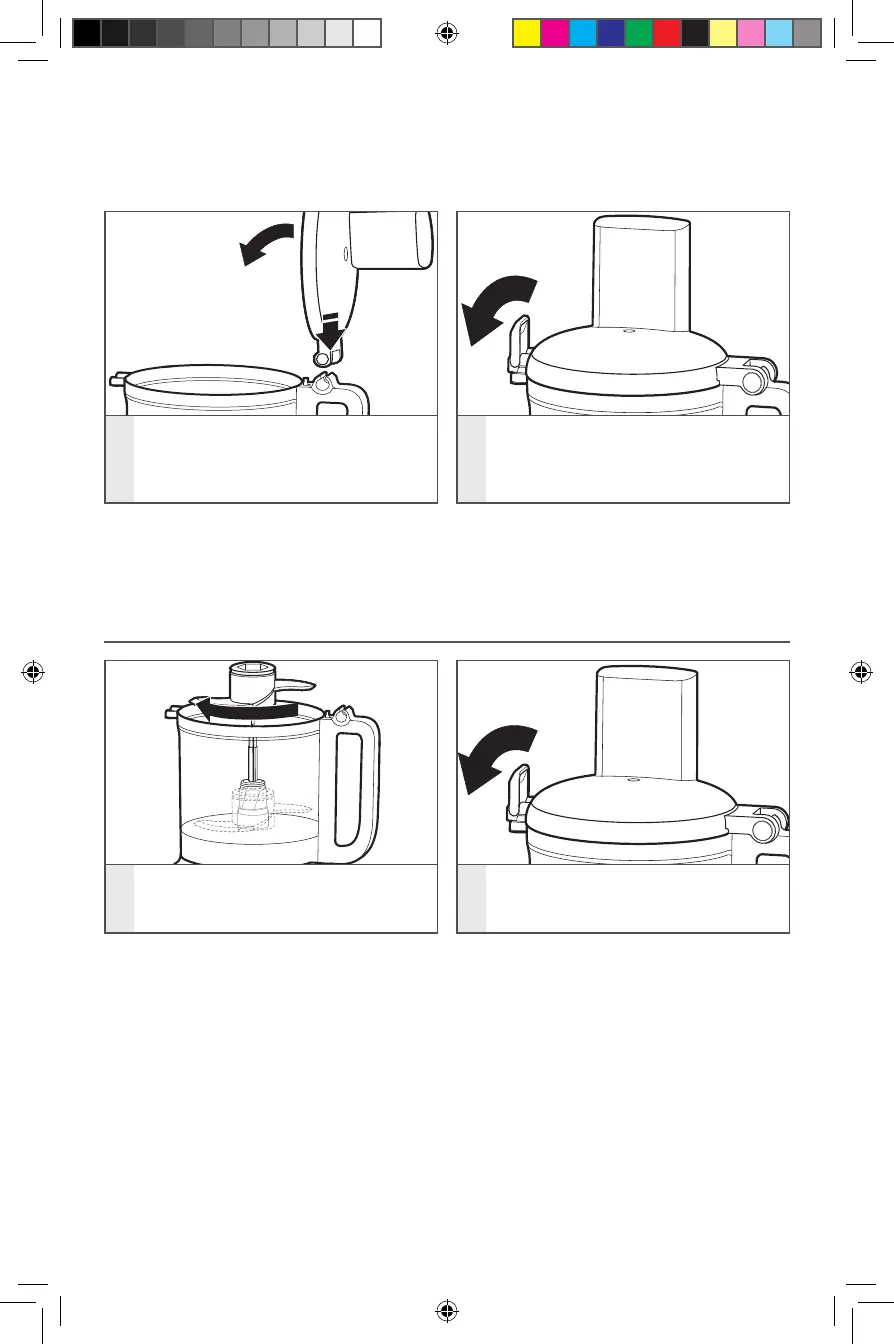
3
To attach the Work Bowl Cover, hook
the Lid Hinge into the Handle Hinge
on the Work Bowl and close the
cover.
4
Once the Work Bowl Cover is closed,
push the Lid Hinge down into the
locked position.
INSTALLING THE MULTIPURPOSE BLADE OR DOUGH BLADE
1
Place the Blade on the Drive Adapter.
Rotate the Blade so it falls down to
the base of the adapter.
2
Install the Work Bowl Cover, and be
sure the Lid Latch is pushed down to
the locked position.
W11501513A_01_EN.indd 8W11501513A_01_EN.indd 8 12/23/2020 3:55:48 AM12/23/2020 3:55:48 AM







 To Next Page