REFRIGERATOR USE
Using the Controls
Your model may have Electronic Controls or Digital Controls.
IM PORTANI"."
• Wait 24 hours for your refrigerator to cool completely before
adding food. If you add food before the refrigerator has cooled
completely, your food may spoil.
NOTE: Adjusting the Refrigerator and Freezer Controls to a
higher (colder) than recommended setting will not cool the
compartments any faster.
The recommended settings should be correct for normal
household refrigerator use. The controls are set correctly
when milk or juice is as cold as you like and when ice cream is
firm.
• If the temperature is too warm or too cold in the refrigerator or
freezer, first check the air vents to be sure they are not
blocked before adjusting the controls.
Electronic Controls
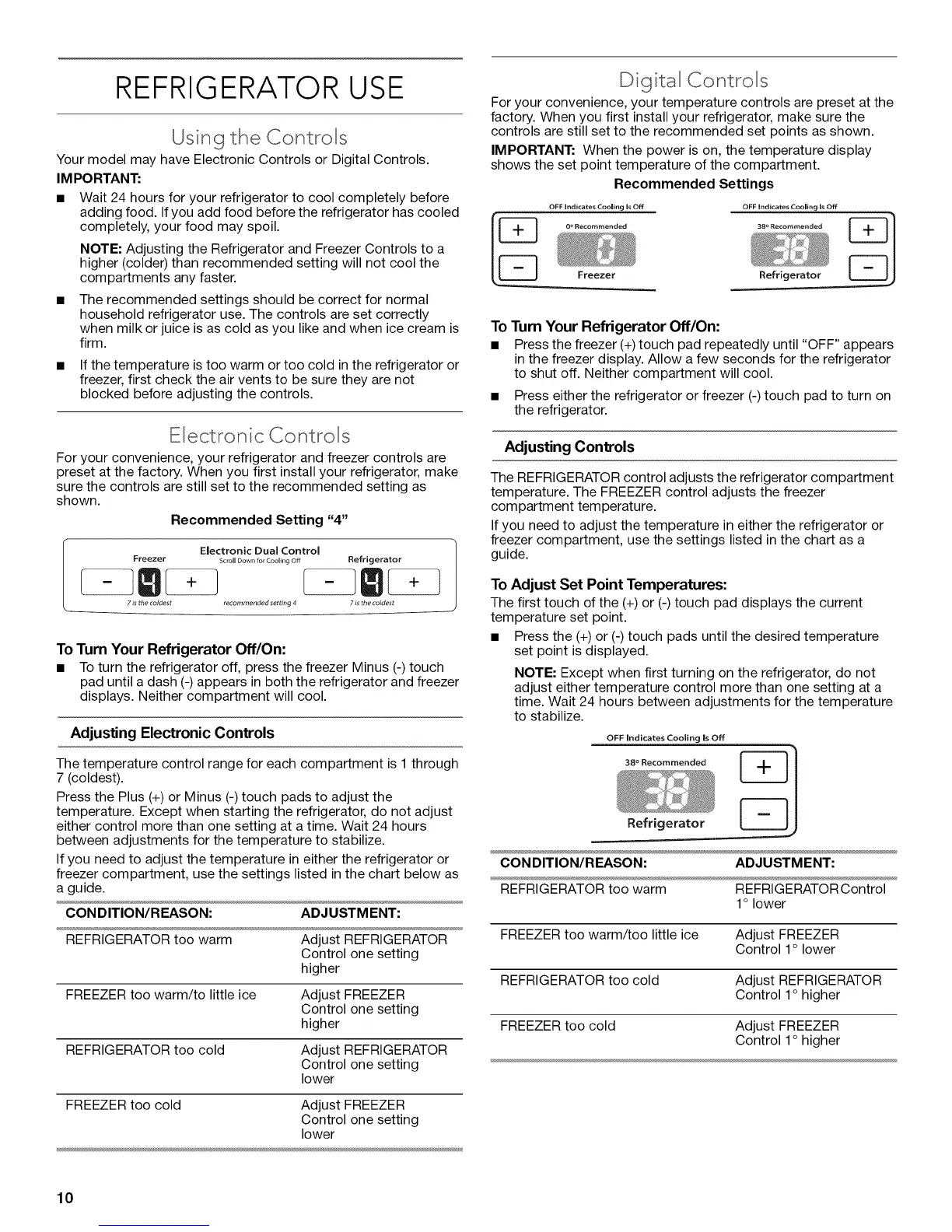
For your convenience, your refrigerator and freezer controls are
preset at the factory. When you first install your refrigerator, make
sure the controls are still set to the recommended setting as
shown.
Recommended Setting "4"
Electronic Dual Control
Freezer Scroll Down for Cooling Off
7 is the coldest recommended setting 4
Refrigerator
7 is the coldest
To Turn Your Refrigerator Off/On:
• To turn the refrigerator off, press the freezer Minus (-) touch
pad until a dash (-) appears in both the refrigerator and freezer
displays. Neither compartment will cool.
Adjusting Electronic Controls
The temperature control range for each compartment is 1 through
7 (coldest).
Press the Plus (+) or Minus (-) touch pads to adjust the
temperature. Except when starting the refrigerator, do not adjust
either control more than one setting at a time. Wait 24 hours
between adjustments for the temperature to stabilize.
If you need to adjust the temperature in either the refrigerator or
freezer compartment, use the settings listed in the chart below as
a guide.
CONDITION/REASON: ADJUSTMENT:
REFRIGERATOR too warm Adjust REFRIGERATOR
Control one setting
higher
FREEZER too warm/to little ice Adjust FREEZER
Control one setting
higher
REFRIGERATOR too cold Adjust REFRIGERATOR
Control one setting
lower
FREEZER too cold Adjust FREEZER
Control one setting
lower
D gital Controls
For your convenience, your temperature controls are preset at the
factory. When you first install your refrigerator, make sure the
controls are still set to the recommended set points as shown.
IMPORTANT: When the power is on, the temperature display
shows the set point temperature of the compartment.
Recommended Settings
OFF Indicates Cooling Is Off OFF Indicates Cooling Is Off
0 o Recommended 38 ° Recommended
LTJ
Freezer Refrigerator
To Turn Your Refrigerator Off/On:
• Press the freezer (+) touch pad repeatedly until "OFF" appears
in the freezer display. Allow a few seconds for the refrigerator
to shut off. Neither compartment will cool.
• Press either the refrigerator or freezer (-) touch pad to turn on
the refrigerator.
Adjusting Controls
The REFRIGERATOR control adjusts the refrigerator compartment
temperature. The FREEZER control adjusts the freezer
compartment temperature.
If you need to adjust the temperature in either the refrigerator or
freezer compartment, use the settings listed in the chart as a
guide.
To Adjust Set Point Temperatures:
The first touch of the (+) or (-) touch pad displays the current
temperature set point.
• Press the (+) or (-) touch pads until the desired temperature
set point is displayed.
NOTE: Except when first turning on the refrigerator, do not
adjust either temperature control more than one setting at a
time. Wait 24 hours between adjustments for the temperature
to stabilize.
OFF Indicates Cooling Is Off
38 ° Recommended __
CONDITION/REASON: ADJUSTMENT:
Refrigerator
REFRIGERATOR too warm REFRIGERATOR Control
1o lower
FREEZER too warm/too little ice Adjust FREEZER
Control 1° lower
REFRIGERATOR too cold Adjust REFRIGERATOR
Control 1° higher
FREEZER too cold Adjust FREEZER
Control 1° higher
10




 To Next Page