3
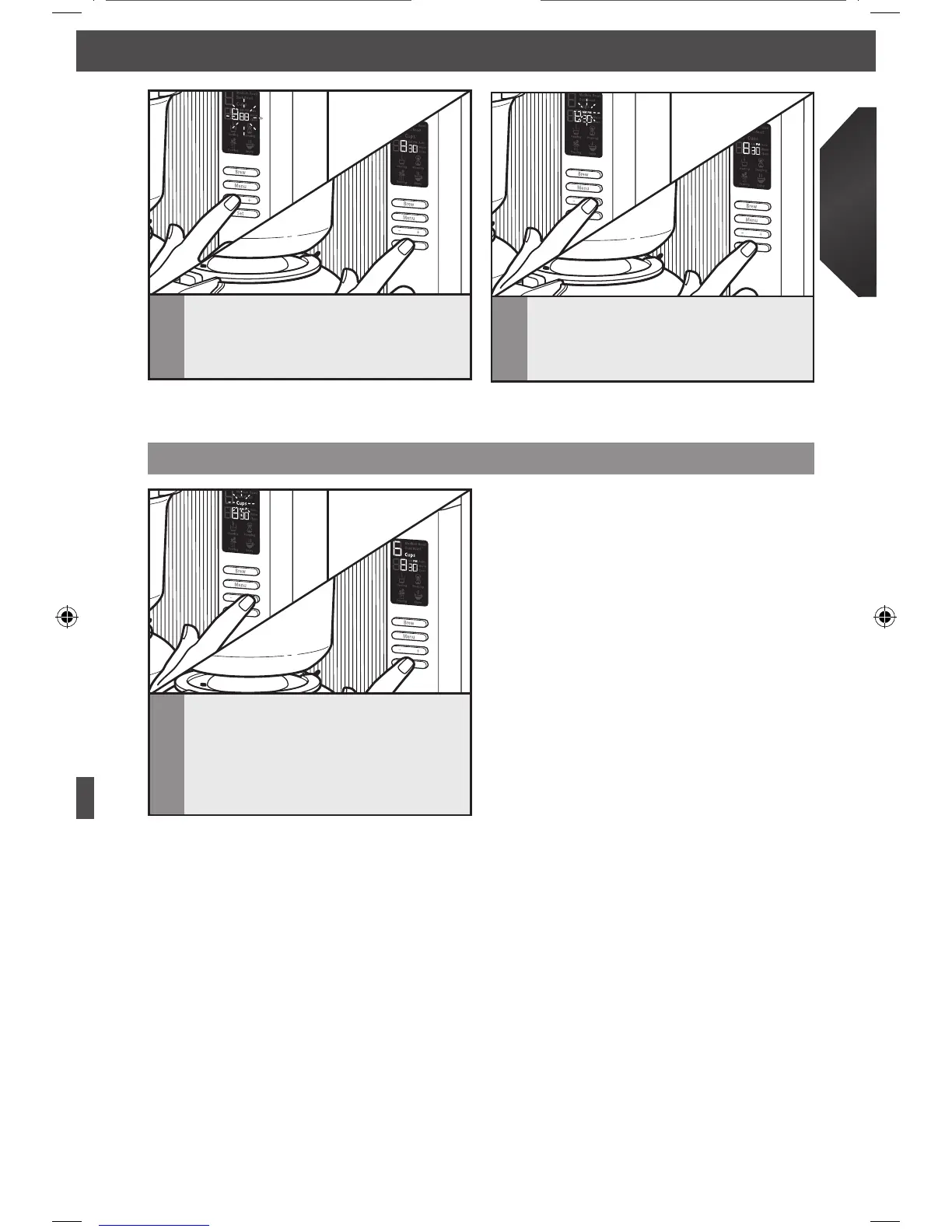
The minute display will start to flash
next. Use the “+” or “-” toggle bar to
choose the correct minute setting, then
press SET to make your selection.
4
The AM/PM display will flash last. Use
the “+” or “-” toggle bar to choose the
correct AM/PM setting, then press SET
to go back to the programming menu.
Selecting number of cups to brew
1
From the main menu, use the “+” or
“-” toggle button to choose the number
of cups you want to brew, between
2 and 8. When the desired number is
displayed, you are ready to brew.
NOTE: To go directly to the clock display menu, when the Coffee Brewer is already on,
press the MENU button four times, until the hour display begins to flash.
NOTE: 8 Cups is the default setting.
NOTE: If the water in the tank has been
sitting for awhile and you wish to start
fresh, select 8 cups and press the BREW
button (without coffee in the brew basket).
This will cycle through any stale water
in the tank.









 To Next Page