11
English
ASSEMBLING THE FOOD PROCESSOR ASSEMBLING THE FOOD PROCESSOR
3
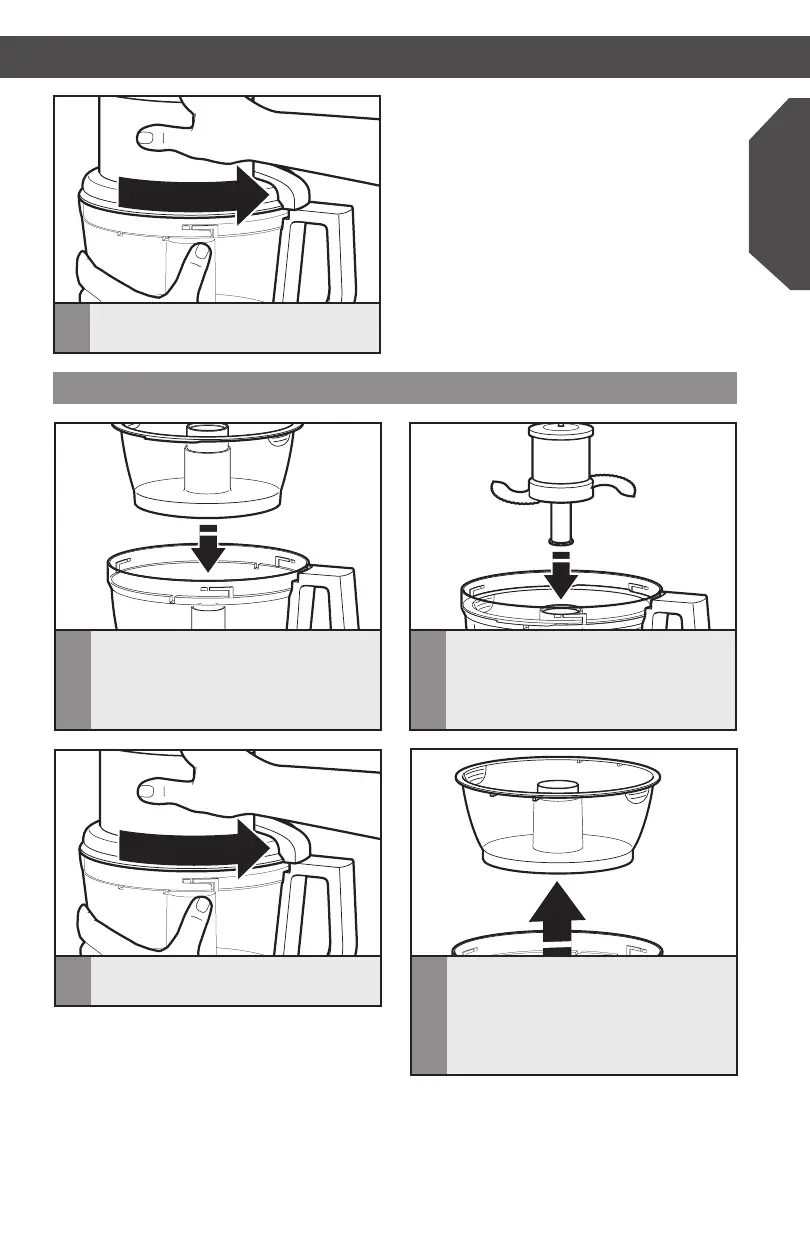
Install the work bowl cover, being sure
it locks into place.
Installing the mini-bowl and mini-blade
1
Place the mini-bowl inside the work
bowl over the power shaft. Rotate the
mini-bowl until the tabs on the top edge
of the bowl drops into the indents on
the top of the work bowl.
2
Insert the drive adapter into the mini-
blade, and place on the power shaft. It
may be necessary to rotate the blade
until it falls into place. Press down firmly
to lock it into place.
3
Install the work bowl cover, being sure
it locks into place.
4
To remove the mini-bowl after
processing, remove the mini-blade by
pulling straight up on the cap. Then lift
the bowl straight up and out, using the
two finger grips located along the top
edge of the bowl.





 To Next Page