15
English
MANUAL COOKING
ADDITIONAL FEATURES
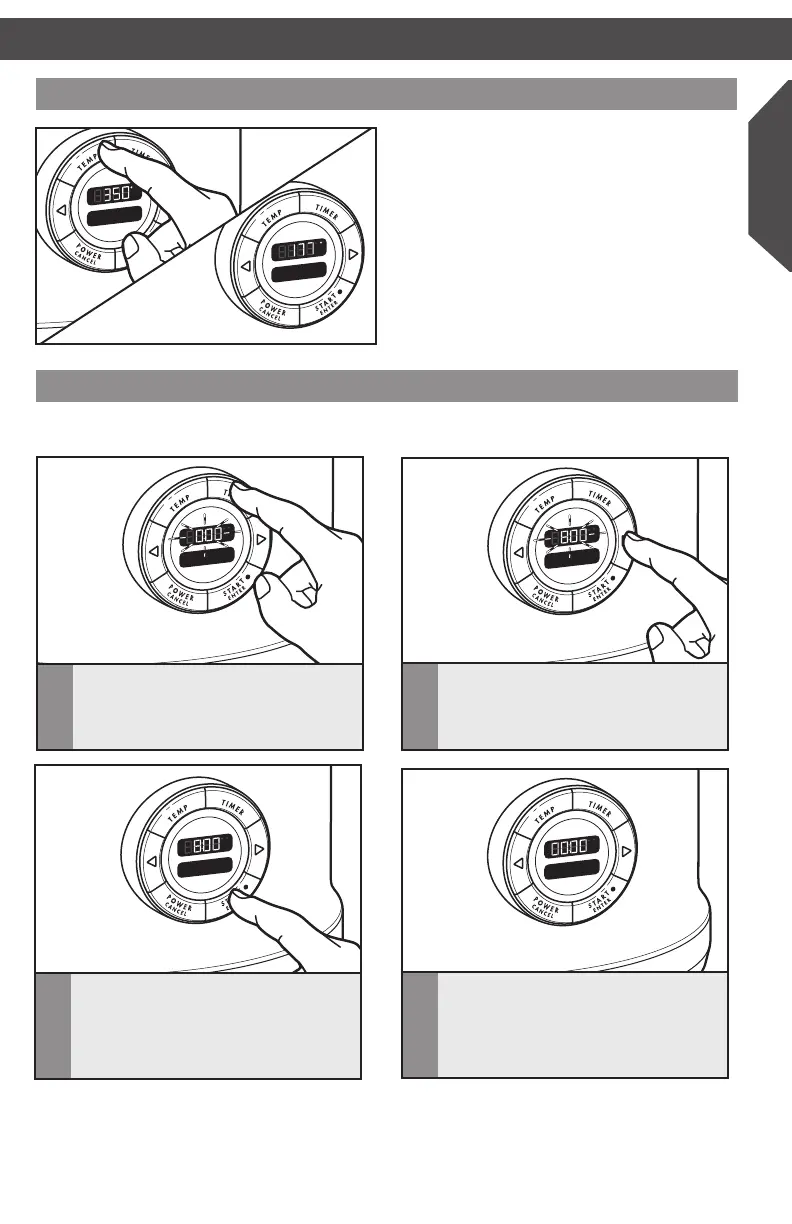
Changing between Fahrenheit and Celsius
To change between degrees Fahrenheit and
degrees Celsius, press and hold the TEMP
button for 3 seconds.
ADDITIONAL FEATURES
Using the timer as a kitchen timer
The Multi-Cooker timer can be used as a kitchen timer when not in a cooking mode.
F
h
C
Timer
1
Press and hold TIMER.
F
h
C
Timer
2
Press the < or > keys to adjust
the time up or down. Pressing and
holding the < or > keys will change
the time more rapidly.
F
h
C
Timer
3
Press START/ENTER to start the
timer countdown. A single tone
will sound when the time reaches 1
minute, then the time will continue
counting down in seconds.
F
h
C
4
When the timer reaches 00:00, three
tones will sound.
W10663378B_Multicooker_NAR_ENv01.indd 15 3/3/15 5:22 PM



 To Next Page