KITCHENAID
Stand Mixer Service Manual LIT4177310-C 2005 KitchenAid
F. Unscrew the two brush holder screw caps and
remove the brushes and springs (Fig. 29).
Viewing from the rear, mark the brushes right and
left, and also the top of the brush, just as it was
removed from the motor.
G. The armature can now be removed.
With the attachment hub bevel gear removed,
insert a drift punch through the attachment hub
opening and gently tap the armature back through
the stator using a block of wood to protect the
shaft (Fig. 30).
Remove the worm end bearing washer and the
fan end spacer washer.
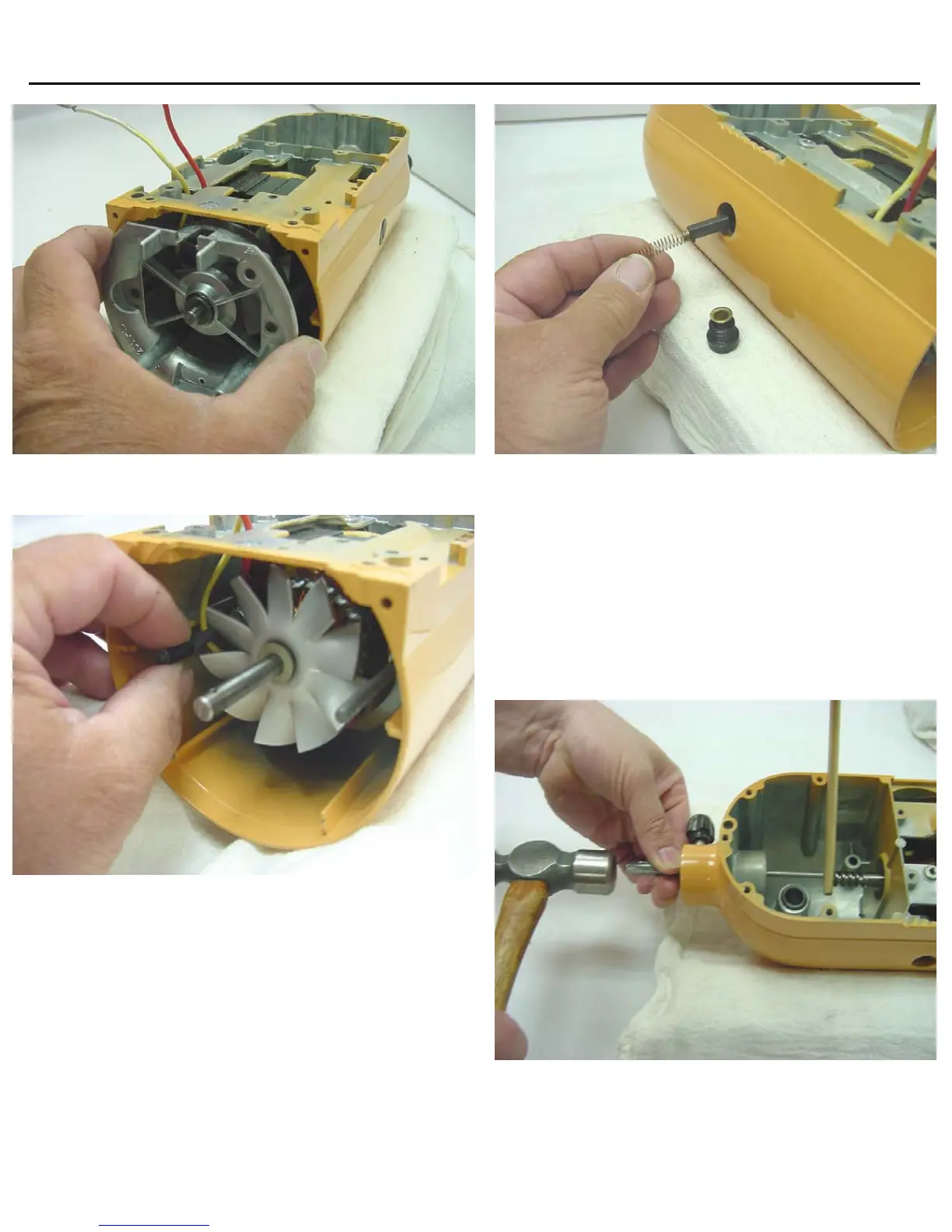
Fig. 27 Bearing bracket being removed after two #10-24
nuts have been removed.
Fig. 28 The motor stud sleeve is shown being removed after
bearing bracket removal.
Pa
e 9
Fig. 29 the brush holder caps are loosened to access
brushes for removal. Make sure to mark orientation.
Fig. 30 A block of wood is used to protect the motor
shaft when removing the armature.




 To Next Page