EasyManua.ls Logo

Kitchenarm KA8520 - Page 11

Kitchenarm KA8520
48 pages
Print Icon
To Next Page IconTo Next Page
To Previous Page IconTo Previous Page
Loading...
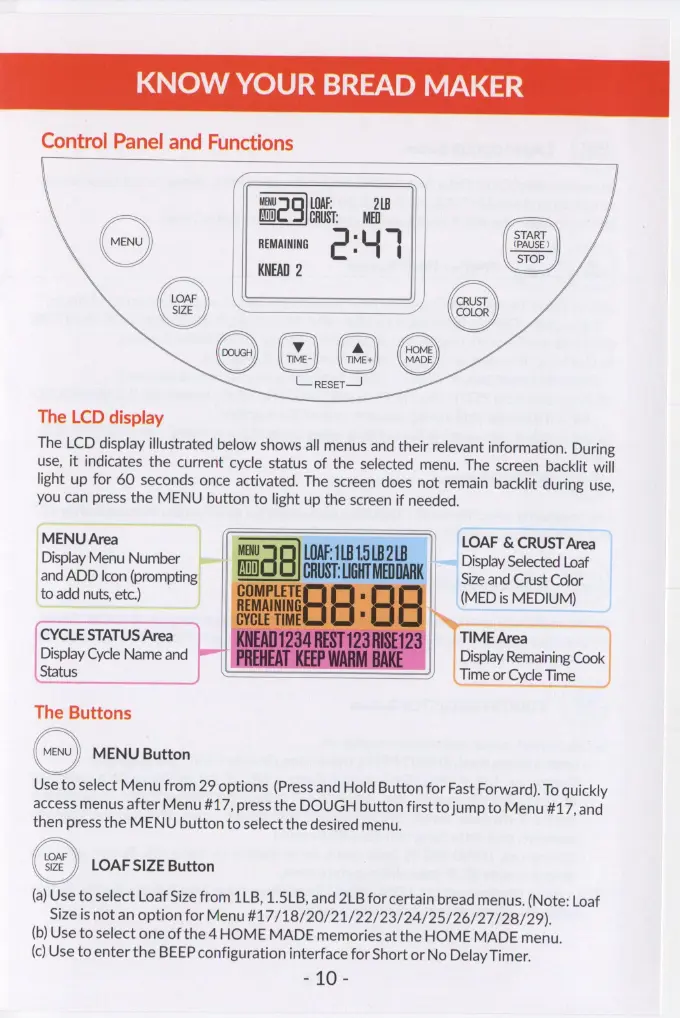
KNOW
YOUR
BREAD
MAKER
Control
Panel
and
Functions
MENU
LOAF:
218
a)
a
CRUST:
MED
REMAINING
KNEAD
2
TIME-
TIME+
L_resetr—
(ae
START
(PAUSE
)
STOP
J
J
CRUST
Yo
COLOR
/
The
LCD
display
The
LCD
display
illustrated
below
shows
all
menus
and
their
relevant
information.
During
use,
it
indicates
the
current
cycle
status
of
the
selected
menu.
The
screen
backlit
will
light
up
for
60
seconds
once
activated.
The
screen
does
not
remain
backlit
during
use,
you
can
press
the
MENU
button
to
light
up
the
screen
if
needed.
||
LOAF
&
CRUST
Area
~~
Display
Selected
Loaf
Size
and
Crust
Color
(MED
is
MEDIUM)
_DisplayMenu
Number
_and
ADD
Icon
(prompting
|
to
add
nuts,
etc.)
TIME
Area
Display
Remaining
Cook
Time
or
Cycle
Time
CYCLE
STATUS
Area
Display
Cycle
Name
and
Status
The
Buttons
MENU
Button
Use
to
select
Menu
from
29
options
(Press
and
Hold
Button
for
Fast
Forward).
To
quickly
access
menus
after
Menu
#17,
press
the
DOUGH
button
first
to
jump
to
Menu
#17,
and
then
press
the
MENU
button
to
select
the
desired
menu.
LOAF
SIZE
Button
(a)
Use
to
select
Loaf
Size
from
1LB,
1.5LB,
and
2LB
for
certain
bread
menus.
(Note:
Loaf
Size
is
not
an
option
for
Menu
#17/18/20/21/22/23/24/25/26/27/28/29).
(b)
Use
to
select
one
of
the
4
HOME
MADE
memories
at
the
HOME
MADE
menu.
(c)
Use
to
enter
the
BEEP
configuration
interface
for
Short
or
No
Delay
Timer.
Pan.