EasyManua.ls Logo

Kitchenarm KA8520 - Page 31

Kitchenarm KA8520
48 pages
Print Icon
To Next Page IconTo Next Page
To Previous Page IconTo Previous Page
Loading...
MAKE
BREAD
WITH
HOME
MADE
MENU
3.
Select
The
HOME
MADE
Memory
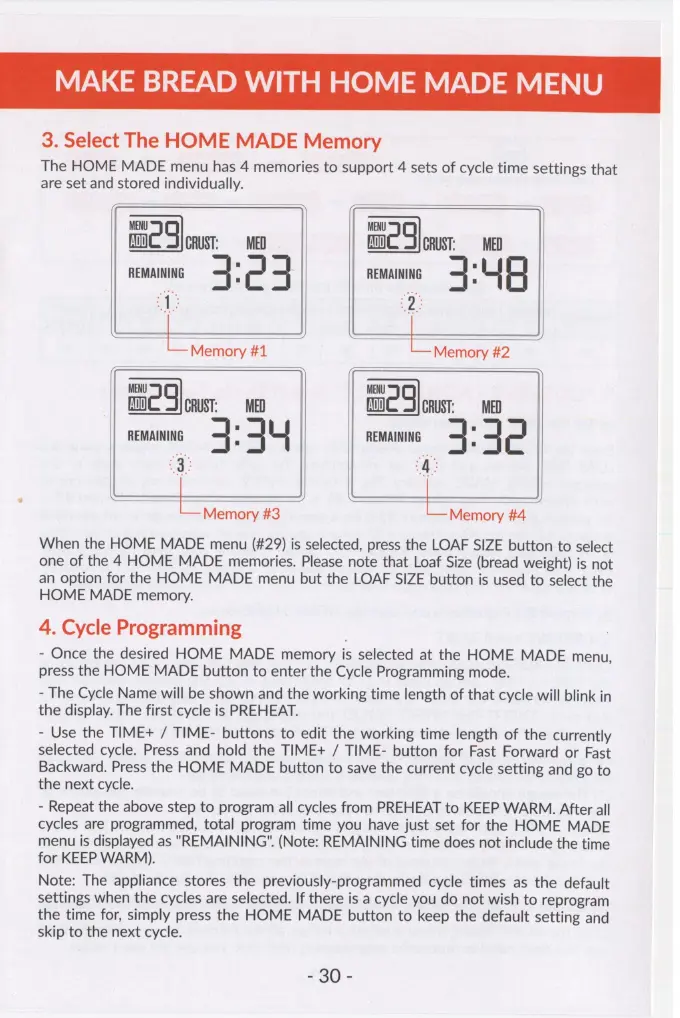
The
HOME
MADE
menu
has
4
memories
to
support
4
sets
of
cycle
time
settings
that
are
set
and
stored
individually.
MENU MENU
ADD}
g
CRUST:
=
MED
ADD}
4
CRUST:
MED
REMAINING
+
;
c
4
REMAINING
+
E
|
4
“1
ee
~
LoMemory#t==—st«*«<‘i«é‘“iz
Memory
MENU
MENU
ADD}
a
CRUST:
=
MED
fw
5
CRUST:
MED
REMAINING
3:
44
REMAINING
4:
42
is
‘A:
Memory
#3
Memory
#4
When
the
HOME
MADE
menu
(#29)
is
selected,
press
the
LOAF
SIZE
button
to
select
one
of
the
4
HOME
MADE
memories.
Please
note
that
Loaf
Size
(bread
weight)
is
not
an
option
for
the
HOME
MADE
menu
but
the
LOAF
SIZE
button
is
used
to
select
the
HOME
MADE
memory.
4.
Cycle
Programming
-
Once
the
desired
HOME
MADE
memory
is
selected
at
the
HOME
MADE
menu,
press
the
HOME
MADE
button
to
enter
the
Cycle
Programming
mode.
-
The
Cycle
Name
will
be
shown
and
the
working
time
length
of
that
cycle
will
blink
in
the
display.
The
first
cycle
is
PREHEAT.
-
Use
the
TIME+
/
TIME-
buttons
to
edit
the
working
time
length
of
the
currently
selected
cycle.
Press
and
hold
the
TIME+
/
TIME-
button
for
Fast
Forward
or
Fast
Backward.
Press
the
HOME
MADE
button
to
save
the
current
cycle
setting
and
go
to
the
next
cycle.
-
Repeat
the
above
step
to
program
all
cycles
from
PREHEAT
to
KEEP
WARM.
After
all
cycles
are
programmed,
total
program
time
you
have
just
set
for
the
HOME
MADE
menu
is
displayed
as
"REMAINING".
(Note:
REMAINING
time
does
not
include
the
time
for
KEEP
WARM).
Note:
The
appliance
stores
the
previously-programmed
cycle
times
as
the
default
settings
when
the
cycles
are
selected.
If
there
is
a
cycle
you
do
not
wish
to
reprogram
the
time
for,
simply
press
the
HOME
MADE
button
to
keep
the
default
setting
and
skip
to
the
next
cycle.
£86
-