EasyManua.ls Logo

Kitchenarm KA8520 - Page 34

Kitchenarm KA8520
48 pages
Print Icon
To Next Page IconTo Next Page
To Previous Page IconTo Previous Page
Loading...
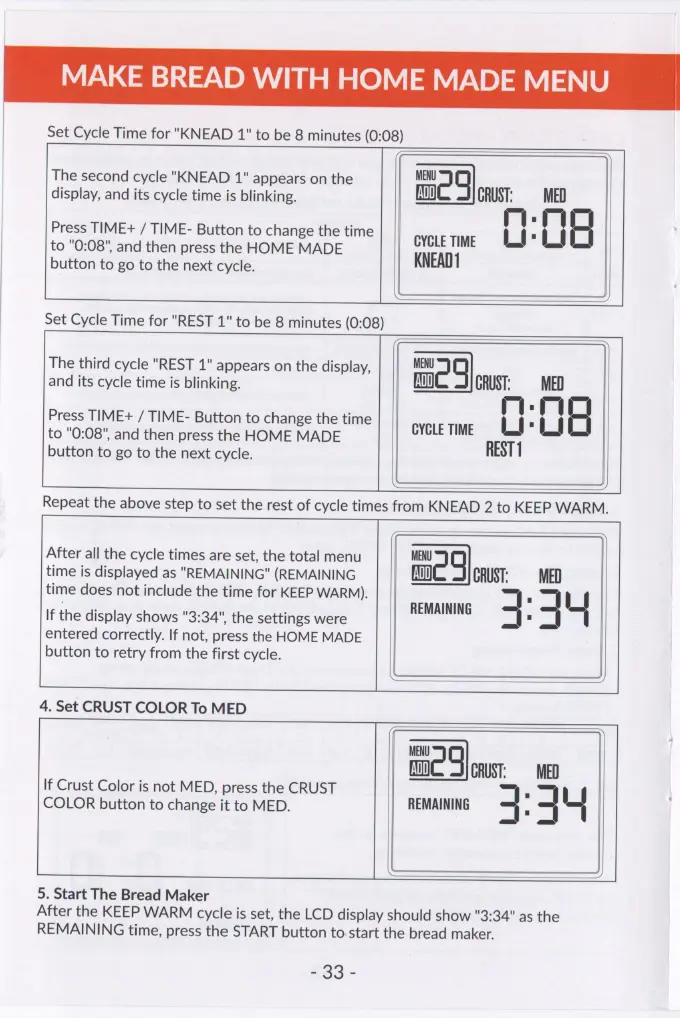
MAKE
BREAD
WITH
HOME
MADE
MENU
Set
Cycle
Time
for
"KNEAD
1"
to
be
8
minutes
(0:08)
The
second
cycle
"KNEAD
1"
appears
on
the
MENU
q
display,
and
its
cycle
time
is
blinking.
ADD}
CRUST:
rq
Press
TIME+
/
TIME-
Button
to
change
the
time
.
to
"0:08",
and
then
press
the
HOME
MADE
GYGLE
TIME
Lt
Vt
button
to
go
to
the
next
cycle.
KNEAD
Set
Cycle
Time
for
"REST
1"
to
be
8
minutes
(0:08)
The
third
cycle
"REST
1"
appears
on
the
display,
MENU
q
and
its
cycle
time
is
blinking.
ADD]
CRUST:
MED
Press
TIME+
/
TIME-
Button
to
change
the
time
rm
.
mr
to
"0:08",
and
then
press
the
HOME
MADE
GYGLE
TIME
Lt
Lt
button
to
go
to
the
next
cycle.
REST
1
Repeat
the
above
step
to
set
the
rest
of
cycle
times
from
KNEAD
2
to
KEEP
WARM.
After
all
the
cycle
times
are
set,
the
total
menu
MENU
g
time
is
displayed
as
"REMAINING"
(REMAINING
ADD}
CRUST:
MED
time
does
not
include
the
time
for
KEEP
WARM).
REMAINING
\f
If
the
display
shows
"3:34",
the
settings
were
4
-
3
entered
correctly.
If
not,
press
the
HOME
MADE
button
to
retry
from
the
first
cycle.
LL
4.
Set
CRUST
COLOR
To
MED
MENU
q
fa)
CRUST:
MED
If
Crust
Color
is
not
MED,
press
the
CRUST
COLOR
button
to
change
it
to
MED.
REMAINING
4
'
4
ut
5.
Start
The
Bread
Maker
After
the
KEEP
WARM
cycle
is
set,
the
LCD
display
should
show
"3:34"
as
the
REMAINING
time,
press
the
START
button
to
start
the
bread
maker.
£23
;