User manual
10.
1. Clean the water tank before use.
2. Fill the water tank with clean water.
3. Fill the water tank with the desired amount. This can be done in 2
ways, by taking off the entire water tank or by taking off the lid and
filling the tank from the top. Do not fill above the MAX line.
4. Now connect the hot water dispenser to the wall socket.
5. Place a cup under the dispenser. Select the desired temperature and
volume and press the ON/OFF button. To stop dispensing press
ON/OFF again.
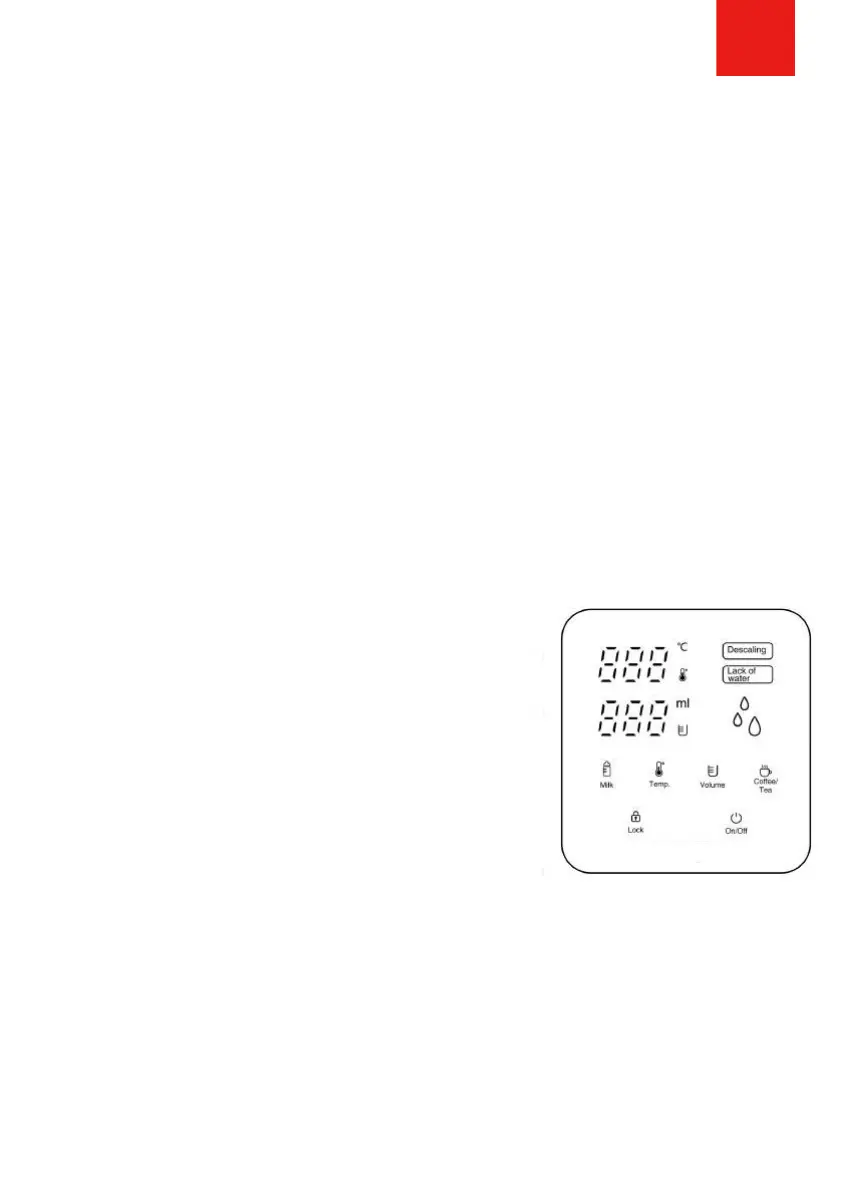
1. Press LOCK for 3/5 seconds to unlock the
device. After 10 seconds, the device
automatically locks again.
2. Select the desired temperature: 45ºC / 55ºC
/ 65ºC / 75ºC / 85ºC / 100ºC.
3. Choose the desired volume: 100ml / 200ml
/ 300ml / 400ml.
4. Select MILK to disperse water at 40ºC
degrees.
Control panel
5. Select the COFFEE/TEA function to disperse water at exactly 92ºC
degrees. This makes it instantly drinkable.
6. At volume 000, select to let water flow continuously. Ideal for a pot
of tea.
7. Press ON/OFF to start and stop dispensing.
8. Lack of water notification: fill the water tank with more water
9. Descaling notification: descale the hot water dispenser.



 To Next Page