14 15
[...continued]
Alternatively
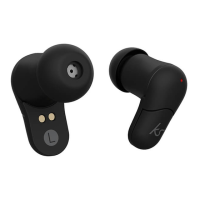
1. From OFF state, hold down both MFB Left (5) and MFB Right (6) for
2 seconds. You will see the LED Indicators (4) ash red & blue and
enter pairing mode. The two headsets will enter auto-pairing mode
and will connect with each other after a few seconds
2. Turn on your iOS, Android, or Windows device’s Bluetooth ON and
search for new devices
3. Select ‘KS Funk 35’ from the list of found devices. If asked for a
passcode, enter ‘0000’ or ‘1234’ and the device will pair
4. Once connected, an audio tone will sound and the LED Indicators (4)
will ash blue. You can then answer the phone and listen to your music
Note: The next time you switch the earbuds on they will automatically
search for and attempt to connect to the last paired device
Re-pairing or pairing new devices
1. Turn Bluetooth connectivity o on any previously paired devices
2. Follow the ‘Pairing the earbuds to your device’ instructions from
step 1


 To Next Page