EasyManua.ls Logo

Kitsound FUNK35 - User Manual

Kitsound FUNK35
14 pages
Print Icon
To Next Page IconTo Next Page
Loading...
USER MANUAL
JB. 7244-a / REG06 / KSFUNK35 / Made in China.
© KitSound is a trademark of Kondor Limited, 2019. Christchurch, Dorset, BH23 4FL, UK
FU NK
TRUE W IRELE S S
EARBUDS
kitsound.co.uk
Question and Answer IconNeed help?

Do you have a question about the Kitsound FUNK35 and is the answer not in the manual?

Summary

Safety Warnings

General Product Safety

Essential warnings for safe product use, covering water, disassembly, and electrical hazards.

Hearing Safety

Protecting Your Hearing

Guidance on preventing hearing damage and avoiding accidents due to loud sounds.

Battery Information

IPX3 Water Resistance

Box Contents

Product Functions

Getting Started and Charging

Initial Charging Procedure

Step-by-step guide for fully charging the earbuds before first use.

Pairing with Your Device

Instructions for connecting the earbuds to a Bluetooth-enabled device.

Advanced Pairing

Re-pairing or New Devices

Instructions for re-pairing the earbuds or connecting to new devices.

Call Handling

Music Playback Controls

Product Specifications

Troubleshooting and Compliance

Troubleshooting and Support

Guidance for resolving issues and contact information for support.

Regulatory Compliance

Information regarding FCC ID, EU declarations, and compliance statements.

FCC and US Information

Warranty and Legal Information

Product Warranty

Information about the product warranty, limitations, and user responsibilities.

Trademarks and Disclaimers

Details on trademarks, ownership, and a disclaimer regarding instruction inconsistencies.

Environmental and Disposal Information

Recycling and Disposal

Instructions for recycling the product, packaging, and batteries according to regulations.

Overview

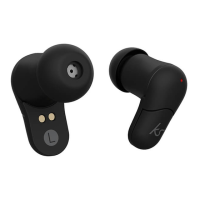
The KitSound Funk 35 True Wireless Earbuds are a pair of wireless earbuds designed for audio playback and call handling, featuring Bluetooth v5.0 technology for connectivity.

Function Description:

The Funk 35 earbuds are designed for listening to music and making/receiving calls wirelessly. They come with a charging case that provides additional battery life, extending their usage time. The earbuds feature multi-function buttons (MFB) on both the left and right earbuds for controlling various functions such as play/pause, volume adjustment, track changes, and call handling. The charging case includes a Micro-USB charging port and an LED indicator to show charging status.
Important Technical Specifications:

  • Bluetooth Technology: v5.0
  • Bluetooth Connectivity Distance: Up to 10 meters
  • Frequency Band: 2.4 GHz – 2.48 GHz
  • Transmission Power: Class 2
  • Signal-to-Noise Ratio (S/N): 93 dB
  • Output RMS: 3 mW/16 Ω
  • Frequency Response: 20 Hz – 20 kHz
  • Drivers: 6 mm
  • Battery Type: LiPo
  • Play Time: Up to 6 hours (up to an additional 18 hours with the charging case)
  • Charging Time: Up to 1.5 hours for the earbuds (first charge may take up to 2 hours for the charging base)
  • IP Rating: IPX3 (water resistant)
  • Working Temperature: -10°C ~ +60°C
  • Earbud Dimensions: H24.1 x W12.9 x D24.6 mm
  • Cable Length (Micro-USB): 0.15 m
  • Total Weight: 41 g

Usage Features:

  • Getting Started: Give the earbuds a full charge before first use. Connect the Micro USB Charge Cable to the charging port (2) and plug into power. The charging base LED Indicator (1) will be red during charging and turn off when fully charged.
  • Pairing:
    • Automatic Pairing: Pick up both headsets from the charging base to power on automatically. They will enter auto-pairing mode and connect with each other within a few seconds.
    • Manual Pairing (from OFF state): Hold down both MFB Left (5) and MFB Right (6) for 2 seconds. The LED Indicators (4) will flash red & blue, indicating pairing mode. The headsets will then connect with each other.
    • Device Connection: Turn on Bluetooth on your iOS, Android, or Windows device and search for new devices. Select 'KS Funk 35' from the list. If prompted for a passcode, enter '0000' or '1234'. Once connected, an audio tone will sound, and the LED Indicators (4) will flash blue.
    • Re-pairing: To re-pair or pair new devices, turn off Bluetooth on any previously paired devices and follow the pairing instructions from step 1.
  • Call Handling:
    • Answer a call: Single press MFB Right (6).
    • Reject a call: Hold MFB Left (5) for 1 second.
    • End a call: Press MFB Right (6) during the call.
    • Voice dial: Press MFB Left (5).
  • Music Playback (Bluetooth):
    • Play/Pause: Single press MFB Right (6).
    • Adjusting Volume: Double press MFB Right (6) to increase volume; double press MFB Left (5) to decrease volume. Volume can also be controlled on your device.
    • Changing Track: Long press MFB Right (6) for 1 second for the next song; long press MFB Left (5) for 1 second for the previous song.

Maintenance Features:

  • General Care: Do not get the product wet (beyond its IPX3 rating). Do not disassemble, modify, or alter the product or accessories. Avoid exposing the product to extreme temperatures or rapid changes. Do not use damaged cables or plugs, or loose electrical sockets. Do not touch the device, cables, plugs, or electrical socket with wet hands.
  • Cable Handling: Do not pull the cable excessively when disconnecting if it's not fixed. Do not bend or damage the cable.
  • Battery Care: Do not dispose of the battery in fire or an oven, or mechanically crush or pierce it, as this may result in an explosion. Do not subject the battery to extremely low air pressure. Use batteries only for their intended purposes. Follow all instructions to ensure the longest lifespan of the device and battery. Damages from not following instructions can void the warranty. Batteries should not be exposed to excessive heat (sunshine, fire, etc.). Disconnect the charger from power sources when not in use.
  • Water Resistance (IPX3): The Funk 35 is rated IPX3, meaning it is protected from water spray at a 60-degree angle but not impervious to large amounts of water. Do not directly immerse in water. To maintain water resistance, remove all cable connections and tightly close the AUX/DC IN cap. Do not expose the Funk 35 to water while charging. Avoid leaving the Funk 35 outside in wet conditions or rain; store in a dry place to prolong its life.
  • Hearing Protection: Excessive exposure to loud sounds can cause hearing damage. Always turn the volume down before plugging in the earbuds and use only the minimum volume setting necessary. In dry environments, static electricity can build up; avoid using headsets in dry environments or touch a metal object to discharge static electricity before connecting.
  • Safety: Do not use a headset while driving or riding, as it may distract attention and cause an accident, and may be illegal depending on your region.
  • Troubleshooting: If experiencing problems, contact support@kitsound.co.uk.
  • Disposal: Products showing the ‘Crossed Through’ wheelie bin symbol must be recycled separately from household waste. Do not dispose of Lithium Polymer batteries with general waste; return them to a battery recycling collection point.

Kitsound FUNK35 Specifications

General IconGeneral
BrandKitsound
ModelFUNK35
CategoryHeadphone
LanguageEnglish

Related product manuals