Need help?
Do you have a question about the Kitsound EUPHORIA and is the answer not in the manual?
Steps to connect and charge the earphones using a USB cable.
Guide to pairing the earphones with a Bluetooth-enabled device.
Instructions for re-connecting or pairing the earphones with new devices.
How to answer and reject calls, and redial the last number.
Controls for play, pause, volume adjustment, and track selection.
This document is a user manual for the KitSound Euphoria Bluetooth Earphones, providing instructions for setup, usage, and care.
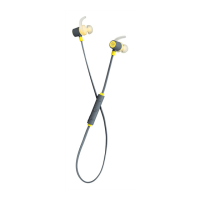
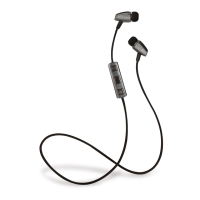
The KitSound Euphoria Bluetooth Earphones are designed to provide a wireless audio experience, allowing users to listen to music and handle phone calls without the need for a physical connection to their device. The earphones feature an in-line remote control with three buttons: Volume+ / Next track, Play / Pause / Power, and Volume- / Previous track. These buttons enable users to manage their audio playback, adjust volume, and control phone calls directly from the earphones. The device utilizes Bluetooth technology for wireless connectivity, ensuring compatibility with a wide range of Bluetooth-enabled devices. The earphones are equipped with a rechargeable Li-Polymer battery, offering several hours of talk time, play time, and standby time on a single charge. The design emphasizes portability, as indicated by the inclusion of a carry case and fitting kit, suggesting a focus on user comfort and convenience for on-the-go use.
The manual outlines a straightforward process for charging and setting up the earphones. For charging, users connect the micro USB end of the charging cable to the earphone's charging port and the standard USB end to a PC USB port or a USB mains charger. A green LED indicator signifies charging, turning off once the battery is fully charged, which typically takes 2-3 hours, with the first charge potentially taking 4-5 hours.
Bluetooth setup involves a simple pairing process. Users initiate pairing by holding down the power button for 4 seconds, observing a rapidly flashing green LED indicator, which then enters pairing mode. Subsequently, users activate the Bluetooth feature on their device, search for 'Euphoria' in the list of available devices, and select it. If prompted for a passcode, '0000' or '1234' should be entered. A tone confirms successful pairing, after which the earphones are ready for use for phone calls or music playback. A convenient feature is the automatic reconnection to the last paired device when the earphones are switched on again. For re-pairing or pairing new devices, users must ensure Bluetooth is turned off on any previously paired devices before following the initial pairing steps.
Call-handling features are integrated into the remote control. To answer an incoming call, users press the middle power button. Holding this button down for 2 seconds will refuse an incoming call. For redialing the last number called, users can tap the middle power button twice when not in a call.
Music playback is also controlled via the remote. Pressing the middle button on the remote will play or pause music. Volume adjustment is managed by pressing the volume + or – buttons, with a tone indicating minimum and maximum volume levels. Track changes are performed by holding down the + or – buttons, again accompanied by a tone to confirm the change. The manual notes that button commands may vary depending on the user's device, suggesting a degree of adaptability in functionality.
Troubleshooting tips are provided to address common issues. If connection problems arise, users are advised to ensure the earphones are charged, switched on, paired, and within 10 meters (30 feet) of their device, free from obstructions. It's also highlighted that only one device can be paired at a time, so conflicting Bluetooth devices should be avoided. If the earphones fail to switch off, placing them on charge can reset them. Intermittent signals often indicate a low battery, so ensuring a full charge is recommended. To conserve power, the earphones automatically power off after 3 minutes if not connected to a device.
The manual includes specific care instructions to ensure the longevity and proper functioning of the KitSound Euphoria Bluetooth Earphones. Users are explicitly advised against getting the earphones wet, as this can cause damage. Opening the earphones is also prohibited, as there are no user-serviceable parts inside, and doing so will void all warranties. Furthermore, exposing the earphones to extreme temperatures or rapid temperature changes (hot to cold or vice versa) should be avoided.
For cleaning, the manual recommends using a soft, dry cloth and no detergents, emphasizing a gentle approach to maintain the device's condition. The document also includes an important note regarding battery disposal: Lithium Polymer batteries should not be disposed of with general waste but should be returned to a battery recycling collection point. This highlights an environmental consideration in the product's lifecycle. The overall message regarding maintenance is to handle the earphones with care, avoid unauthorized modifications or repairs, and follow proper cleaning and disposal guidelines to preserve their functionality and comply with environmental standards.
 General
| Type | Over-Ear |
|---|---|
| Driver Size | 40 mm |
| Frequency Response | 20 Hz - 20 kHz |
| Battery Life | Up to 20 hours |
| Cable Length | 1.2 m |
| Connector | 3.5 mm |
| Weight | 220 g |
| Foldable | Yes |
| Connectivity | Wireless |
| Impedance | 32 Ohms |

 To Next Page