6 7
Re-pairing a wireless device
1. Turn o Bluetooth connectivity on any previously paired devices
2. Follow the ‘Pairing a wireless device’ instructions
3. If a previously paired device is not present within the wireless connectivity range
then the speaker will re-enter pairing mode
Playing music through your MyJack
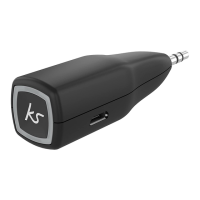
• Plug the MyJack into the aux-in port of the speaker/stereo
• Play the music on your device and the sound will play through the speaker
• Whilst playing music please use your device to change volume/track
• To play/pause songs through the MyJack short press the MFB (1)
Call handling
You can take phone calls whilst connected via wireless. The MFB (1) becomes an
Answer/End call button.
Answer phone call Short press MFB (1)
Reject phone call Press MFB (1) for 1 second
Hang up the phone call Short press MFB (1)
Re-dial last number Short press MFB (1) twice
Cancel dialling Short press MFB (1)
Note: If your vehicle’s aux-in port is located within the glove box and the glove box is closed,
you may have problems talking over the phone as the MIC won’t be able to pick up your voice.
If the KS MyJack doesn’t t into your aux-in port because of a tight space you can insert the
extension cable into the aux-in port and then connect the KS MyJack into the other end.



 To Next Page