8
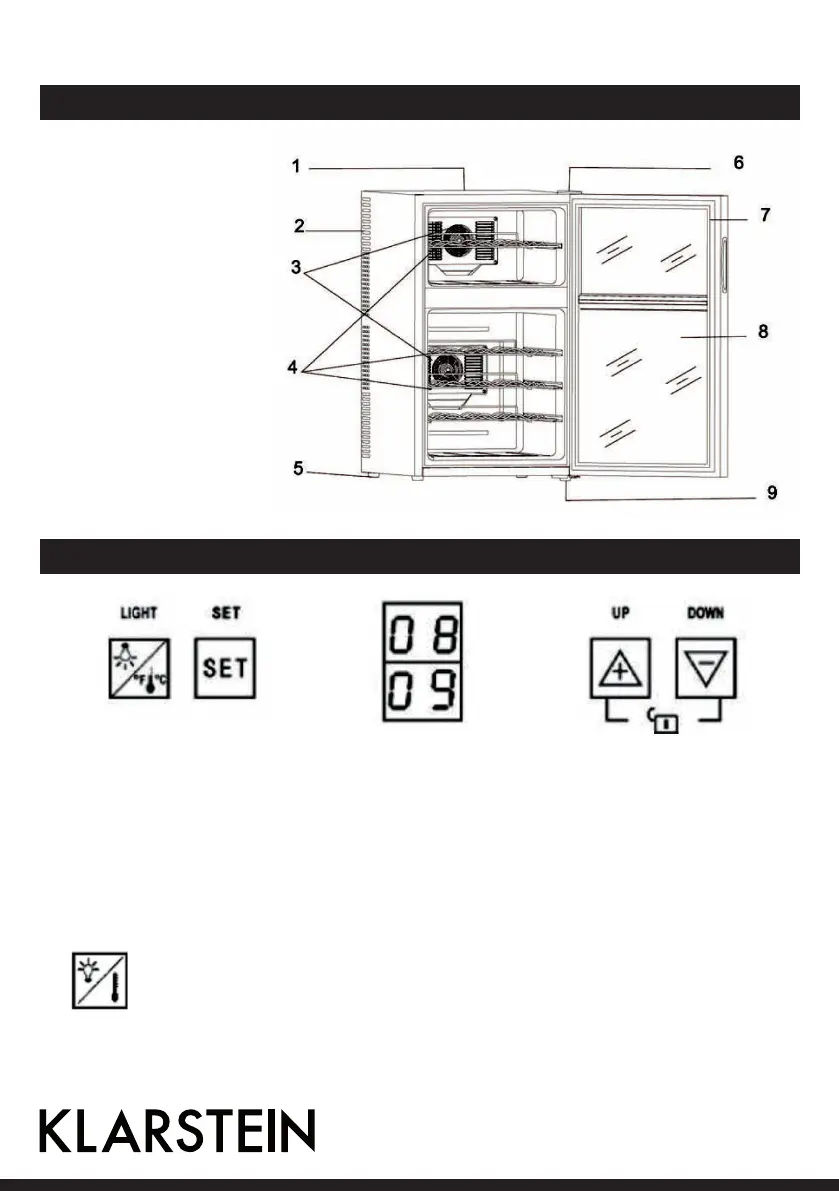
Product Description
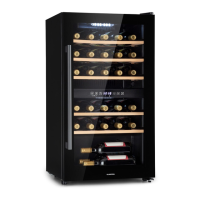
1 Cabinet
2 Ventilation holes
3 Cold sink fan cover
4 Shelf
5 Leveling feet
6 Upper door hinge
7 Door gasket
8 Glass door
9 Bottom hinge
Control Panel and Buttons
How to use the Buttons
• Upper zone and bottom zone are each controlled separately.
• Your Wine Cellar has been equipped with an automatic“ control panel lock, that will activate 12 seconds after
the last time a button has been touched. Push the arrow buttons simultaneously for 3 seconds to unlock the
control panel. You will hear a „BEEP“ sound to alert you that the control is now active.
• You can set the temperature as you desire by pushing the arrow buttons on the control panel for each zone.
The temperature that you desire to set will increase 1 °F or 1 °C if you push the UP button once, on the con-
trary the temperature will decrease 1°F or 1°C if you push the DOWN button once.
You can select temperature display setting from Fahrenheit to Celsius degree by pushing this but-
ton approximately for 3 seconds. The degrees will appear in blue color in the temperature display
window.



 To Next Page