25
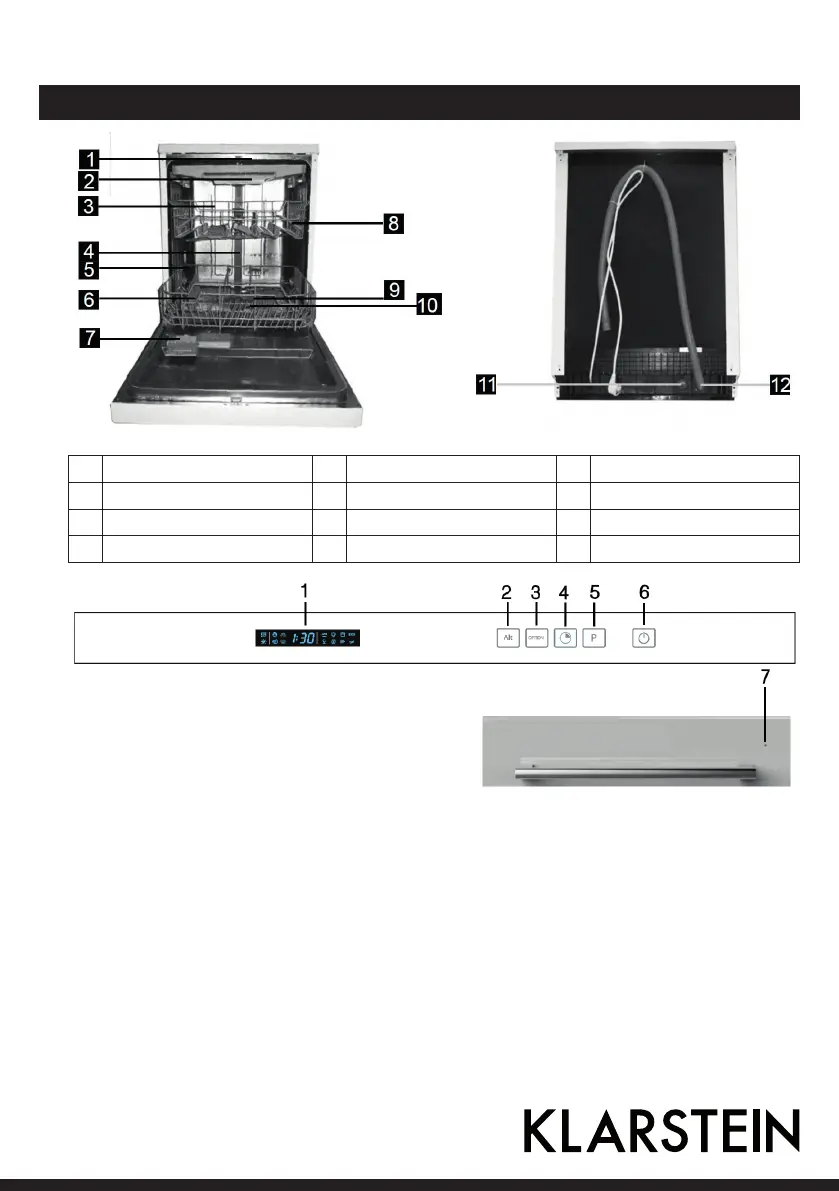
Product Description and Control Panel
1 Top spray arm 5 Lower basket 9 Spray arms
2 Cutlery rack 6 Salt container 10 Filter assembly
3 Upper basket 7 Dispenser 11 Inlet pipe connector
4 Inner pipe 8 Cup shelf 12 Drain pipe
1 Display Screen: to show the reminding time,
programm irons, salt and rinse aid warning.
2 Alt Butt on: Dual zone wash function, press
the button to select either upper basket or
lower b asket loa ded, and the response indi-
cators will light on.
5 Program Button : To Press the button to select
appropriate Program.
6 Power Button: To t urn on/off the power
supply.
3 Option Button : to select option the Extra
Drying or Expr ess function with the mai n
program being selected.
4 Delay Button: To t ouch the but ton t o delay,
delay time will be increased by discontinuous
or continuous touch, maximum 24 hours delay
can be defined.
7 State Indicator: to show the state of dishwa
sher with the door closing.




 To Next Page