16
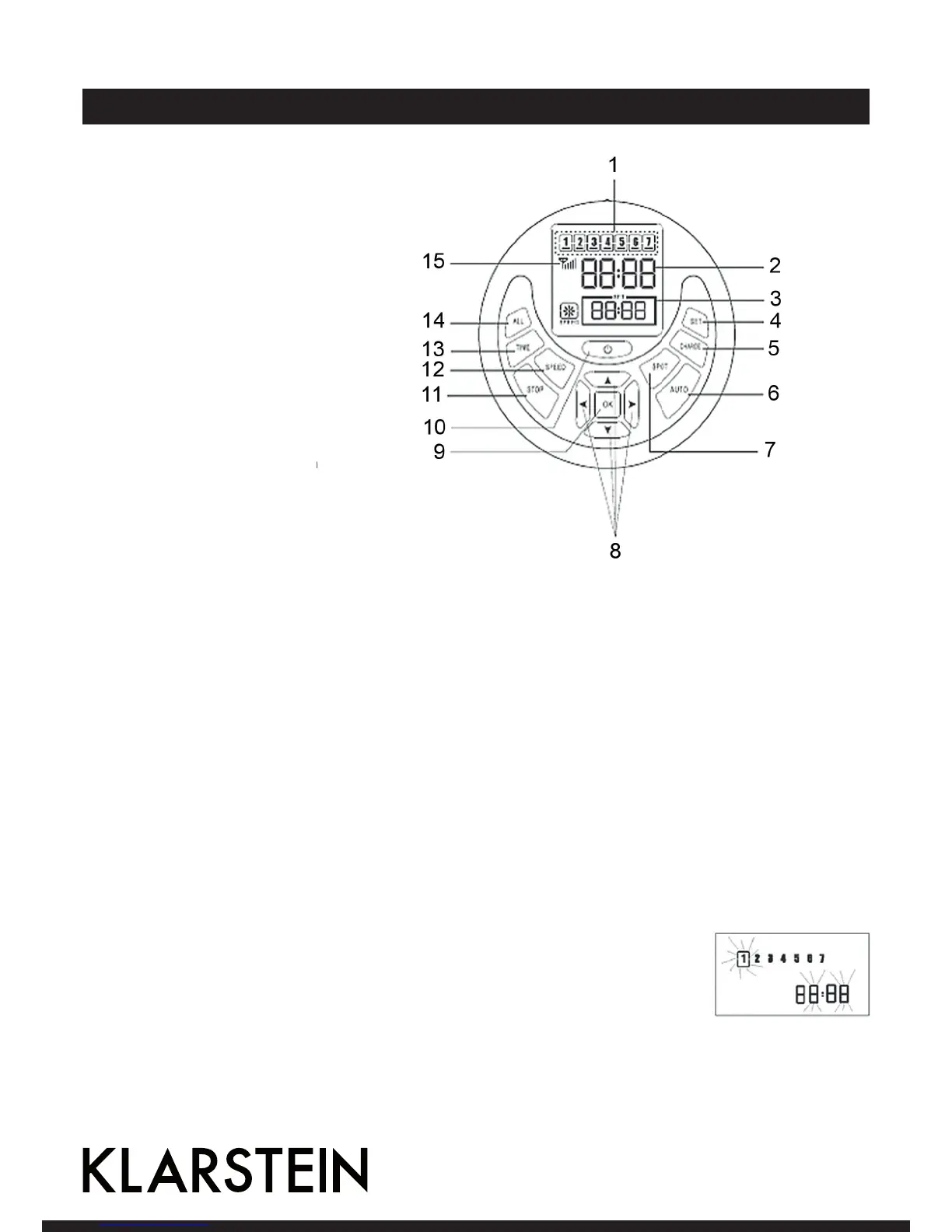
Remote Control
1 Weekdays
2 Current Time
3 Pre-set time
4 Pre-set cleaning
5 „Charge“
6 Automatic cleaning
7 Spot cleaning
8 Direction buttons
9 Confirm
10 Power button
11 Stop
12 Speed
13 Setting of current time
14 Pre-set to select all or turn
off charging indicators
15 Emission signal
Note: Code check is required before you use the remote control, or it will fail to work. Steps for code check: Ple-
ase ensure the power of the remote control & cleaner are enough, and then according to the following steps.
A: Turn off the cleaner;
B: Press and hold the “OK” button on the remote control;
C: Turn on the machine
D: After the cleaner toot twice or 3 times,release the “OK” button, then the code check set is finished successfully.
Note: If you fail to hear toot twice or 3 times,during the code check,just repeat the above process.
Fernbedienung Funktionen
SPEED:
press “SPEED” button on the remote control, you canchoose fast or slow speed.
TIME:
Press “TIME” button first and then press arrow buttons, you can see a shining spot
on the screen of the remote control switching among hour, minute & weekday (as
shown on Pic). Press arrow buttons to change the parameter and set the hour, mi-
nute & weekday respectively.


 To Next Page