11
EN
TIMER button
• The timer can be set to a maximum of 9 hours.
• The set time is shown on the display. In standby mode the display shows the
temperature.
OSC button
• Press the button to swing the fan left and right.
• Press the button again to exit the oscillation function.
MODE button
• When switched on, the device will run in normal mode.
• Press the MODE button several times to enter the mode in the following selection
sequence: Normal (Normal Mode)> Natural (Natural Mode)> SLEEP (Sleep
Mode)> ECO (Sleep Mode).
• The corresponding icon of the selected mode will light up in the display.
• As long as the device is connected to the mains, the set mode will be saved and
called up the next time it is used.
ECO mode (energy-saving mode)
After selecting the ECO mode, the device will check the current room temperature and
then select the appropriate function:
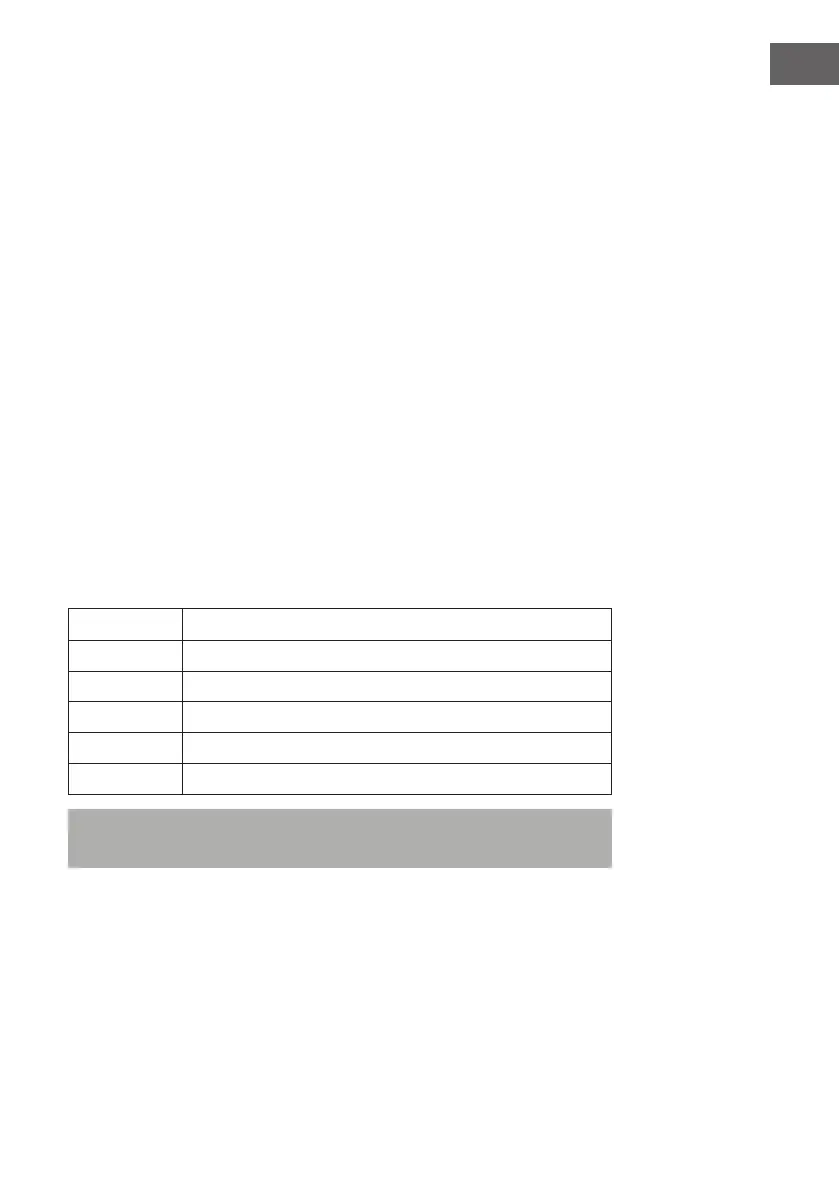
Temperature Function
>22°C normal mode + speed level 1
22-25°C normal mode + speed level 2
25-28°C normal mode + speed level 4
28-32°C normal mode + speed level 7
>32°C normal mode + speed level 8
Note: The ECO mode takes about 30 seconds to determine the current room
temperature.


 To Next Page