10
EN
OPERATION
Remote control operation
• The maximum distance between the remote control and the unit is between 3.5-5 metres.
• Mute: When turned on, the unit will run in normal mode. Press the VOICE button on
the remote control to activate muting.
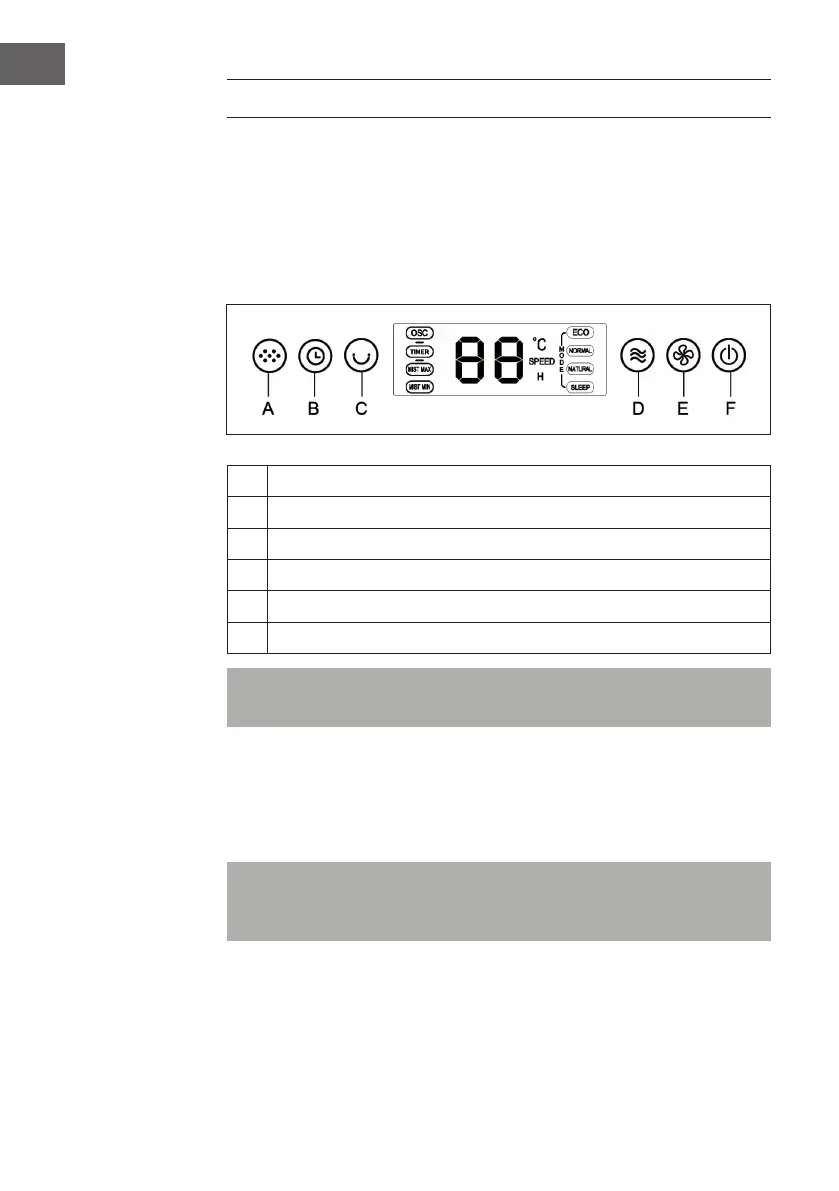
Control panel and button functions
A
MIST button (nebulizer)
B
TIMER button
C
OSC button (oscillating function)
D
MODE button (mode)
E
SPEED button (speed)
F
ON / OFF button (turn device on / off)
Note: If you do not press any of the buttons for more than 60 seconds, the backlight
of the control panel will automatically turn off. Press any key to turn it back on.
MIST button
• The nebulizer function can be used independently of the other functions, even if the
fan is not running.
• By default, this feature is turned off.
Note: Make sure that there is water in the tank before using this feature. If the tank is
empty or the water is running low, the timer light will ash and a warning signal will
sound. In this case, add water immediately. Always rell with fresh water.


 To Next Page