22
EN
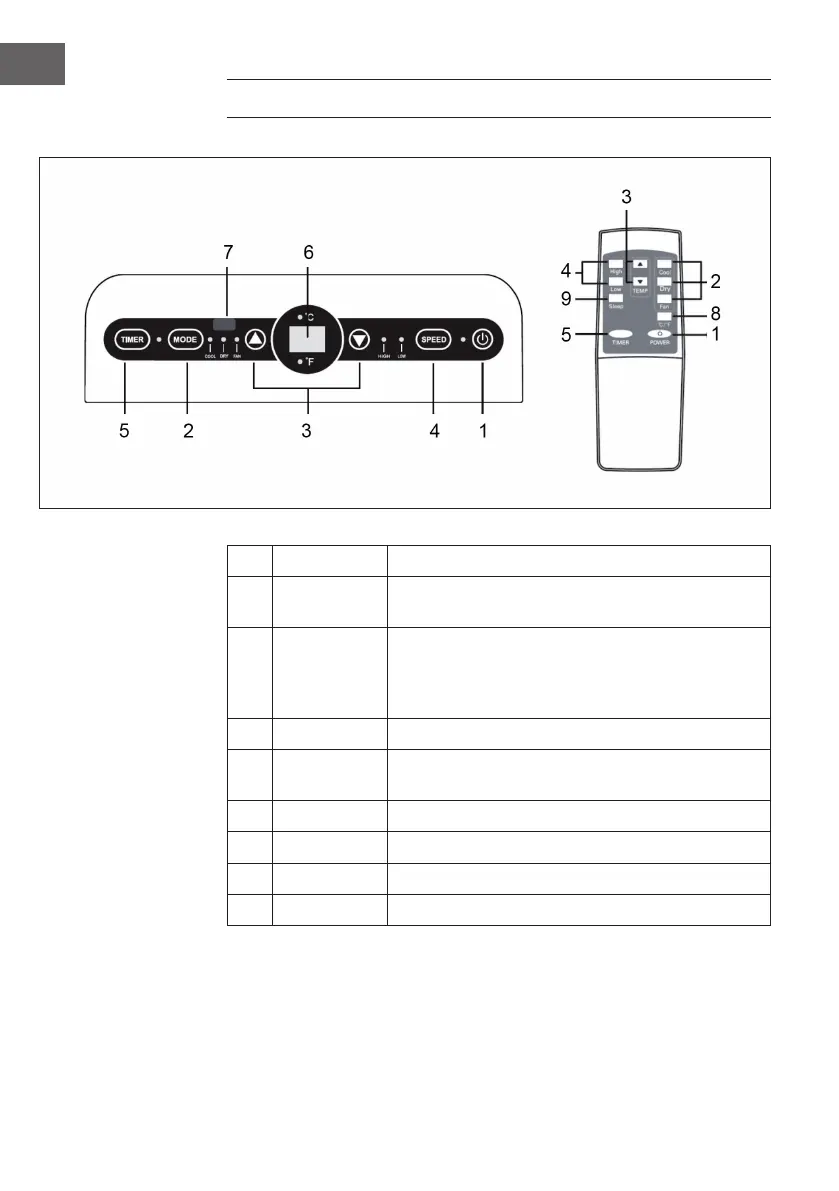
CONTROL PANEL AND REMOTE CONTROL
1
ON/OFF Switch device on/off.
2
MODE
Press several times to select cooling, wind or
dehumidication.
3
ARROW KEYS
In cooling mode, press to increase/decrease temperature.
In Timer mode, press to set the time for the on/off timer.
Press both buttons simultaneously to toggle between
°C/°F.
4
SPEED Press repeatedly to set the fan speed (high/low).
5
TIMER
In standby mode, press to set the power-on timer time.
When the power is on, press to set the power-off timer time.
6
DISPLAY Displays the set temperature/time.
7
RECEIVER Receives the signal from the remote control.
8
°C/°F Press button to toggle between °C/°F.
9
SLEEP In cooling mode, press to activate sleep mode.




 To Next Page