30
EN
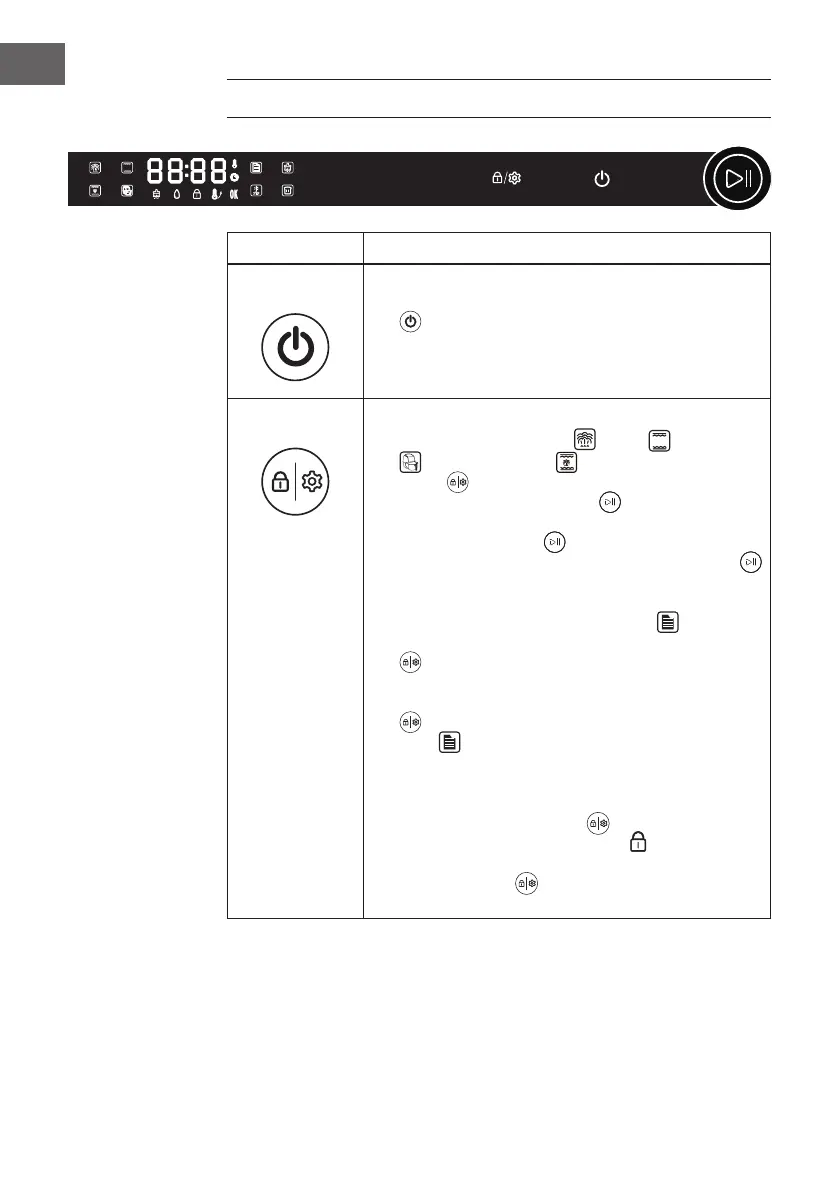
CONTROL PANEL AND BUTTON FUNCTIONS
Buttons Function Description
Power On/Off
• After switching on for the rst time, a beep sounds and the
indicator light lights up. Now press the [On/Off button]
to enter the function selection mode.
• If no function is selected within 5 minutes, all settings are
deleted and the appliance is put into standby mode.
Setup/Child Lock
1. Setup:
• In the programmes “Steam“
, “Grill“ , “Air Fryer
or “Grill and Steam“ , the [Setup/Child Lock
button] lights up. When you press the button, the Time-
LED and the [Start/Pause knob] ash simultaneously.
Turn the knob to set the temperature and time. Then press
the [Start/Pause knob] to conrm the setting. If you
wait too long, the time LED and the [Start/Pause knob]
ash simultaneously for 5 seconds and then the setting is
automatically conrmed and saved.
• When you select the “Menu“ programme after
switching on the appliance, the [Setup/Child Lock button]
lights up. This button can be used to set the cooking
time according to the amount of food. This is only possible
once for a recipe, then the [Settings/Child Lock button]
goes out and the time cannot be set again for that
mode .
2. Child Lock:
• The child lock can be activated in all programmes. Press
the [Setup/Child Lock button]
(when it is lit) for
3seconds. The [Child Lock indicator] lights up, which
means the child lock is activated. If you press the [Setup/
Child Lock button] , again for 3 seconds, the child lock
is deactivated.


 To Next Page