44
EN
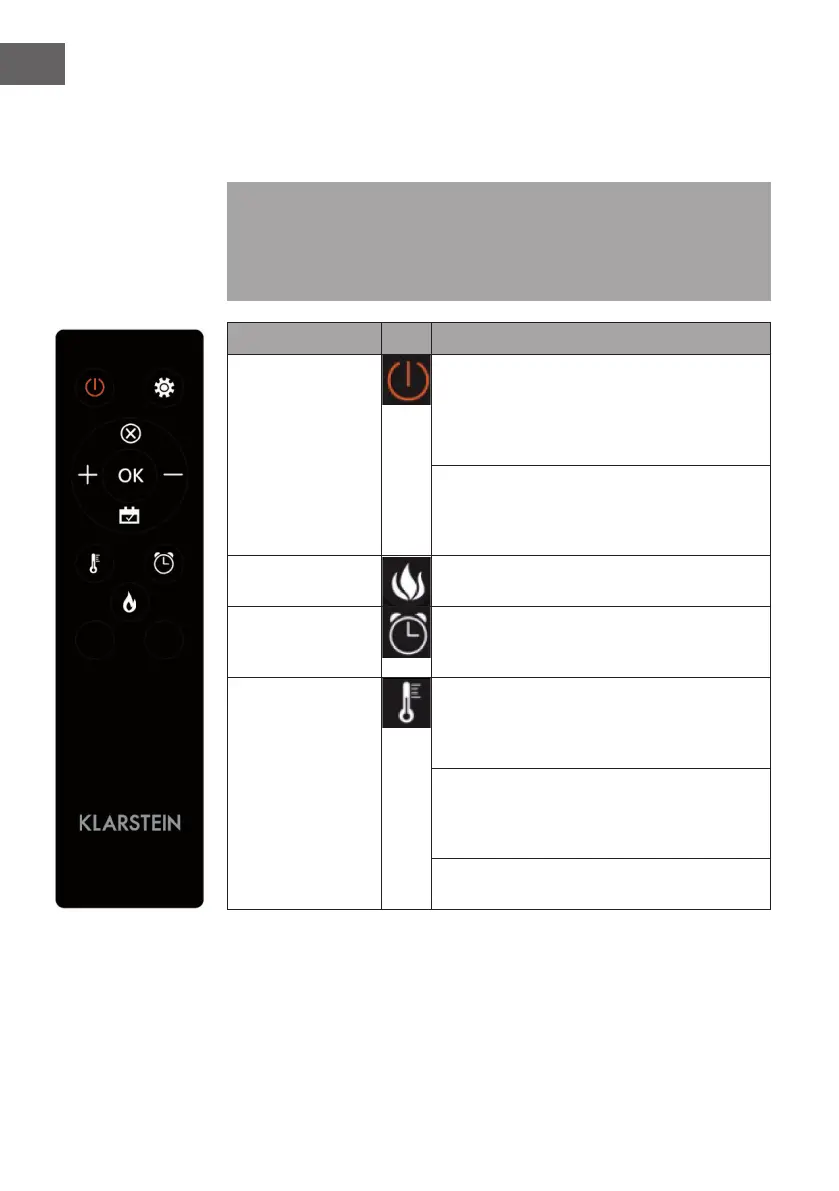
Using the Remote Control
Before using the remote control, make sure that the power plug of the appliance is
plugged in and that the power switch is in the „ON“ position.
Note: When using the remote control, make sure that you align the remote control
with the screen of the product when you press any of the buttons. A beep sounds.
There may be a slight delay in signal transmission from the transmitter to the receiver.
During operation, do not press the respective button more than once within 2
seconds.
Function Description
Switching on/off
Press this button to switch the unit on/off. Press it
once to turn on the appliance and the ame effects.
Press this button again to turn off the appliance and
the ame effects and the appliance is in standby
mode.
Press and hold for 10 seconds to activate or
deactivate the child lock. Once activate the child
lock, the heater will be turned off but the ame still
on.
Flame Four brightness levels can be selected (L1-L4).
Timer
Press the Timer button to select one of the following
timer settings: 1H > 2H > 3H > 4H > 5H > 6H > 7H
> 8H > 9H > OFF > 1H (...)
Heating function
Press this button repeatedly to set the following
functions: Room temperature between 17 °C
and 27 °C (62 °F - 82 °F) > Heating continuously
ON > Heating OFF.
Press and hold for 10 seconds to activate or
deactivate the child lock. Once activate the child
lock, the heater will be turned off but the ame still
on.
Press and hold the button for 5 seconds to toggle
between Fahrenheit and Celsius.


 To Next Page