To Next PageTo Next Page
 Need help?
Do you have a question about the Klein Tools AEPJS1 and is the answer not in the manual?
Steps for pairing the speaker with a mobile device via Bluetooth.
Alerts the user when the speaker's battery is low (10%).
Information on connecting the speaker for charging and LED indicators.
Details on audio input and charging interfaces like 3.5mm AUX and Micro USB.
Physical dimensions (length, height, width) and material (ABS) of the speaker.
Bluetooth compatibility, transmission distance, output power, S/N ratio, and frequency range.
Information on rated voltage, battery capacity, charging voltage/current, and charging time.
Instructions for answering, ending, and rejecting calls using the speaker.
How to turn the speaker on and off using the power button.
Method for adjusting the speaker volume using +/- buttons.
Automatic switching to line-in mode when 3.5mm audio plug is inserted.
Recommendation to switch off the speaker when not in use to prevent power loss.
Recommended temperature range for operating the speaker.
Recommended humidity and temperature range for storing the speaker.
Compliance information with FCC rules regarding radio frequency energy.
Compliance information with Industry Canada's licence-exempt RSSs.
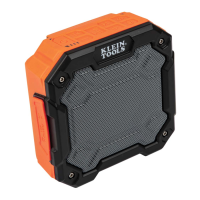
This document outlines the features and usage of the AEPJS1 Bluetooth Speaker, a portable audio device designed for outdoor use with an IPX6 waterproof rating.
The AEPJS1 Bluetooth Speaker primarily functions as a wireless audio output device, connecting to mobile phones and other Bluetooth-enabled devices to play music and handle calls. It also supports wired audio input via an AUX-in port, allowing connection to non-Bluetooth devices such as MP3 players, PCs, and laptops. The speaker is equipped with a built-in lithium battery, providing portability and extended usage.
To initiate Bluetooth pairing, power on the speaker by pressing the power button for several seconds. A rapidly flashing blue LED indicates that the speaker has entered pairing mode.
The speaker provides voice instructions for incoming calls.
The speaker includes a 3.5mm AUX audio-in port. To use this feature, simply connect the speaker to your non-Bluetooth device (e.g., mobile phone, MP3 player, PC, laptop) using the provided 3.5mm audio cable. A green LED will illuminate, indicating that music can now be played via the wired connection. When the 3.5mm audio plug is inserted while the speaker is in Bluetooth mode, it will automatically switch to line-in status.
The speaker will provide a voice hint to remind you to charge when the battery level is low (approximately 10% remaining). Users should charge the speaker promptly to ensure continued operation.
To charge the speaker, connect the micro USB charging cable to a computer or a USB charger. A red LED will illuminate, indicating that charging is in progress. The red LED will turn off once charging is complete.
 General
| Brand | Klein Tools |
|---|---|
| Model | AEPJS1 |
| Category | Speakers |
| Language | English |