ENGLISH
Instruction Manual
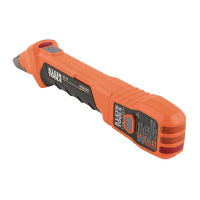
ET300
Apo
Digital Circuit
Breaker Finder
Digital Circuit Breaker
Finder
ET300
TRANSMITTER
Digital Circuit Breaker
Finder
ET300
UP
RECEIVER
Micro-Processor
Controlled
(Cat. No. 69411)
ET300
• 90 – 120V AC
•
50 – 60Hz
•
Up to 1000 ft. (305 m)
•
32°F – 104°F (0°C – 40°C)
•
50%
•
< 6562 ft. (2000 m)
•
For indoor use only
•
9 volt alkaline battery
•
Approximately 4 minutes
• 2.8" x 1.9" x 1.2" (7.11 x 4.83 x 3.04 cm)
•
6.0" x 2.0" x 0.9" (15.24 x 5.08 x 2.29 cm)
•
1.6 oz. (45 g)
•
3.2 oz. (91 g)
• Indication at 0.16" (4 mm) distance from a wire
carrying 120V AC.
•
UL listed
To ensure safe operation and service of the tester, follow these instructions.
Failure to observe these warnings can result in severe injury or death.
• Understand the risks of working around live voltage.
• Turn off power before inspecting, applying, or removing
the transmitter (when using the optional 'Leads Adapter').
• Exer
cise extreme caution around live, bare wires, especially
in an open breaker panel.
• Consult with an e
xperienced electrician when necessary.
A
Scr
ew this adapter into an empty light socket.
Make sure the fixture is live. Plug in the
transmitter and follow the instructions
starting at step 4.
B
Car
efully attach leads to the correct wires.
Plug in transmitter to adapter. Follow the
instructions starting at step 4.
Exercise extreme caution around live wires.
Dig tal C rcu t B eaker
Finder
ET300
TRANSMITTER
A
B
99
Washington Street
M
elrose, MA 02176
Phone 781-665-
1400
To
ll Free 1-800-517-8431
Visit us at www.TestEquipmentDepot.com

 Need help?
 General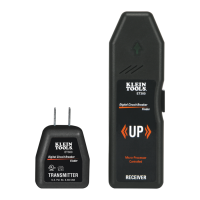

 To Next Page