EasyManua.ls Logo

Klein Tools PJSFM2 - User Manual

Klein Tools PJSFM2
4 pages
Print Icon
To Next Page IconTo Next Page
Loading...
PJSFM2
Rechargeable Jobsite Fan
–
Instructions
ENGLISH
CONTENTS
•
PJSFM2 Rechargeable Jobsite Fan
•
42" (106.7 cm) USB-C Cable
•
Instruction Manual
GENERAL SPECIFICATIONS
Cell Type: 18650 Lithium-ion
Capacity: 6400mAh (46.08 Wh)
Operating/Storage Altitude: 6562' (2000 m)
Operating Temperature: 14° to 104°F (-10° to 40°C)
Storage Temperature: -4° to 113°F (-20° to 45°C)
(up to 3 months)
Storage Humidity: <75% Relative humidity
Charging Temperature: 32° to 104°F (0° to 40°C)
(For optimum charging, ambient temperature should be
below 86°F (30°C))
Operating/Charging Humidity: <85% non-condensing
Runtime (minimum): High 5 hours, Low 12 Hour
Charging Time: Full charge in 6 hours under optimum
charging conditions
Life Expectancy: Up to 500 charging cycles typical
(depending on use & care)
Charging Requirements: Max 5V DC, 0.5A-2.4A (12W Max)
Dimensions: 12.9" × 10.4" × 5.4" (327.7 × 264.2 × 137.2 mm)
Weight: 3.93 lb (1782 g)
Drop Protection: 6.6' (2.0 m)
Ingress Protection Rating: IP54
Standards: UL 507, CSA C22.2 #60335-1, #60335-2-80,
UL2054, IEC62133, CE, UKCA, DOE/CEC, NRCan
Specifications subject to change.
1390431 Rev 10/22 B
w ww . . co m
information@itm.com1.800.561.8187
Question and Answer IconNeed help?

Do you have a question about the Klein Tools PJSFM2 and is the answer not in the manual?

Summary

General Specifications

Warnings

Maintenance

Cleaning

Instructions for cleaning the unit using a dry, soft, lint-free cloth.

Storage

Guidance on storing the device for over a month, including recharge intervals.

Recharging

Advice on how often to recharge and inspecting charging ports.

Disposal and Recycling

Information on proper disposal of equipment and accessories according to regulations.

Operating Instructions

Charging Battery

Steps to connect the USB-C cable and interpret battery level indicator bars.

Using the Fan

How to turn the fan on/off and cycle through speed settings.

Mounting Options

Details on using the clamp, magnets, or nail hole for mounting.

Troubleshooting

Common issues like the fan not recharging and potential causes.

Feature Details

Product Symbols

FCC & IC Compliance

Summary

General Specifications

Warnings

Maintenance

Cleaning

Instructions for cleaning the unit using a dry, soft, lint-free cloth.

Storage

Guidance on storing the device for over a month, including recharge intervals.

Recharging

Advice on how often to recharge and inspecting charging ports.

Disposal and Recycling

Information on proper disposal of equipment and accessories according to regulations.

Operating Instructions

Charging Battery

Steps to connect the USB-C cable and interpret battery level indicator bars.

Using the Fan

How to turn the fan on/off and cycle through speed settings.

Mounting Options

Details on using the clamp, magnets, or nail hole for mounting.

Troubleshooting

Common issues like the fan not recharging and potential causes.

Feature Details

Product Symbols

FCC & IC Compliance

Overview

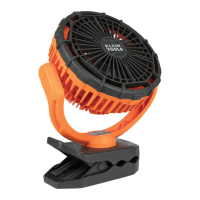
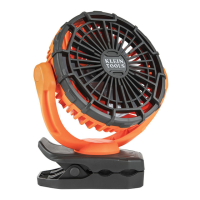
The Klein Tools PJSFM2 is a rechargeable jobsite fan designed for portable cooling in various work environments. It features a durable construction and multiple mounting options, making it versatile for different jobsite needs.

Function Description:

The PJSFM2 fan provides airflow for personal comfort or to aid in drying. It operates on a built-in rechargeable lithium-ion battery, offering cordless operation. The fan has two speed settings (High and Low) and can be easily turned on or off using a single power button. Its design incorporates a clamp, magnets, and a nail hole for flexible mounting to various surfaces, including conduit, ferrous materials, and walls. The fan also includes a battery status indicator to monitor charge levels.

Important Technical Specifications:

  • Cell Type: 18650 Lithium-ion
  • Capacity: 6400mAh (46.08 Wh)
  • Operating/Storage Altitude: 6562' (2000 m)
  • Operating Temperature: 14° to 104°F (-10° to 40°C)
  • Storage Temperature: -4° to 113°F (-20° to 45°C) (up to 3 months)
  • Storage Humidity: <75% Relative humidity
  • Charging Temperature: 32° to 104°F (0° to 40°C) (optimum charging below 86°F (30°C))
  • Operating/Charging Humidity: <85% non-condensing
  • Runtime (minimum): High 5 hours, Low 12 hours
  • Charging Time: Full charge in 6 hours under optimum conditions
  • Life Expectancy: Up to 500 charging cycles typical
  • Charging Requirements: Max 5V DC, 0.5A-2.4A (12W Max)
  • Dimensions: 12.9" x 10.4" x 5.4" (327.7 × 264.2 × 137.2 mm)
  • Weight: 3.93 lb (1782 g)
  • Drop Protection: 6.6' (2.0 m)
  • Ingress Protection Rating: IP54
  • Standards: UL 507, CSA C22.2 #60335-1, #60335-2-80, UL2054, IEC62133, CE, UKCA, DOE/CEC, NRCan

Usage Features:

  • Power Button Operation: A single power button controls the fan's speed and power. Pressing once turns the fan on HIGH, a second press switches to LOW, and a third press turns the fan OFF.
  • Battery Level Indicator: The fan features a battery status indicator with four bars (Red, Yellow, two Green) to show the remaining charge:
    • Four bars solid: 100% charge
    • Red solid, yellow solid, one green solid: 75% to 99% charge
    • Red solid, yellow solid, one green blinking: 50% to 74% charge
    • Red solid, yellow blinking: 25% to 49% charge
    • Red blinking: 0% to 24% charge
    • No LEDs illuminated: 0% charge, recharging required
    • The battery level can be checked by pressing and holding the power button for 5 seconds without changing fan speed.
  • Charging: The fan charges via a USB-C input. It comes with a 42" (106.7 cm) USB-C cable. An external USB (2.0 or higher) port or AC adapter (not included) is required for charging. The charging adapter should not exceed 5.0V DC, 2.4A. The unit can operate at LOW speed only while charging.
  • Mounting Options:
    • Clamp: A rubberized grip clamp allows attachment to various objects, including conduit. To use, squeeze the handles, open the clamp fully, push onto the object, and release.
    • Magnets: Four integrated magnets enable mounting to ferrous surfaces. For best results, the fan should be mounted with the two farthest magnets aligned vertically.
    • Nail Hole: A #10D nail hole allows for secure mounting by placing it over a nail head and sliding it into the slot.

Maintenance Features:

  • Cleaning: The device should be disconnected from all power sources and devices before cleaning. Use a clean, dry, soft, lint-free cloth to wipe down the entire unit. Abrasive cleaners or solvents should not be used.
  • Storage: For storage longer than one month, the fan should be fully charged before storage and recharged approximately every 3 months to prevent full discharge. Store in cool temperatures, mild humidity, and away from direct sunlight. Avoid extreme hot or cold temperatures, which can decrease service life and performance.
  • Recharging: Recharge as needed. Avoid complete discharge on a regular basis to maximize overall battery life. Regularly inspect the charging port and cable for debris, dirt, damage, and corrosion. Do not attempt to fix damaged components; replace the device or cable as needed.
  • Troubleshooting (Recharging): The PJSFM2 will not recharge if the cable is not properly connected, the charging cable is damaged, the charging port or device cannot supply the minimum voltage and current, or the connector on the charger is damaged.

Klein Tools PJSFM2 Specifications

General IconGeneral
BrandKlein Tools
ModelPJSFM2
CategoryFan
LanguageEnglish

Related product manuals