
 Need help?
Do you have a question about the Klein NCVT-6 and is the answer not in the manual?
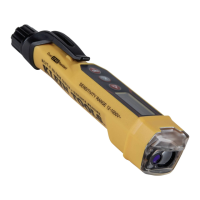
Identifies key components of the non-contact voltage tester including buttons, display, and antenna.
Lists the various indicators displayed on the LCD screen for voltage, laser, battery, and mode status.
Details Ingress Protection (IP4), Drop Protection (6.6 ft), and Safety Rating.
Explains symbols for electric shock risk, double insulation, and CAT IV rating for measurements.
Provides detailed technical specifications for the voltage tester and laser distance meter.
Explains how to use the NCV On/Off, Laser Distance Meter, and Change Units/Reference Point buttons.
Outlines critical safety precautions for laser use, electric shock, and proper tester operation.
Step-by-step guide to verify the tester's functionality by testing a known live circuit.
Instructions for activating silent mode and details on the auto-power off feature.
Covers battery replacement, cleaning, storage, and disposal/recycling guidelines.
The Klein Tools NCVT-6 is a versatile non-contact voltage tester with an integrated laser distance meter, designed for professionals who need to detect AC voltage and measure distances accurately. This device combines two essential tools into one compact unit, enhancing efficiency and safety on the job.
The NCVT-6 primarily functions as a non-contact voltage tester (NCV) and a laser distance meter (LDM).
The NCV function allows users to detect AC voltage without making physical contact with the conductor. To activate this mode, simply press and release the NCV On/Off Button (1). The tester will emit a single audible beep, and the NCV Indicator (5) will illuminate with a solid blue light, signaling that the NCV function is active. A proximity sensor then indicates voltage strength using a dash scale displayed on the LCD (4). When voltage is detected, the NCV Indicator (5) will blink red or illuminate steadily red, accompanied by audible beeps. If no voltage is detected, the NCV Indicator (5) will remain steadily blue. This visual and audible feedback system provides clear indications of live circuits, helping to prevent accidental contact with energized conductors. The NCVT-6 is capable of detecting AC voltage from 12V to 1000V, making it suitable for a wide range of electrical applications. To power off the NCV function, press and hold the NCV Power Button (1) for two seconds. If the Laser Distance Meter (LDM) function is active, a short press of the NCV Power Button (1) will deactivate the LDM and switch to NCV mode.
The LDM function enables precise distance measurements using a laser. To activate the LDM, press the LDM Control Button (2). A short press of this button will cause the NCVT-6 to emit an audible beep and take a single distance measurement, with the value displayed on the LCD (4). For continuous measurement mode, press and hold the LDM Control Button (2) for an extended period. In this mode, the NCVT-6 will continuously take measurements, emitting an audible beep with each new reading and updating the display (4) accordingly. This feature is particularly useful for quickly measuring lengths, areas, or volumes in various settings. To power off the LDM function, press and hold the LDM Control Button (2) for two seconds.
LCD Display (Fig. 2): The LCD provides crucial information at a glance. It shows the current measurement (A), indicates when the laser is active (B), displays the reference points (C for Ref. Point #1, D for Ref. Point #2), confirms if NCV is on (E), shows battery status (F), indicates the units of measurement (G – ft, in, m), and displays the silent mode icon (H).
Change Units / Reference Point Button (3): This button offers dual functionality. A short press allows users to switch the measurement reference point between Reference Point 1 (NCV Antenna) and Reference Point 2 (Battery Cap). This is useful for measuring from different starting points. A long press of this button changes the units of measurement for the LDM function, cycling through meters, feet with fractions, and inches.
Silent Mode: For environments where audible alerts might be disruptive, the NCVT-6 offers a silent mode. To activate this, with the device powered off, press and hold either the NCV On/Off Button (1) or the LDM Control Button (2) for five seconds. In silent mode, the silent mode icon (H) will be displayed on the LCD. All visual indicators and display readings will continue to function normally, but no audible beeps will be emitted. Silent mode remains active until the NCVT-6 is powered off.
Auto-Power Off (APO): To conserve battery life, the NCVT-6 features an auto-power off function. In NCV mode, the display (4) will power down after 15 seconds of no voltage detection (though the NCV indicator (5) remains illuminated). After an additional 4 minutes of inactivity, the NCVT-6 will fully power off. Similarly, in LDM mode, the device will automatically power off after 15 seconds of inactivity.
Durability and Safety: The NCVT-6 boasts an IP40 ingress protection rating, indicating it is dust resistant. It also has a 6.6 ft. (2 m) drop protection, ensuring its resilience in demanding work environments. The device is safety rated CAT IV 1000V AC, signifying its suitability for measurements performed at the source of low-voltage installations and outside lines. It is double insulated for enhanced safety.
Battery Replacement: The NCVT-6 is powered by two AAA batteries (10). The Battery Status Indicator (F) on the LCD shows the remaining battery life. When only one bar remains, the LDM functionality will be disabled, and the NCV function will have less than 8 hours of operation left. At this point, battery replacement is recommended. To replace batteries, unscrew the Battery Cap (11), remove the spent batteries (10), and install two new AAA batteries, ensuring correct polarity. It is crucial to screw the battery cap back until fully seated to ensure a tight seal and avoid damaging the O-ring (9). The O-ring is vital for maintaining the IP40 dust-resistant rating.
Cleaning: To maintain the device, ensure it is turned off and wipe it with a clean, dry, lint-free cloth. Abrasive cleaners or solvents should not be used, as they can damage the tester.
Storage: For prolonged periods of non-use, it is advisable to remove the batteries to prevent leakage and damage. The device should not be exposed to high temperatures or excessive humidity. If stored in extreme conditions, allow the tester to return to normal operating conditions before use.
Disposal/Recycle: The NCVT-6 and its accessories should be disposed of in accordance with local regulations, not in general trash. This ensures environmentally responsible recycling.
 General
| Type | Non-Contact Voltage Tester |
|---|---|
| Detection Method | Non-Contact |
| Audible Alert | Yes |
| Battery Type | 2 x AAA |
| IP Rating | IP40 |
| Safety Rating | CAT IV 1000 V |
| Low Battery Indicator | Yes |
| Auto Power Off | Yes |
| Visual Indicator | Yes |
| Frequency | 50/60 Hz |
| Operating Temperature | -10°C to 50°C |
| Storage Temperature | -20°C to 60°C |

 To Next Page