PLAYBACK SPEED ADJUSTMENT
Long press to reduce the playback speed (-7).
Long press to increase the playback speed (+7).
The normal playback speed is 0.
Press to choose different folders if there are multiple folders on the CD.
In TF card mode, press and hold the to enter the folder preview. Press
[IC or to switch between folders. Press to confirm the folder, choose
the track and press to play.
Long press to return to the main playback interface.
PROG
P01/32
PROG
P01/32
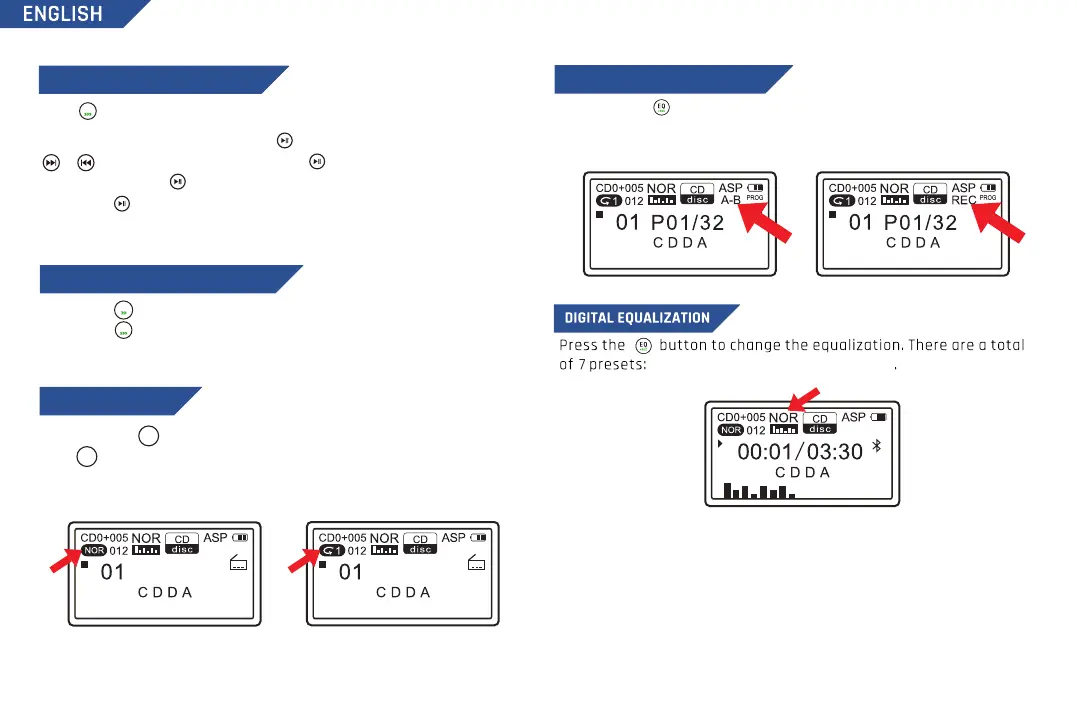
NOR, BBS, POP, ROC, JAZZ, CLAS, COV
RECORDING FUNCTION (TO TF)
Press and hold to start the recording function, press and hold the button
again to complete the recording
Note: If no TF card is installed, it will prompt "No device").
PLAYING FOLDER TRACKS (DIR)
6
Press and hold for 2 seconds to switch between CD and TF card.
Press to change the playback mode between: 1 (repeat track) / A (repeat
album) / RND (shuffle) / INT (intro preview) / NOR (normal mode). In TF card
mode, you also have the additional mode: F (repeat folder).
MODE
FM+
MODE
FM+
PLAYBACK MODE
DIR
FM
DIR


 To Next Page