KLIM Impact User Manual www.klimtechs.com
III. KLIM IMPACT DRIVERS
Our dedicated software for Windows lets you take your audio experience to the next level
and fully customize several aspects, including equalization, surround sound and other audio
effects. You can download it from our website: www.klimtechs.com/drivers
NOTE: if you receive a warning indicating that the program is potentially harmful, this is
due to Windows certifications. We are in the process of obtaining these
certifications. However, the driver remains perfectly safe to use.
Once the driver has been downloaded you can use a decompressing tool such as WinRar to
extract the folder into your hard drive.
Double click on the KLIM Impact 7.1 Gaming Headset Setup icon and follow the on-screen
instructions to install the software. You may have to unplug and plug your headset during
this process.
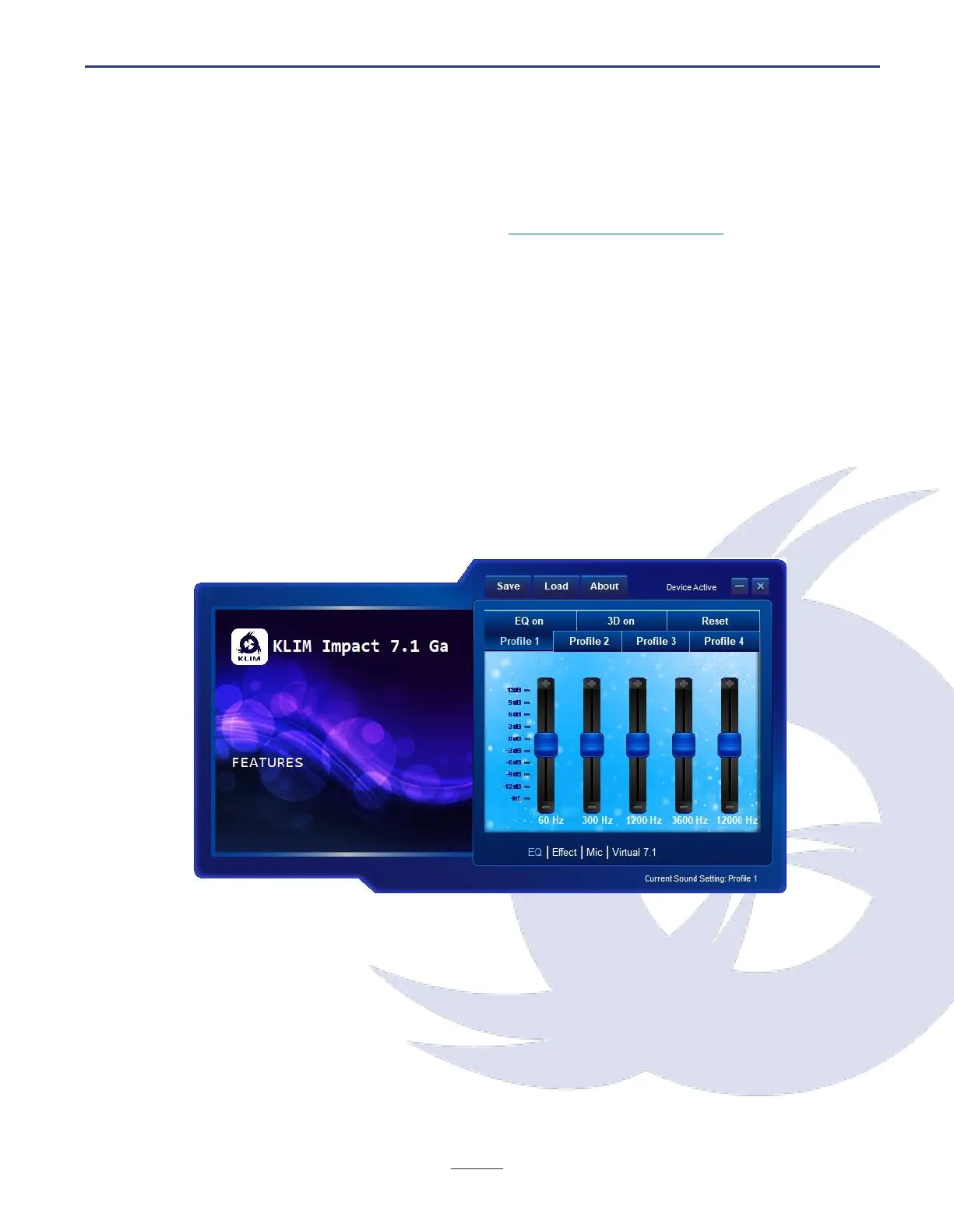
Equalization screen
The main screen shows the equalizer settings. It is generally recommended to keep the
default settings.
EQ on: activates the equalizer
Profile 1-4: select different audio profiles
3D on: activates 3D effects
Save: export current settings
Reset: reverts to default values
Load: import settings from file
Access the other settings screen by clicking on Effect, Mic or Virtual 7.1 at the bottom.


 To Next Page