PLAYBACK SPEED ADJUSTMENT
Long press to reduce the playback speed (-7).
Long press to increase the playback speed (+7).
The normal playback speed is 0.
Press to choose different folders if there are multiple folders on the CD.
In TF card mode, press and hold the to enter the folder preview. Press
[IC or to switch between folders. Press to confirm the folder, choose
the track and press to play.
Long press to return to the main playback interface.
PROG
P01/32
Press and hold for 2 seconds to switch between CD and TF card.
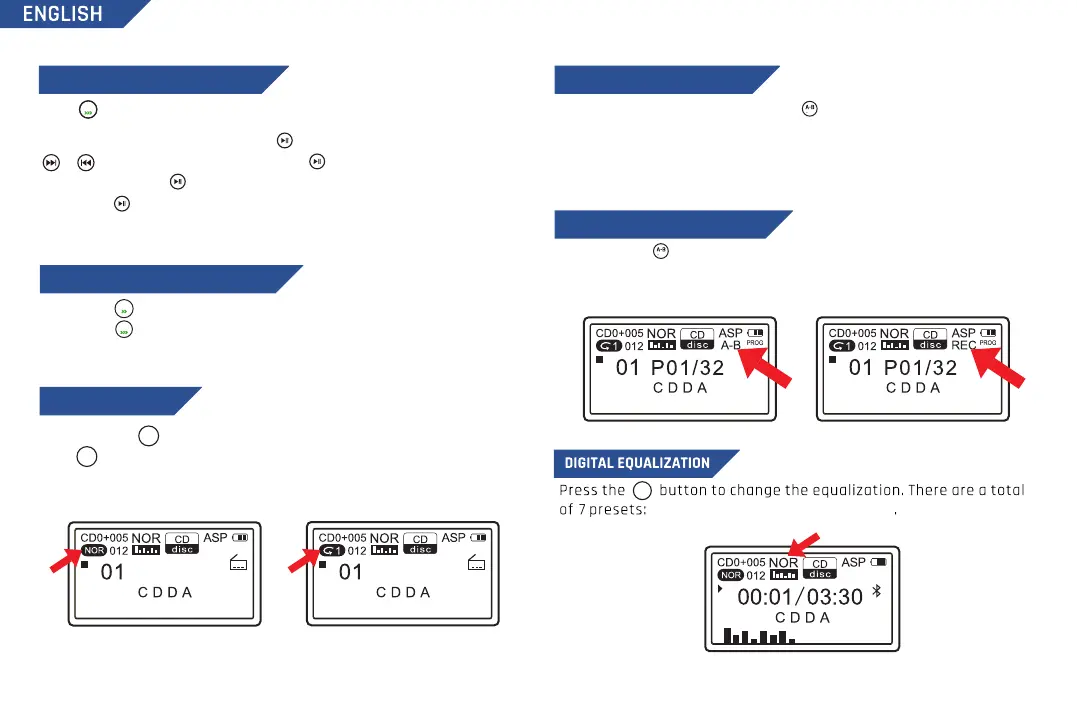
Press to change the playback mode between: 1 (repeat track) / A (repeat
album) / RND (shuffle) / INT (intro preview) / NOR (normal mode). In TF card
mode, you also have the additional mode: F (repeat folder).
PROG
P01/32
A-B POINT FUNCTION
When playing a CD or a TF card, press once to mark an A point, then
press the button again to mark a B point. The unit will repeat playing the
audio between point A and point B. Press the button again to cancel.
Note: Point A and Point B must be within the same track.
NOR, BBS, POP, ROC, JAZZ, CLAS, COV
MODE
FM+
MODE
FM+
EQ
RECORDING FUNCTION (TO TF)
PLAYBACK MODE
Press and hold to start the recording function, press and hold the button
again to complete the recording.
Note: If no TF card is installed, it will prompt "No device").
PLAYING FOLDER TRACKS (DIR)
REC
REC
6
DIR
FM
DIR


 To Next Page