ATTENTION:
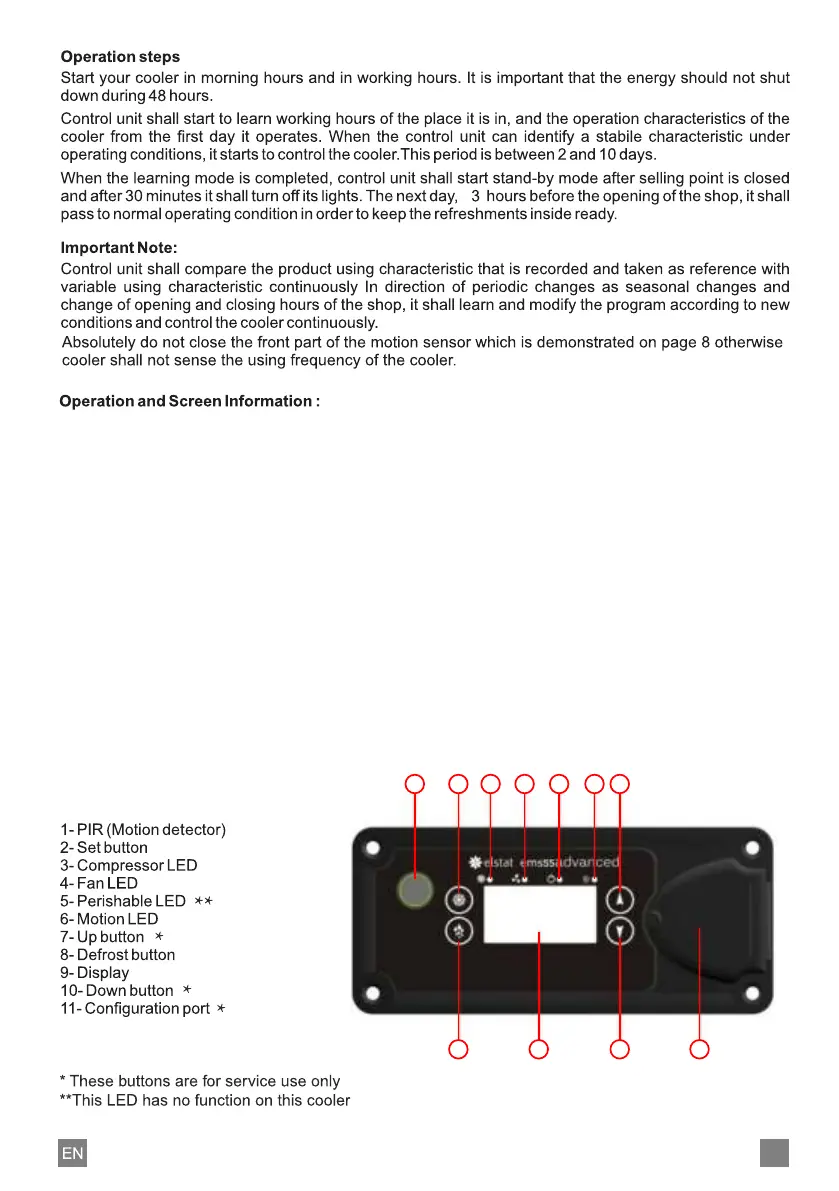
The defrost button can be used to set the cooler manually on defrost mode which will last for 10 minutes
COMPRESSOR (Compressor light) : If green light is on, it shows that compressor is active.
FAN (Fan light) : If green light is on, it shows that inner fans are active.
On screen of the control panel, symbols stated below can apeear depending on the type of the
trouble that maybe formed and cooling mode of the cooler.
"USE" : Your cooler is ready to use.
"–––" : Your cooler is in stand-by mode.
"888" : Your cooler is in protection against freezing mode.
“dO" : It shows that door is open.
"dEF" : System is in defrost mode.
"rSF" : There is problem at cooling system, contact your cooler maintenance.
"SLO" : Cooler is shut down because the voltage is low.
"SHI" : Cooler is shut down because the voltage is high.
"Pf1" : Input problem, contact your cooler maintenance.
1 2 3 4 5 6 7
8 9 10 11
13



 To Next Page