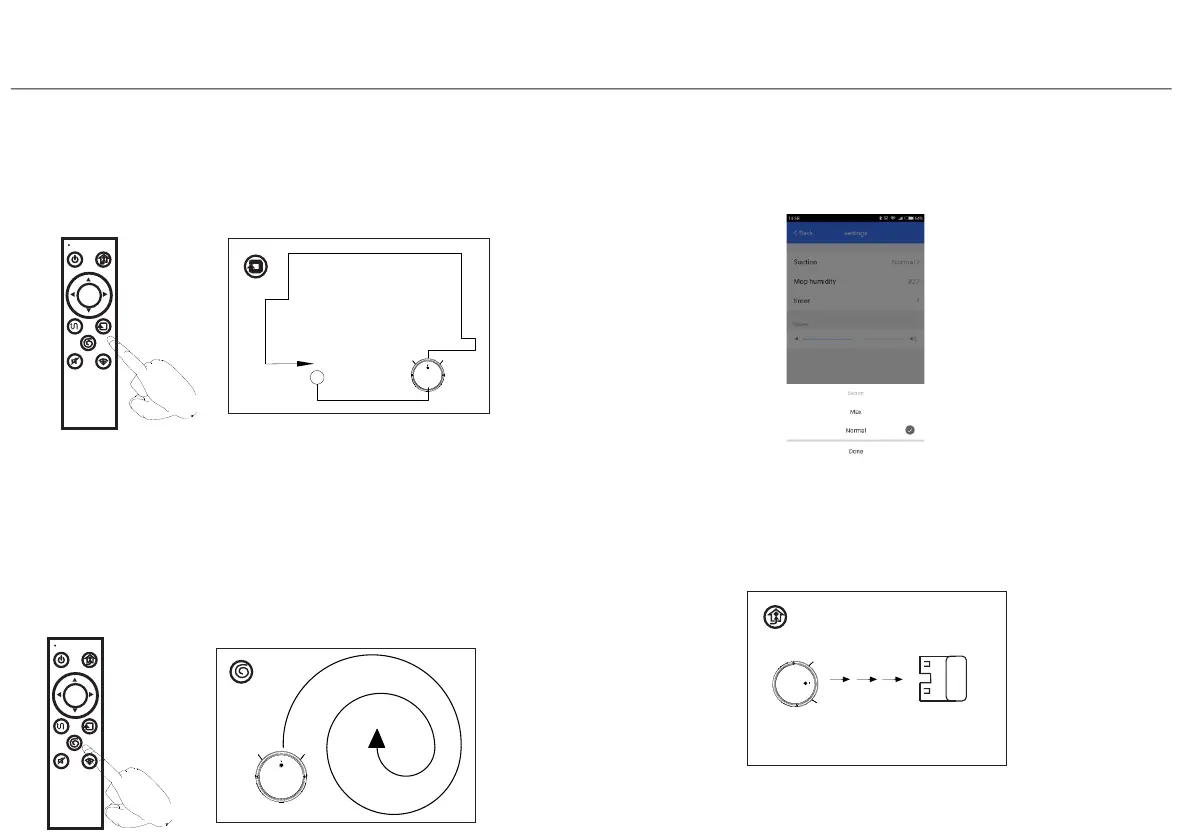
2.Edge Clean Mode
Press edge button in app or remote control
edge to cleaning
SPOT
sleep/wake/stop
charge
OK
AUTO EDGE
MUTE WIFI
return
3.Sprial Clean Mode
Focus on specific areas ,cleaning more thorough,
it is recommended use in the living room or
other area with less obstacles.
SPOT
sleep/wake/stop
charge
OK
AUTO EDGE
MUTE WIFI
return
4.Suction Option Mode
Adjust suction through APP setting
5.Auto charge Mode
Robot will find docking station
automatically when battery
power is low
4.4 Function Use
Machine along the object
Note:If the battery power below 10%,robot will
shut down. Please manual charging the robot.
Press remote control spot button or sprial in app.
4.Instruction for Use
17


 To Next Page