5.1 channel surround sound system designed to provide a life-like audio experience
Boasts 115 watts of total output, precisely delivered by a 40-watt subwoofer and
five 15-watt satellites
Streams music wirelessly with any Bluetooth
®
-enabled device from up to 33ft from the audio source
Seamless integration of multiple audio sources: USB, SD™ card and RCA input
Convenient remote to control the system
Front facing interface with digital display
Desktop or wall mount satellite speakers
Congratulations on the purchase of your new Klip Xtreme
KWS-751 5.1 Speaker System
with wireless technology.
We invite you to visit us at www.klipxtreme.com for support and to find out more about this
audio system and other new and exciting products.
I. Introduction
III. Package contents
To get the most of your speaker system, please take a few minutes to read the following
instructions and familiarize yourself with the operation of the unit. Before setting up the device,
make sure that the following items are included in box:
Unpack your unit carefully. We recommend that you save the box and all original packing
materials, in case you wish to store the unit, or if you ever need to return it for service.
• Subwoofer speaker
• Satellite speaker
• RCA to 3.5mm stereo cable
• Remote control
• AAA battery
• Quick installation guide
(1)
(5)
(1)
(1)
(2)
(1)
II. Main features
®
•
•
•
•
•
•
•
IV. Product overview
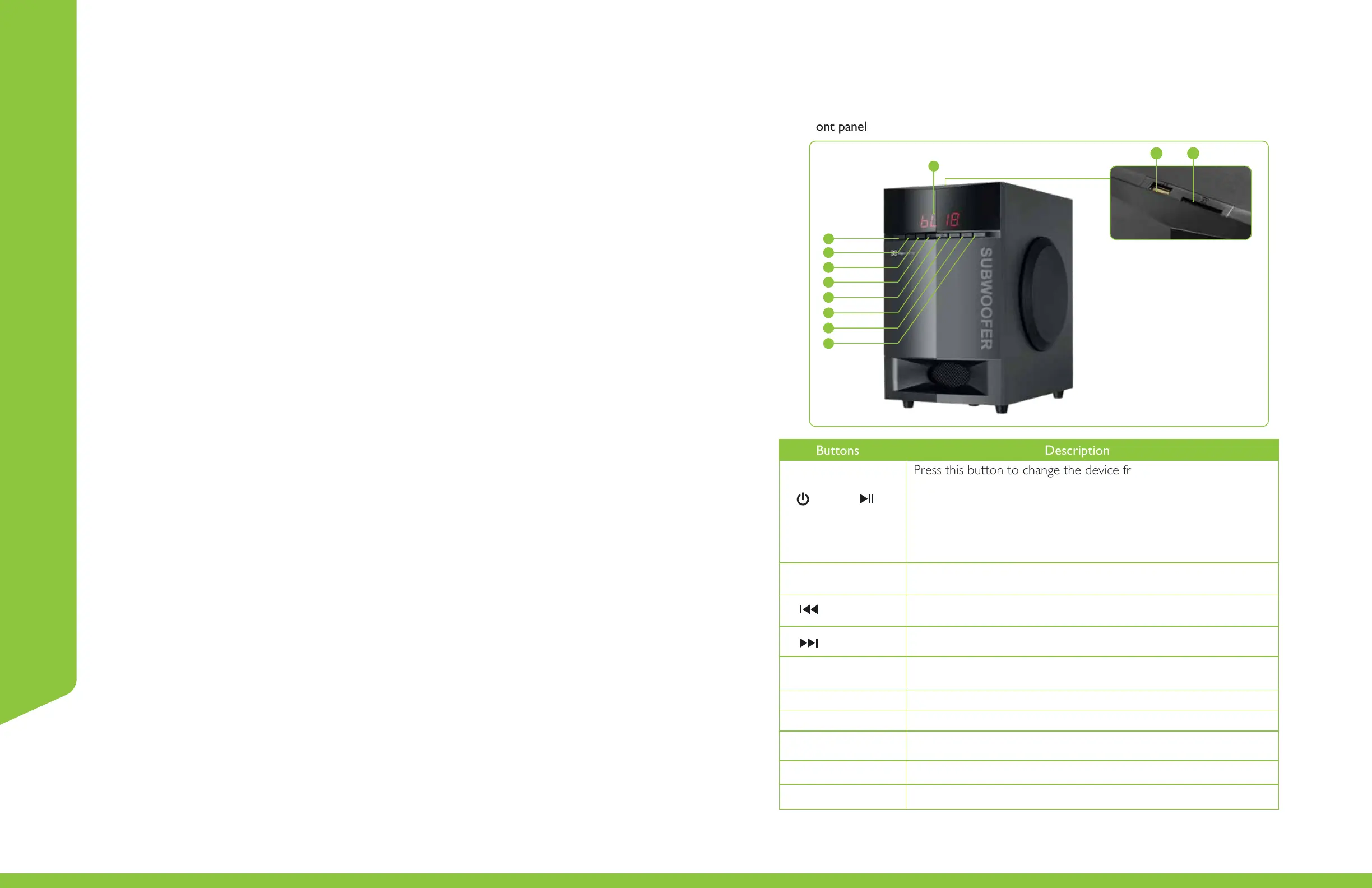
Front panel
1.
2.
Standby
Press this button to change the device from standby to active
mode, and vice versa.
Press this button to start and pause media during Bluetooth
®
,
SD™ or USB audio playback.
In auxiliary input mode, press it briefly to mute audio.
Source
Press this button to toggle among the available input modes
on the system.
3. PRO-LOGIC
This button switches the decoder between 2.1 and 5.1
audio channels.
6. Select
Press this button once to adjust the treble level as desired.
To adjust the bass level, press it twice.
4.
5.
Press this button to select the previous track on your play list.
Available in Bluetooth
®
, SD™ and USB modes.
Press this button to lower the audio level.
Press this button to select the next track on your play list.
Available in Bluetooth
®
, SD™ and USB modes.
7. Volume -
It exhibits the input mode, volume level, the track being played,
decoder mode and the current channel selected.
9. LED display
Insert a compatible storage device in this port.
10. USB port
Insert a compatible storage device in this slot.
11. SD™ card slot
Press this button to increase the audio level.8. Volume +
English
Buttons Description
1
2
3
4
5
6
7
8
9
10 11


 To Next Page