Sets the current day and method of use
OFF, Lun, Mar, Mer, …, Dom
Sets technical parameters (RESERVED)
Sets PROGRAM 1 switch-on time
From 00:00 to 23:50 in 10’ steps
Sets PROGRAM 1 switch-off time
From 00:00 to 23:50 in 10’ steps
Choice of days with stove ignition
Between on/off from Mon to Sun
Sets PROGRAM 2 switch-on time
From 00:00 to 23:50 in 10’ steps
Sets PROGRAM 2 switch-off time
From 00:00 to 23:50 in 10’ steps
Choice of days with stove ignition
Between on/off from Mon to Sun
Sets PROGRAM 3 switch-on time
From 00:00 to 23:50 in 10’ steps
Sets PROGRAM 3 switch-off time
From 00:00 to 23:50 in 10’ steps
Choice of days with stove ignition
Between on/off from Mon to Sun
Sets PROGRAM 4 switch-on time
From 00:00 to 23:50 in 10’ steps
Sets PROGRAM 4 switch-off time
From 00:00 to 23:50 in 10’ steps
Choice of days with stove ignition
Between on/off from Mon to Sun
The chrono-thermostat function allows to program automatic switch-on/off of the thermo stove throughout the week.
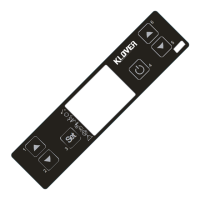
Press button 3 twice to enter programming. Press button 3 again to scroll all of the programming parameters explained below. Pressing key 4 allows to exit
programming ay any time.
Find all of the parameters in detail below:
UT01
The parameter allows to set the current day of the week, select functioning day by day (weekly mode) or disconnect programming.
It is possible to set 4 time intervals when to switch the thermo stove on during the day. If the UT01 parameter is set with the current day (for example
Tuesday/Tue) it is possible to associate the ignition of PROGRAM 1, 2, 3 and 4. By pressing buttons 1 and 2 the desired value can be selected. This can be
carried out for every day of the week, as there is the possibility to select on which days to ignite the thermo stove and on which days to leave it off.
UT02
The parameter allows to set the current time. The time is shown in the lower display.
UT03
Used to set the minutes.
UT04
Reserved technical parameter. Only for After-sales centres.
UT05-UT06
Parameters to respectively set the switch-on and switch-off time of PROGRAM 1. Their setting is active whenever the UT01 parameter is set in weekly
mode.
UT07
This parameter is active and assumes meaning when the UT01 parameter is set in weekly mode. When PROGRAM 1 programming is active, use button 1 to
select the day of the week and use button 2 to activate/deactivate ignition of the insert. The example that follows shows ignition of the insert takes place only
on Saturday and Sunday.
UT08 - UT09
Parameters to respectively set the switch-on and switch-off time of PROGRAM 2. Their setting is active whenever the UT01 parameter is set in weekly
mode.
UT10
This parameter is active and assumes meaning when the UT01 parameter is set in weekly mode. When PROGRAM 2 programming is active, use button 1 to
select the day of the week and use button 2 to activate/deactivate ignition of the insert. The example that follows shows ignition of the insert takes place only
on weekdays.
UT11 - UT12
Parameters to respectively set the switch-on and switch-off time of PROGRAM 3. Their setting is active whenever the UT01 parameter is set in weekly
mode.



 To Next Page