
 Need help?
Do you have a question about the knead KD01 and is the answer not in the manual?
This document provides assembly instructions and operational details for the Knead KD01 standing desk.
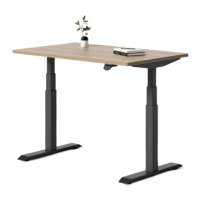
The Knead KD01 is an electric height-adjustable standing desk designed for use in dry work areas only. It allows users to easily switch between sitting and standing positions, promoting a healthier work environment. The desk features an electric motor system that adjusts the height, controlled by a handset.
The desk's height is adjustable via a handset. The handset allows for both continuous adjustment and the setting of memory positions.
To reset the handset, press the paddle down to the lowest height and release. Then press the paddle down again for 5 seconds until the display shows "RST" and returns to a normal digital number. This process is necessary if the display shows "RST", "E07", or "E08".
Hold the paddle down, and the height adjustable desk will lower. Release the paddle to stop.
Hold the paddle up, and the height adjustable desk will rise. Release the paddle to stop.
Setting Memory for Seated Height: Adjust the desk to your preferred seated height (e.g., 35.5 inches). Press the side button on the handset, and the display will show a heart icon. Press the side button one more time to save the current height. The display should show "♥ -2".
Setting Memory for Standing Height: Adjust the desk to your preferred standing height. Press the side button on the handset, and the display will show a heart icon. Press the side button one more time to save the current height. The display should show "♥ -1".
If you have saved a standing height, then pressing the handset paddle up twice quickly will automatically adjust the desk from sitting to standing height.
If you have saved a sitting height, then pressing the handset paddle down twice quickly will automatically adjust the desk from sitting to standing height.
Press and hold the side button on the handset for 5 seconds to enter the settings. Pressing the side button again will enter the activity reminder settings. Here, you can use the paddle to adjust the duration of the timer between 30 min, 40 min, and 50 min. Press the side button to confirm. If you want to cancel the reminder, enter this menu again.
Upper and Lower Limit: Enter the settings menu and navigate with the paddle to the upper and lower limit settings. Press the side button to enter the settings, and select an upper limit, lower limit, or to cancel the limit.
Locking Handset: If you want to lock the handset, enter the settings menu and navigate to the lock settings with the paddle. Press the side button to enter the settings, and choose to lock the handset. The manufacturer does not recommend locking the handset as it should be easily adjustable.
Vibration Mode: Enter the settings menu and navigate to the vibration settings. Press the side button to enter the settings and toggle this on or off with the paddle.
This product is designed with a duty cycle of 10% (2 min. on, 18 min. off).
In the event of a power outage or if the power cord is unplugged, a manual reset may be necessary. Refer to the "Resetting the Handset" instructions.
Please read this manual carefully. If this desk is sold, please provide this manual to the buyer.
 General
| Brand | knead |
|---|---|
| Model | KD01 |
| Category | Indoor Furnishing |
| Language | English |

 To Next Page