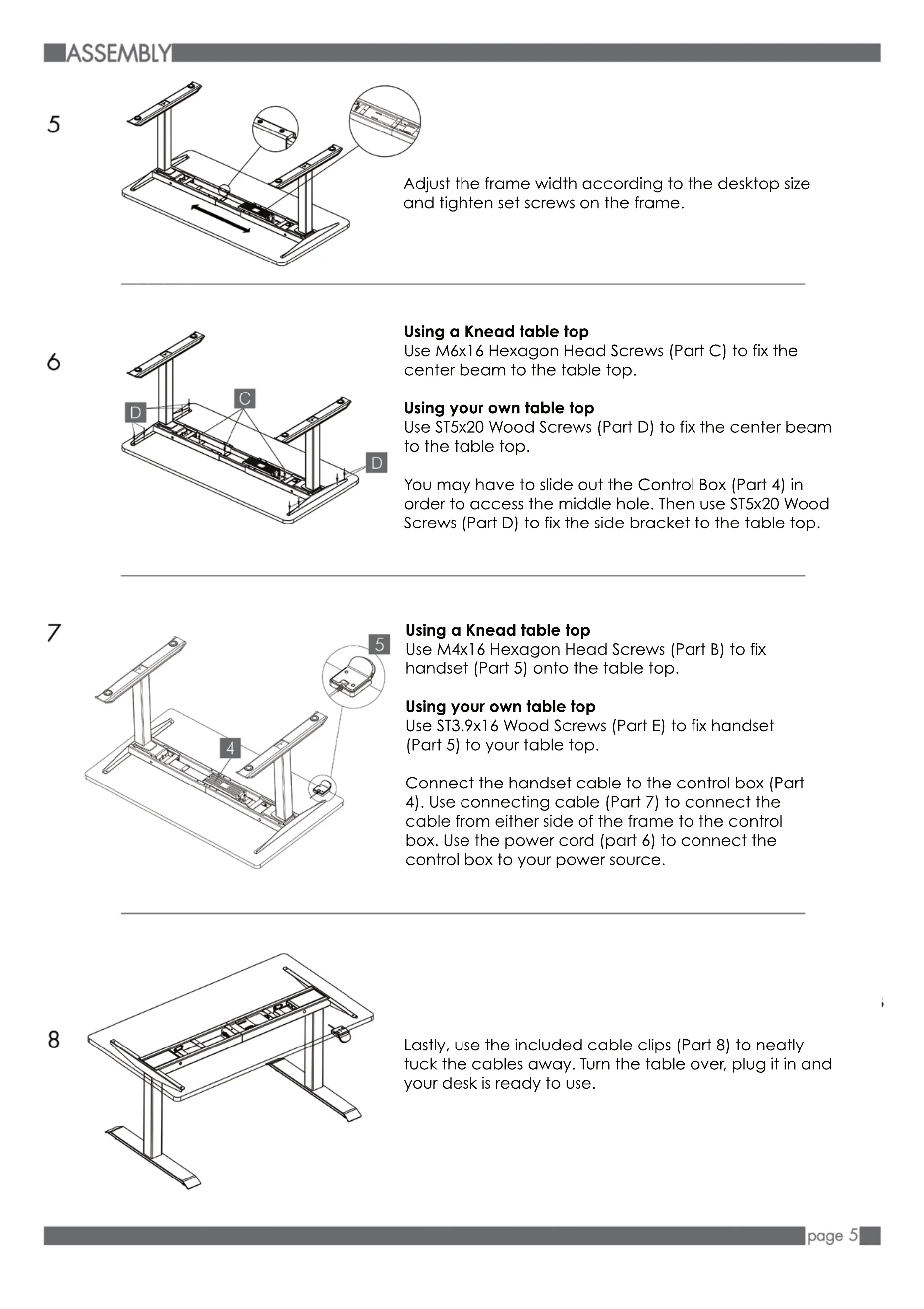
Adjust the frame width according to the desktop size
and tighten set screws on the frame.
Using a Knead table top
Use M6x16 Hexagon Head Screws (Part C) to fix the
center beam to the table top.
Using your own table top
Use ST5x20 Wood Screws (Part D) to fix the center beam
to the table top.
Y
You may have to slide out the Control Box (Part 4) in
order to access the middle hole. Then use ST5x20 Wood
Screws (Part D) to fix the side bracket to the table top.
Using a Knead table top
Use M4x16 Hexagon Head Screws (Part B) to fix
handset (Part 5) onto the table top.
Using your own table top
Use ST3.9x16 Wood Screws (Part E) to fix handset
(Part 5) to your table top.
Connect the handset cable to the cont
Connect the handset cable to the control box (Part
4). Use connecting cable (Part 7) to connect the
cable from either side of the frame to the control
box. Use the power cord (part 6) to connect the
control box to your power source.
D
D
Lastly, use the included cable clips (Part 8) to neatly
tuck the cables away. Turn the table over, plug it in and
your desk is ready to use.


 To Next Page