30
RS232 Terminal Specifications and Commands
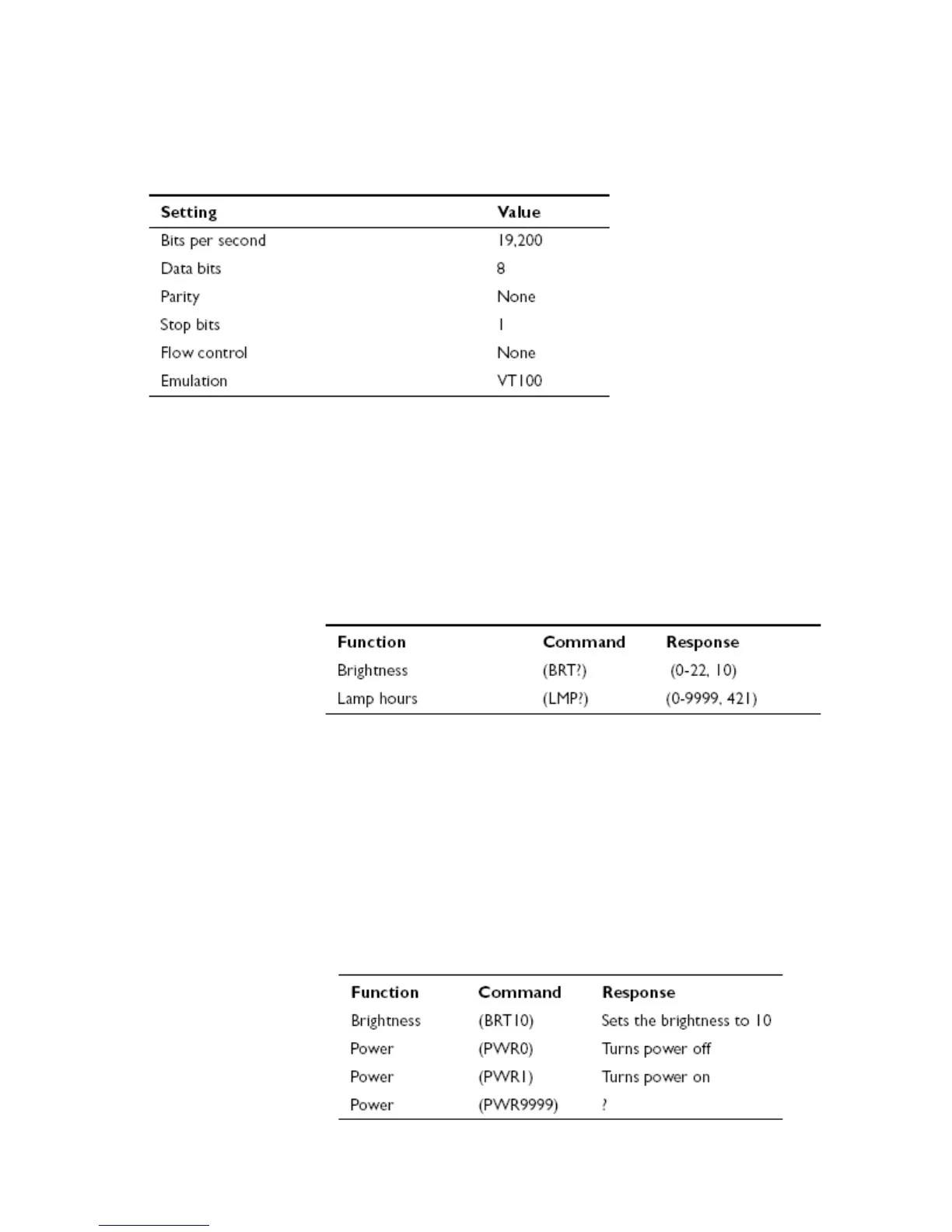
To control the projector from an LCD control panel, connect an RS-232 cable to the serial control
connec8tor on the projector and set your computer’s serial port settings to match this communication
configuration:
Command format
All commands consist of 3 alpha characters followed by a request, all enclosed in parentheses. The request
can be a read request (indicated by a “?”) or a write request (indicated by 1 to 4 ASCII digits).
A read request format: (AAA?) where
( starts the command
AAA denotes the command
? denotes the read request
) ends the command
A read command returns
the range and the current
setting, for example:
A write request example: (AAA####) where
( starts the command
AAA denotes the command
#### denotes the value to be written
(leading zeros not necessary)
) ends the command
Some commands have ranges, while others are absolute. If a number greater than the maximum range is
received, it is automatically set to the maximum number for that function. If a command is received that is
not understood, a “?” is
returned. With absolute
settings, “0” is off, 1-9999
is on.
The one exception is the
Power command, where 0
is off and 1 is on.



 To Next Page