9
Connecting a Video Device
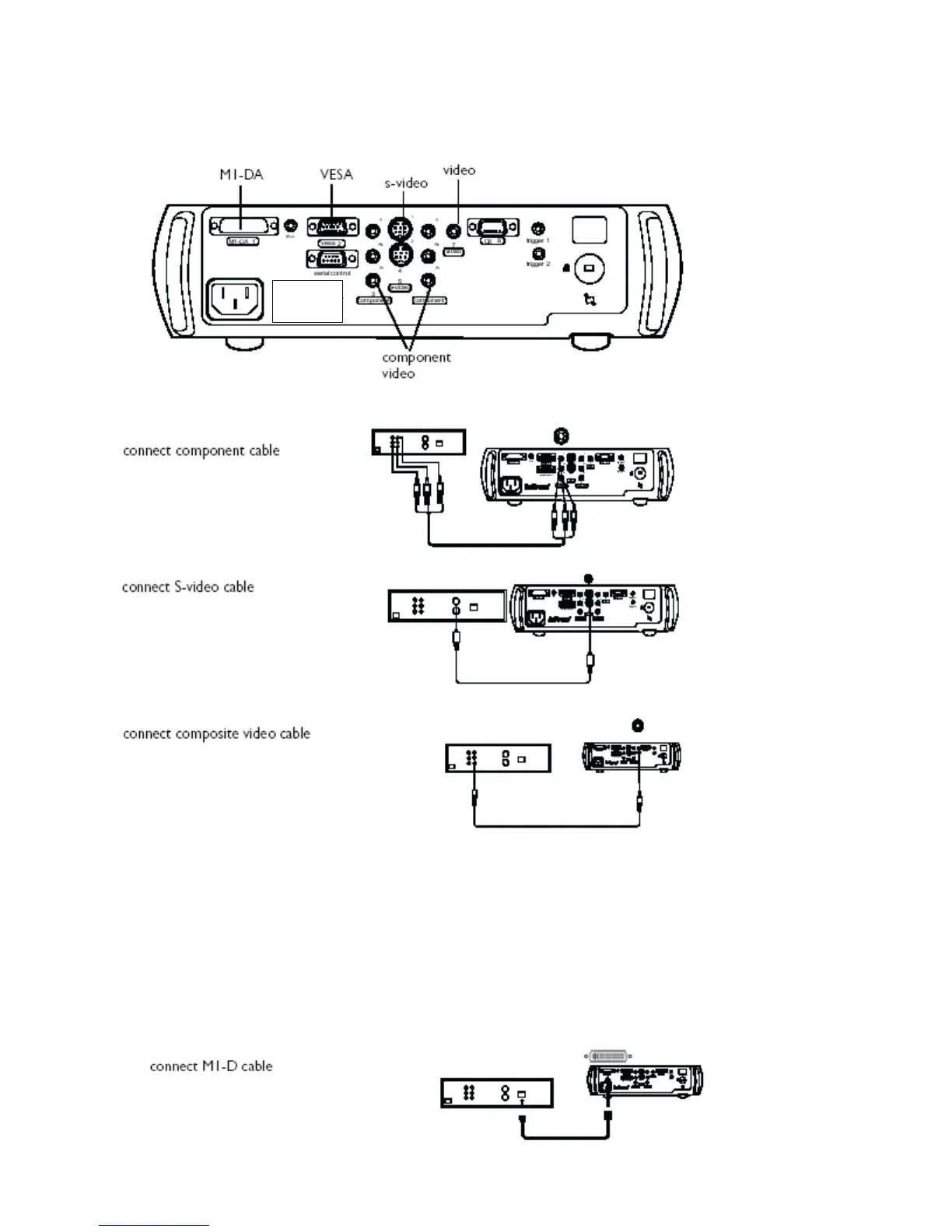
If your video device has more than one output, select the highest quality one. DVI video has the best quality,
followed by Component video, S-video, and then composite video.
If the video
device uses
component
cable
connectors,
plug the cable’s
green con-
nectors into the
green
component-out
connector on
the video device
and into the
green
component
connector
(labeled “Y”) on
the projector.
Plug the
component
cable’s blue
connectors into
the blue
component-out
connector on
the video device
and into the
blue component
connector
(labeled “Pb”)
on the projector.
Plug the
component
cable’s red
connectors into
the red
component-out
connector on
the video device
and into the red
component
connector
(labeled “Pr”) on
the projector.
If the video device uses a round, four-prong S-video connector, plug an S-video cable into the S-video
connector on the video device and into the S-video connector on the projector.
If the video device uses a yellow composite video connector, plug a composite video cable’s yellow
connector into the video-out connector on the video device. Plug the other yellow connector into the yellow
Video connector on the projector.
If the video device uses a DVI connector, plug an M1-D cable into the video-out connector on the video
device. Plug the other connector into the M1-DA connector on the projector.


 To Next Page