8
Some function keys may not be available depending on operating
system.
Pairing the Keyboard
Your keyboard can be paired to your MAC (or other decive).
1. Switch on your device, and activate the Bluetooth® feature.
2. Switch the keyboard on. Press CONNECT, the LED indicator will light up.
The keyboard is now in pairing mode.
3. On your device, select the keyboard Bluetooth® name “Bluetooth
Keyboard”. You may be asked to type in a code. Your keyboard is now
paired with your device. The LED indicator will turn o.
To disconnect the keyboard from your device, press CONNECT.
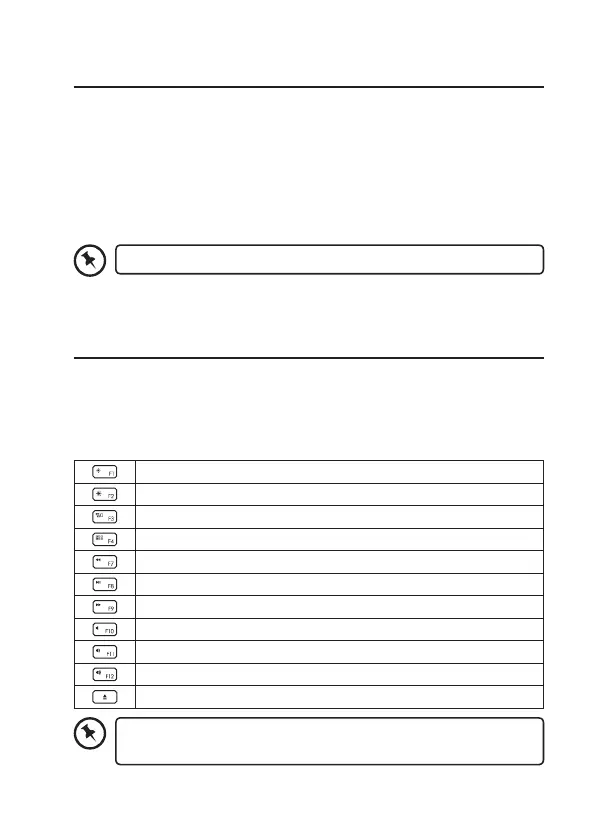
Function Keys
The keyboard has shortcut function keys which can be used as shortcuts
when using the keyboard.
To access these functions by pressing the function keys directly.
To access F1-F12, press the Fn Key and the desired key together.
Decrease the Brightness
Increase the Brightness
Show / hide Mission Control
Show / hide Launchpad
Back to previous track
Play/pause soundtrack
Go to next track
Mute sound
Decrease the Volume
Increase the Volume
CD Eject



 To Next Page