17
PROCESSING VOTERS | SIMILAR NAME VOTER
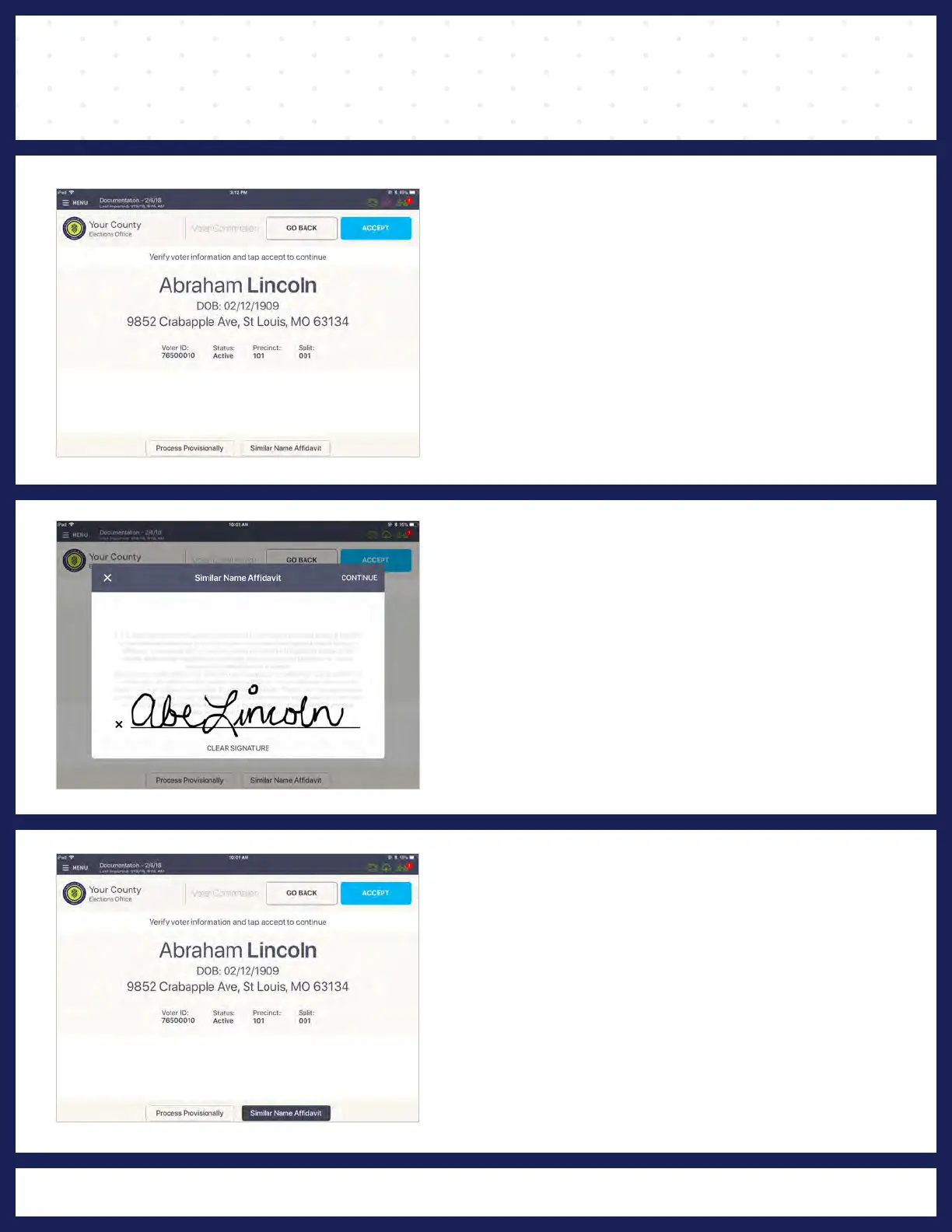
❷ AFFIDAVIT FOR SIMILAR NAME
Have the voter read the "SIMILAR NAME
AFFIDAVIT" screen and sign by the "X" mark on
screen, then press CONTINUE.
❸ VOTER CORRECTION/
CONFIRMATION
"SIMILAR NAME AFFIDAVIT" button will be
highlighted. Press ACCEPT on the top right
corner to continue voter check-in.
❶ LOOK UP VOTER
Lookup the voter’s record using either Scan
Barcode or Manual Entry instructions.
If the voter's recorded name and the name on the
ID are not the same, but are substantially similar,
press "SIMILAR NAME AFFIDAVIT", on the
bottom right of the screen.
Note: If the voter would like to update their voter
registration record to match the name on their ID,
the voter should fill out a Voter's Similar Name
Correction Form, Statement of Residence, or a
Voter Registration Application.



 To Next Page