19
PROCESSING VOTERS | PROVISIONAL VOTER
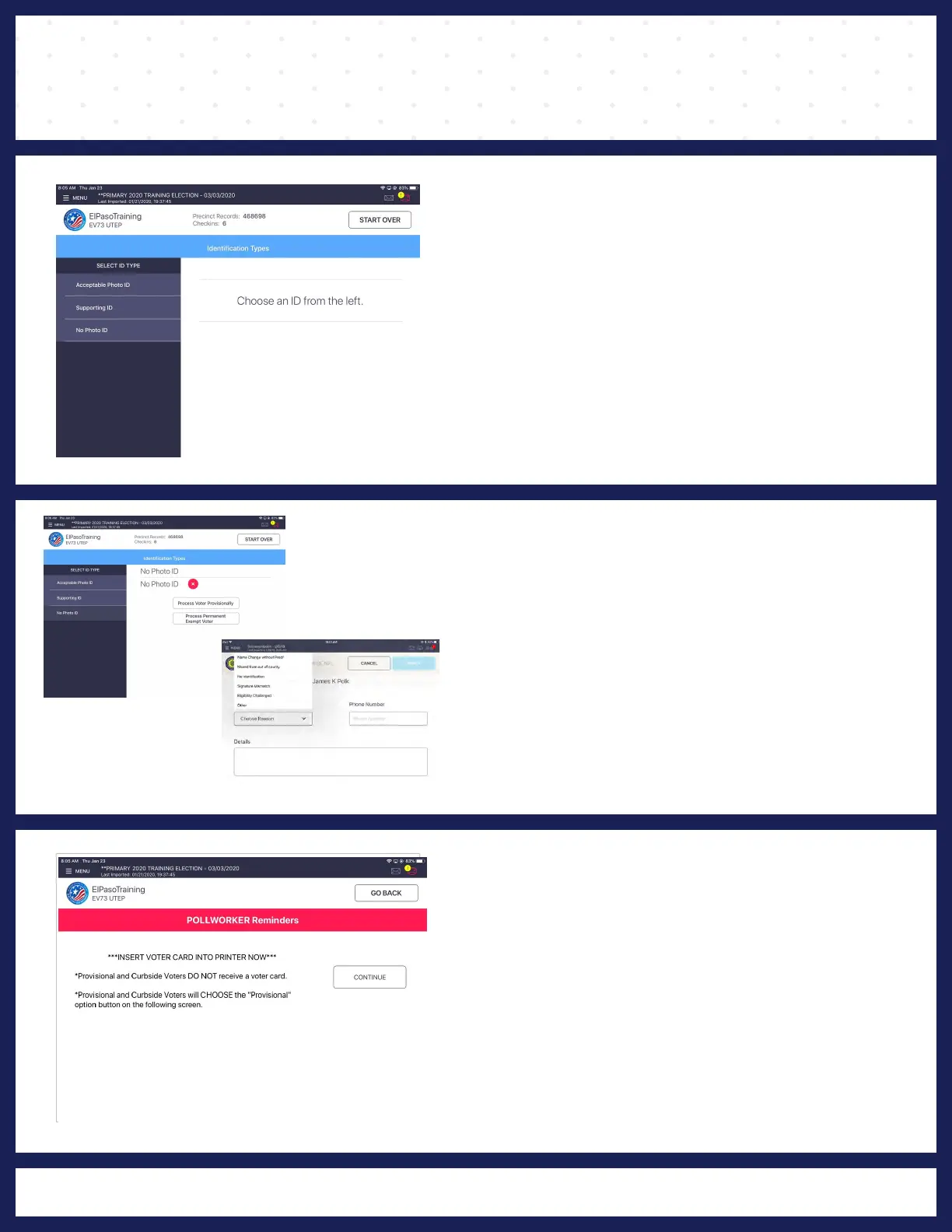
❶ LOOK UP VOTER
Lookup the voter's record using either Scan
Barcode or Manual Entry instructions.
❷ PROCESS PROVISIONALLY
Voter has No Photo ID, make sure you click on
PROCESS VOTER PROVISIONALLY.
❸ POLL WORKER REMINDER
If voter fails to meet requirements to be
processed he/she can vote provisionally, select
"PROCESS PROVISIONALLY."
"POLL WORKER REMINDER" screen displays
and instructs Poll Worker to insert activation card
into the printer, but instead Poll Worker will
press "CONTINUE" button.
*PROVISIONAL and CURBSIDE voters DO
NOT receive a activation card.
Or select reason from drop-down menu and if
available enter voter's phone number. Phone
number is NOT a required field. When finished,
press APPLY
.



 To Next Page