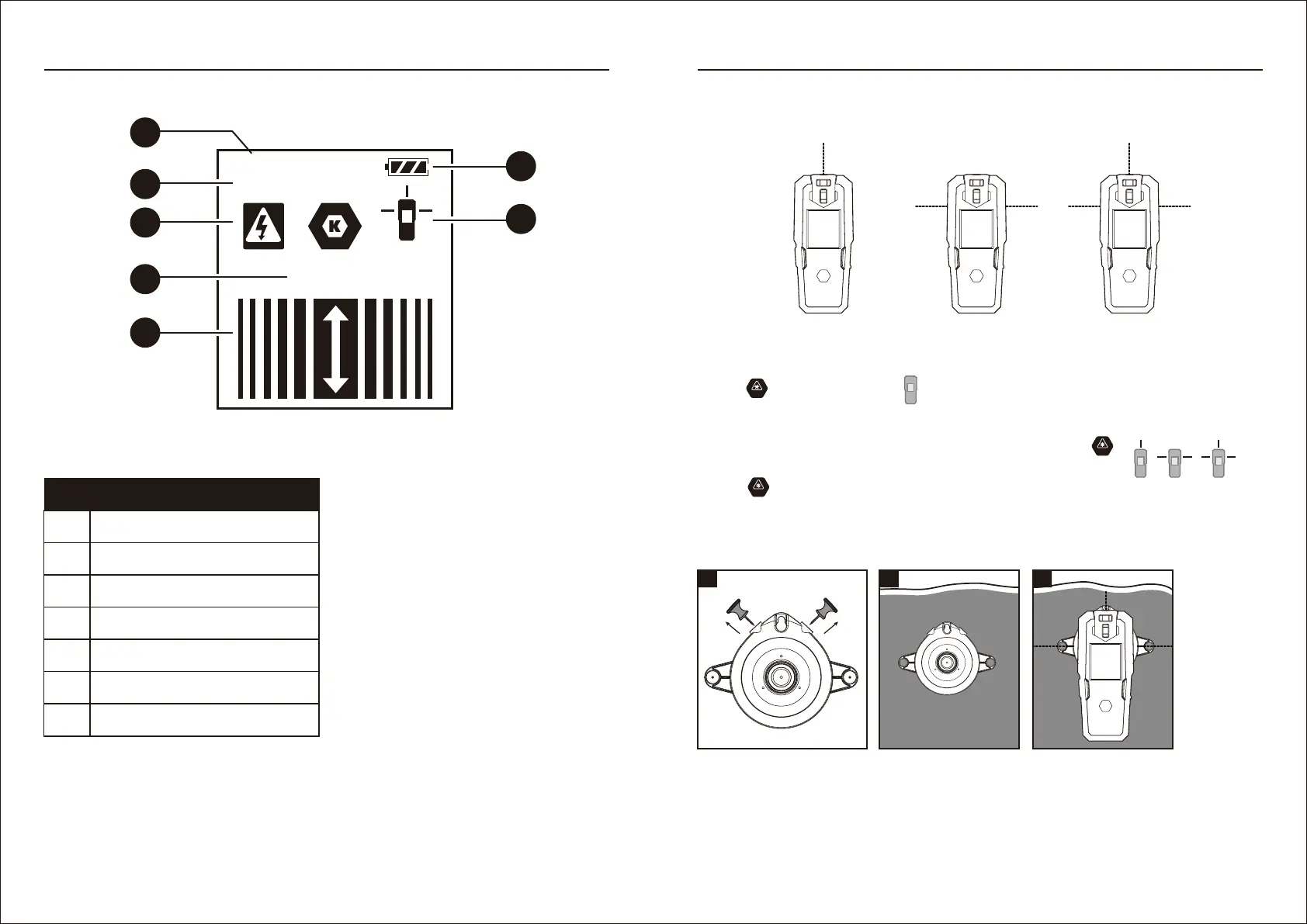
DISPLAY
LASER LINES
Turning ON/OFF/mode switch.
Mounting with the push pins
(For securing the laser level on drywall surface only)
ON
ON
ON
CALIBRATING...
READY
LASER
CENTER
ON
Horizontal Line ModeVertical Line Mode
Horizontal & Vertical
Line Modes
1) Press button for 1.5 seconds, will appear on the LCD screen.
2) Three operating modes (vertical line mode,horizontal line mode, horizontal & vertical line modes)
can be switched in-between at any time by short pressing the button .
The Laser line indicator on the LCD screen also will be switched between
3) Press button for 1.5 seconds to turn off the laser line.
1) Remove the push pins from the storage area.
2) Insert a push pin into each hole on the sides of the bracket and push the pins into the mounting.
3) Place the laser level onto the bracket and use the bubble levels to level the unit.
1 2 3
7 8
B
C
D
E
F
A
G
A Battery indicator
B Detector calibrating indicator
C Detector ready indicator
D Live AC wires indicator
E Center of stud indicator
F Stud detection bars
G Laser line indicator
PART DESCRIPTION
PRODUCT OVERVIEW OPERATING INSTRUCTION


 To Next Page