EN KTFD-01
DIGITAL FANCOIL THERMOSTAT
28 / 34
6 OPERATION
7 THERMOSTAT OPERATION
7.1 Fan operation
1. Push fan button, display will show and Auto separately means fan rotate in HI MED LOW or
AUTO speed.
2. If you select AUTO speed, fan operation will change speed according to the difference between the
room temperature and set temperature. If room temperature is 3
o
C higher than setting temperature
in cooling or 3
o
C lower than setting temperature in Heating. Fan will run in HI speed. If room temper-
ature is 2
o
C – 3
o
C higher than setting temperature in cooling or 2
o
C - 3
o
C lower than setting tempera-
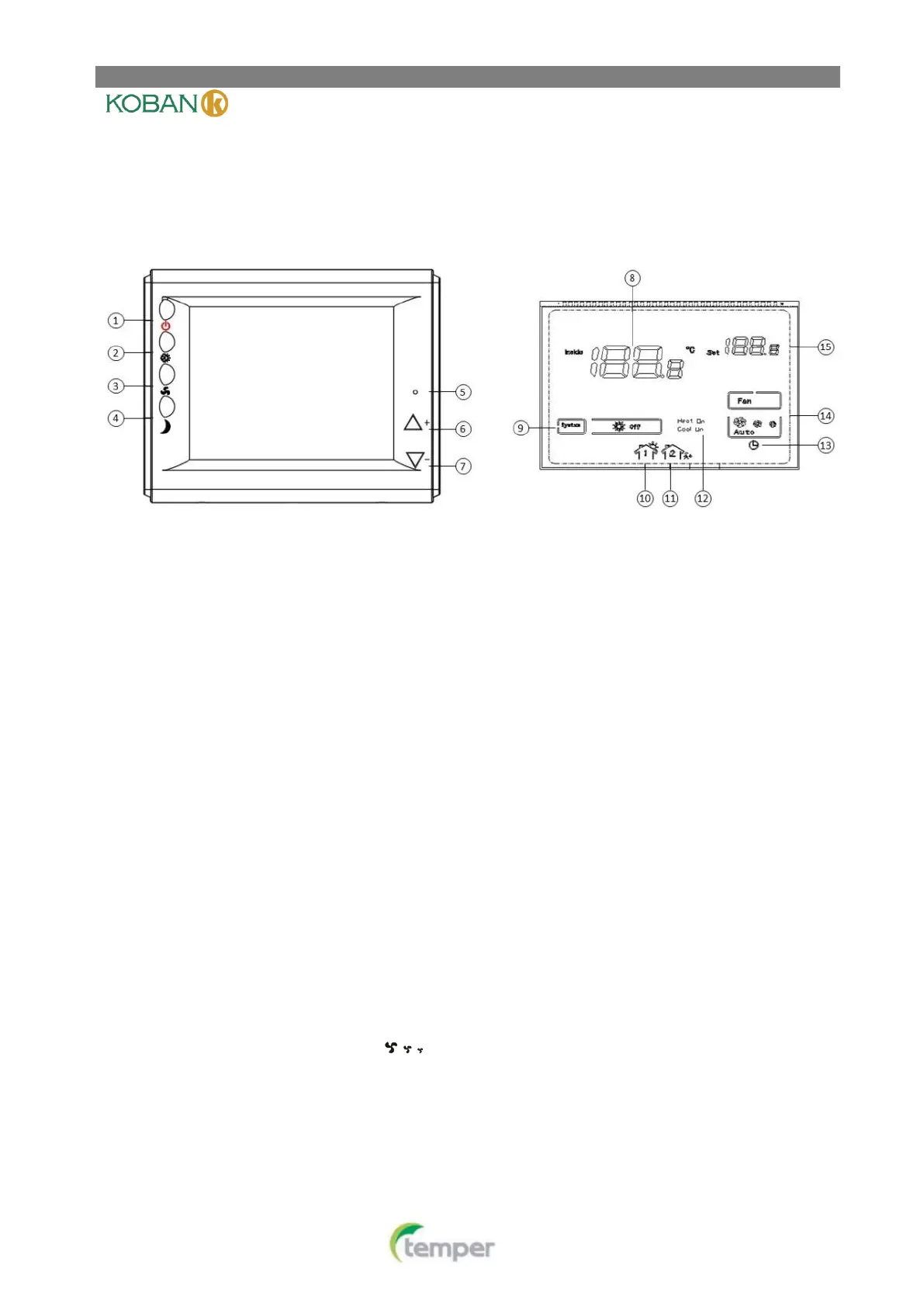
(1)Power button
(2)System switch (HEAT, COOL)/ Lock switch
(3)Fan switch (AUTO, LOW, MED, HIGH)
(4)Sleep operation button
(5)Reset switch
(6)▲Raises Temperature setting
(7)▼ Lower Temperature setting
(8)Room temperature
(9)Shows system mode
(10)Window card
(11)Room card
(12)Heat on shows when the thermostat is calling for heat.
Cool on shows when the thermostat is calling for cool.
(13)Sleep operation
(14)Indicate fan switch position
(15)Setting temperature


 To Next Page